Televisions
TV wall mount compatibility: check the television, bracket, and wall
A practical way to check a television mounting pattern, bracket limits, and wall attachment before choosing a full-motion mount.
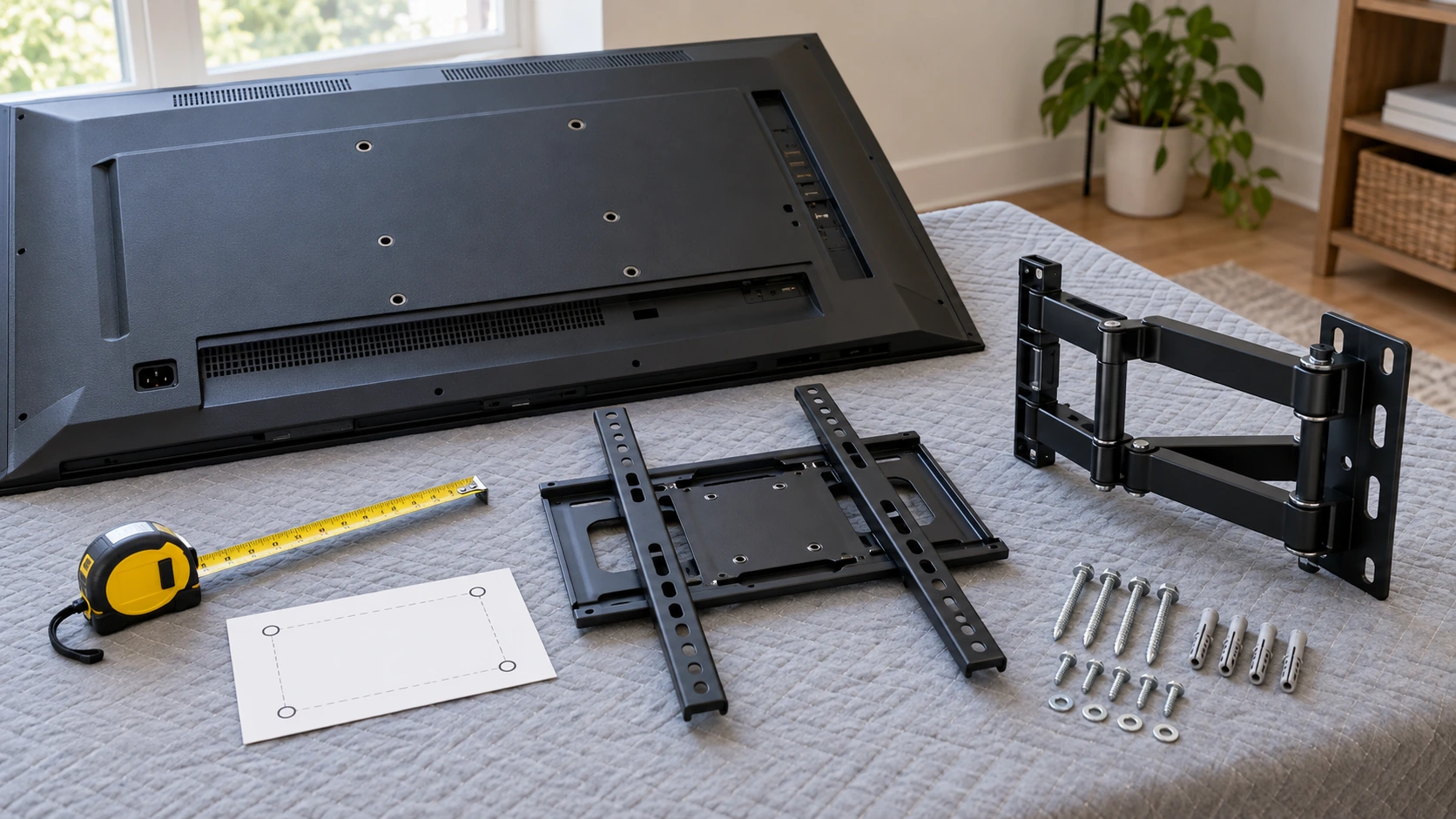
TV wall mount compatibility comes down to three checks: the bracket must match the television's rear mounting pattern, support its weight within the documented limit, and attach to the wall by an approved method. Screen size alone answers none of those questions. A listing can advertise a broad range of televisions while leaving its wall requirements unclear. Record your exact TV model, rear pattern, weight, and wall construction before choosing a bracket. Treat seller specifications as claims to confirm against the instructions for the product that will actually arrive.
Identify the television before the bracket
Find the full model identifier on the television or in its documentation. Similar model names can have different mounting patterns, weights, or supplied screws. Use the manufacturer's instructions for that exact model to find the VESA hole spacing, weight without the stand, screw specification, and mounting restrictions. If those details are unavailable, pause the purchase instead of estimating from the diagonal screen size. Two televisions sold as 55-inch sets may require different brackets or hardware. Write the model number directly on your comparison sheet so a later search result for a similar-looking television does not replace it by accident. If the manufacturer lists multiple regional or production variants, confirm which one you own before using its mounting table.
Record the horizontal and vertical distance between the threaded rear mounting holes as a pair, usually expressed in millimeters. Do not confuse the outside width of the television with the distance between its rear holes. Look for recesses, a curved back, or connectors that could interfere with the bracket rails. The television maker's instructions determine whether spacers can be used and which screws fit. An improvised stack of spacers or longer screws is no substitute for the specified mounting arrangement.
Use the documented weight of the television in the condition in which it will be mounted. The bracket's stated limit applies to the supported load, not to the apparent size of its steel arms. If a soundbar, camera, or another device would hang from the same assembly, check the instructions for both products before adding it. Compare the television's documented weight with the mount's rating for the intended configuration. Do not infer extra capacity from the appearance of the hardware.
Check where power and signal ports sit on the back of the TV. A rail might cover an input or force a cable into a tight bend against the wall. A full-motion arm may make ports easier to reach when extended, but it also needs space to swing without striking furniture or an adjacent wall. A simple rear-view sketch showing the mounting holes, ports, and TV edges can reveal those conflicts before you choose a wall location. Include any plug that projects straight out from the back, since its connector may need more space than the socket alone. The sketch is a planning aid; compare it with the bracket dimensions and the television maker’s directions before treating a position as workable.
Read VESA, load, and screen ranges separately
A maximum VESA dimension does not establish that every smaller pattern is supported. Find a stated list or range that includes both dimensions of your television's exact hole pattern, then check whether the rails can be placed without obstructing ports. If the seller supplies only a maximum, request confirmation for your specific pattern. The advertised screen-size range is another filter, but a TV within that range could still be too heavy or have an incompatible rear layout.
The live PGMF21 full-motion mount listing claims support for 32- to 69-inch televisions, up to 99 pounds, VESA patterns up to 400 by 400 millimeters, and attachment to 12- or 16-inch wood studs. These are seller claims to compare with a particular TV and wall. The structured product record names NOBRAND, while an inspected gallery image shows PERLEGEAR branding. Ask the seller to identify the shipped model and reconcile the branding before relying on its capacity or hardware statements.
The live ZYL full-motion mount listing claims a 37- to 70-inch screen range and VESA support up to 600 by 400 millimeters. Its structured description does not give an equally clear weight rating or wall-attachment specification. An inspected gallery image shows another brand and a capacity graphic; those figures cannot be treated as verified specifications for the ZYL listing. Request a model-specific manual, load rating, approved wall materials, and fastener details before considering it for an installation.
The larger advertised VESA maximum on the second offer does not make it a better choice for your television. The first page includes a weight and wood-stud claim but presents a brand conflict. The second advertises a larger pattern while leaving important load and wall information unclear in its structured description. Neither listing proves fit for a particular TV or wall. Keep a list of unanswered questions beside each URL. If the seller cannot identify the actual product and provide consistent instructions, remove the offer from your shortlist.
Do not infer strength from a photograph of thick steel or translate a marketing test claim into permission to mount a heavier television. An arm that extends the screen changes the load on its attachment, so the permitted use depends on the exact parts and instructions. Follow the mount maker's stated rating and installation method. A capacity figure is one condition to verify alongside the television pattern, the wall, and the intended arm position.
Keep the wall-side question separate
Identify the wall material and its structural attachment points before settling on a location. Drywall, wood framing, masonry, and other constructions require different methods. The exact mount instructions should specify suitable materials and fasteners. Avoid copying a generic installation video or substituting leftover anchors from another kit. If the wall construction or safe attachment method is uncertain, ask a qualified installer to assess it. An article or a photograph cannot certify the strength of your wall.
Measure the spacing of the structural supports the mount would need to reach. A seller may mention common wood-stud spacing, but that claim says nothing about what is behind your wall. The plate's permitted position may also differ from where you want the television centered. Read the exact instructions for plate placement and adjustment before drilling. If the planned location cannot satisfy those instructions, choose another approved position or mounting arrangement. Mark proposed support locations on a paper drawing first. This makes it easier to see whether the wall plate can reach the needed points while keeping the screen in a usable place. Confirm the actual structure using an appropriate inspection method before installation; the drawing cannot establish what is inside the wall.
Look for obstructions around the proposed wall position: electrical boxes, plumbing, trim, a chimney, a cabinet, or a door that swings toward the screen. Plan cable and power routing according to the equipment instructions and applicable building requirements. A full-motion mount needs clearance through its movement path, as well as behind the television. Draw the screen in its resting position and at the farthest extension you expect to use. That sketch can expose a collision before the wall is marked.
The wall-side check differs from the desk attachment discussed in the monitor-arm compatibility guide. Both decisions involve a screen-side mounting pattern, but a TV wall mount attaches to a wall rather than a desk clamp or grommet. The monitor-arm comparison concerns movable support for a desktop display. Carry over the habit of checking each interface separately; do not carry over its hardware or load assumptions to a television wall installation.
Plan movement and viewing space
Decide what movement you actually need. Tilting to improve a viewing angle, turning toward another seat, and pulling the screen forward for port access are different tasks. Use a cardboard outline and room measurements to test the planned positions. Check that the TV will clear furniture, a doorway, and neighboring walls throughout the permitted movement range. If a fixed or tilt mount serves the room, a full-motion arm may add installation complexity without improving how you use the screen.
Note the distance between the wall and the back of the TV with the arm folded and extended. An advertised reach does not determine your final viewing position by itself; the TV-side rails and safe wall-plate location also matter. Allow enough cable slack for intended movement without leaving loops that can snag. Follow the television and cable makers' routing and bend guidance. Do not conceal a power cord in a wall cavity unless the method is specifically permitted by applicable instructions and local requirements.
Plan the screen height from the normal seated viewing position in this room. A fireplace, shelf, or large piece of furniture may constrain the choice, and advertised height adjustment can be limited. Mark the TV's top and bottom edges at the proposed position before drilling. If that position would require the arm to work outside its rated movement or put the screen where people could strike it, change the plan. Measurements copied from another room cannot account for these constraints.
Consider who will move the screen after installation. A television pulled into another viewing position will need to return safely to its resting position. Children, visitors, or shared-room users may pull on the screen rather than use a designated grip. Follow the manufacturer's operation instructions and check that the controls are practical in your room. Swivel range, adjustment force, and locking behavior vary by model; visible joints alone do not establish how the arm works. A listing photograph may show the arm at an attractive angle that is impossible at your chosen wall position. Use the exact manual’s movement limits and your room measurements to decide whether the path is practical for everyone who will use it.
Confirm the actual package before installation
When a specific mount has consistent documentation, compare the delivered package with your saved order before installation. Check the model and brand on the box, bracket, instructions, and hardware bags. A listing with conflicting gallery branding calls for particular care here. Do not install a product whose instructions do not match the ordered model or its stated capacity. Keep the packaging and parts together while resolving a discrepancy with the seller. Returns are easier before holes are drilled and hardware is mixed with tools.
Lay the parts out against the exact manual. Confirm that the TV-side rails fit the documented hole pattern and that the wall plate and fasteners are approved for your wall construction. Holding the bracket against the television and guessing that nearby holes will work is unreliable. The wrong screw length can damage the TV or leave a weak connection. Use the specified hardware and tightening procedure. If a required part is missing or the instructions conflict with the seller page, stop and obtain the correct documentation or component.
Keep a short compatibility record for a future move: television model and weight, its VESA pattern, mount model, wall construction, installation instructions, and any professional assessment. Another room can have a different wall even when the TV and bracket stay the same. Record what was actually installed rather than copying the listing's claims. If the television is replaced, repeat the screen-side checks. If the mount moves, repeat the wall-side checks before making new holes.
Put unresolved questions in one place before deciding. Use separate columns for confirmed television facts, documented mount facts, and wall observations that still need professional confirmation. Leave a cell blank instead of filling it from an unrelated gallery image. When a seller supplies an answer, save the response with the product identity and date, then compare it with the actual manual. A simple fit sheet can show that your next useful step is obtaining a missing specification, not choosing between two incomplete offers.
A compatible TV wall mount matches the television, bracket, and wall as one documented installation. Check the TV's exact rear pattern and weight, the mount's supported limits, and the approved attachment method for the actual wall. Keep seller claims separate from manufacturer instructions, especially where the listing and gallery disagree about product identity. Request the missing documentation when a claim is unclear. If fit cannot be established, postpone purchase or installation instead of treating screen size as the final answer. Save the completed fit record for installation and later changes.