Crypto Commerce
MOUNT-IT MI-4881 ultrawide arm vs SIIG MTPRO: one ultrawide or two screens
Compare MOUNT-IT MI-4881 ultrawide arm by display weight, VESA fit, desk clamp, reach, movement, and cable space.
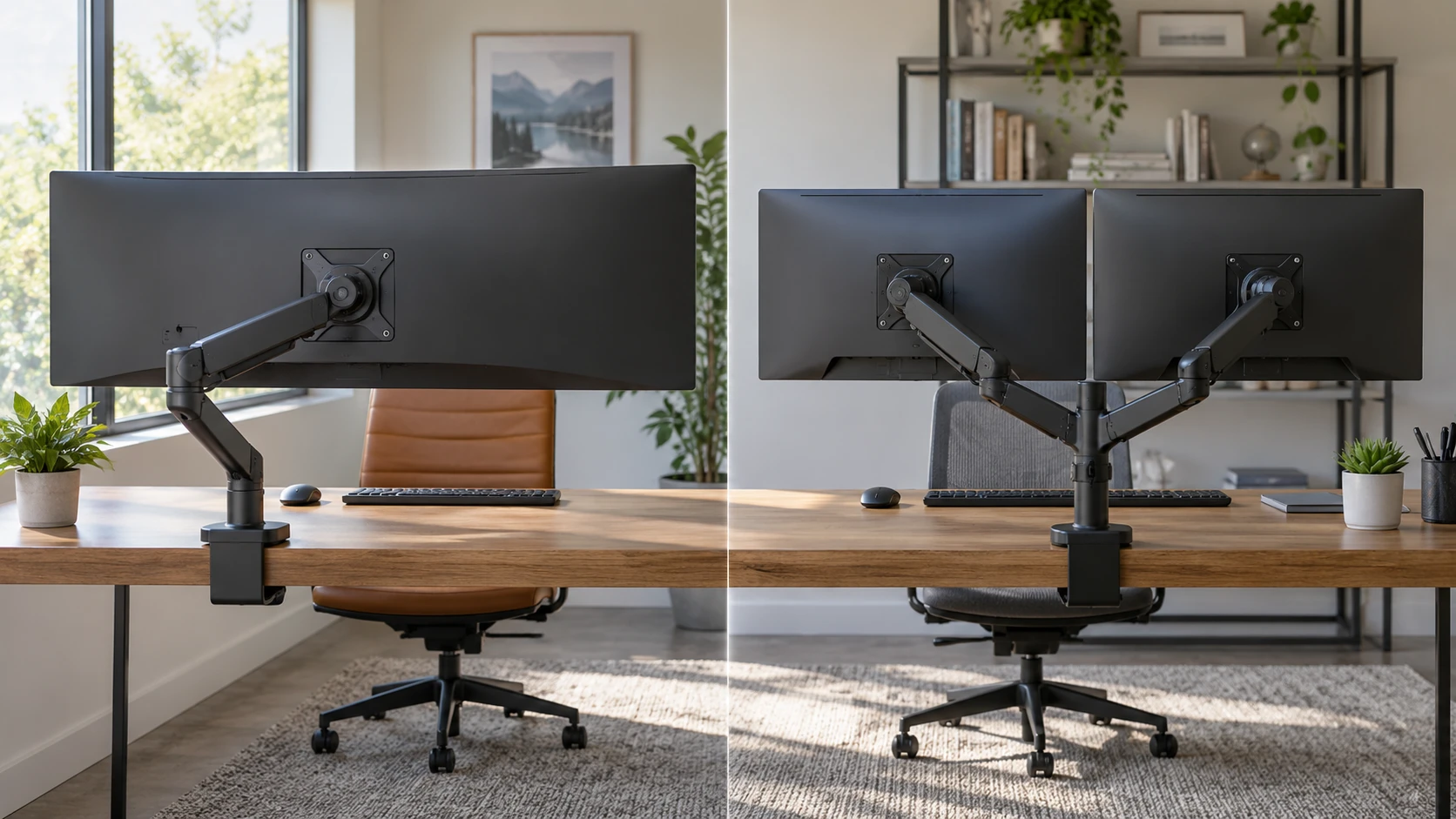
The MOUNT-IT MI-4881 and SIIG MTPRO solve different monitor layouts. MOUNT-IT describes a single heavy-duty gas-spring arm for a curved or ultrawide display up to 49 inches and 44 pounds. SIIG describes a dual arm for two displays up to 32 inches and 19.8 pounds each. The prices in the saved catalog are close, but the mounts are not interchangeable. Start with the exact displays you own or intend to buy, including weight without stands, VESA pattern and width. Then measure the desk edge and the space behind it.
The MOUNT-IT MI-4881 ultrawide arm listing gives a 4.4-to-44-pound display range and names large curved examples such as the Samsung Odyssey G9 and LG 49-inch UltraWide. A compatible example in a product description does not mean every variant of that monitor will fit. Check the monitor's current weight, mounting interface and center of gravity. Curved screens can project farther forward than a flat screen, so the space needed to swing the display and reach its ports matters as much as the advertised diagonal.
Load ratings apply to each screen position — SIIG MTPRO dual monitor arm
SIIG's 19.8-pound rating is per arm. Two arms rated at 19.8 pounds each do not create one 39.6-pound support point for an ultrawide. Each screen must fit its own size, weight and VESA limits. That makes SIIG suitable to investigate for a pair of ordinary office or gaming monitors, while the MOUNT-IT rating is aimed at one heavier display. If a screen's weight is close to an arm's maximum, confirm the manufacturer's guidance for that particular shape and mounting position instead of relying on a rounded catalog figure.
Screen weight often changes when the original stand is removed, but accessories attached to the screen may add weight. Look up the manufacturer's weight without stand and include any VESA adapter plate or mounted light that the arm must carry. An arm may lift the screen yet slowly sag if its gas spring is outside the intended working range or poorly adjusted. The MOUNT-IT listing also has a minimum load of 4.4 pounds. A very light portable display may need a different mount even though its weight is well below the maximum.
The number of screens affects how work is arranged. One ultrawide can keep several windows on a continuous canvas without a bezel in the center. Two separate displays let you give a full screen to each task and change one screen's orientation independently. Neither layout is automatically more productive. Decide where the main work or game sits and where reference material goes. That choice tells you whether a heavy single arm or a dual mount belongs on the desk.
VESA pattern and mounting hardware — SIIG MTPRO dual monitor arm
MOUNT-IT lists a detachable VESA plate for 75 by 75 and 100 by 100 millimeter patterns. SIIG lists the same two VESA patterns for its dual arms. Match the pattern on the back of each monitor, then check whether recessed holes, a curved back or a proprietary adapter changes the installation. A matching hole spacing can still need longer screws or spacers specified by the display maker. Use the hardware approved for the screen rather than forcing a screw that bottoms out or grips too few threads.
For a two-screen SIIG setup, repeat the fit check for both displays. Different monitor models can have VESA holes at different heights relative to the visible panel. Two arms with similar settings may therefore leave the top edges uneven until adjusted. If matching alignment is important, check the monitor dimensions and the available vertical travel rather than assuming the dual mount will automatically line up unlike screens.
MOUNT-IT describes aluminum and steel construction and includes both a two-piece C-clamp and a grommet mounting option. SIIG's saved description lists a C-clamp and integrated cable management but does not state a grommet option. If the desk has a cable hole in the ideal position and you need to mount through it, verify SIIG's exact package or choose based on confirmed hardware. Check whether the desktop can support the chosen mount and the moving load.
Desk edge and thickness are part of compatibility — desk space planning for monitor mounts
The MOUNT-IT listing recommends desk thickness from 0.39 to 3.3 inches for the clamp and 0.39 to 1.9 inches for its grommet mount. Measure the actual mounting point, including any lip, apron or reinforcement beneath the desktop. A desk with a thick rear beam can block a clamp even when the top panel itself is thin. Confirm there is enough clear underside space for the clamp hardware and that the desk manufacturer permits the concentrated load.
SIIG's source says its C-clamp attaches to most desks but does not give a thickness range in the saved description. Ask for the installation drawing before ordering for an unusually thick, thin or beveled desk. A mount that technically closes around an edge may still sit poorly if the rear profile is rounded or hollow. The two-screen load can also change how the desk flexes as you reposition the arms. The safest preflight is a measurement of the actual edge and a check of the desktop construction.
Use desk space planning for monitor mounts to sketch the screen footprints and the cleared surface underneath. The clamp may free space where monitor stands used to sit, while the articulated arms need movement room behind and beside the screens. A desk against a wall can limit backward reach. A dual mount can put two screens side by side but still leave too little side clearance to swing one into portrait mode. Include the walls and nearby furniture in the sketch.
Reach and adjustment ranges — SIIG MTPRO dual monitor arm
MOUNT-IT gives up to 18 inches of reach and a listed height range from 8.54 to 19.68 inches. It describes 360-degree screen rotation, 180-degree swivel and tilt from 20 degrees down to 50 degrees up. SIIG gives up to 18.15 inches of reach and height up to 19.65 inches from the base, with tilt 40 degrees down to 90 degrees up and broad rotation and swivel claims. These specifications are useful for rough layout, but the pivot location and screen size affect what movement is possible after installation. A 49-inch curved panel can hit the wall or desk well before its arm reaches a catalog limit.
Set the intended seated viewing position first. Mark the screen centerline, eye distance and any camera or speaker that must fit nearby. Then check whether the selected arm can put the display there without an awkward tilt or excessive reach. The extreme travel positions matter less than the one you will use for several hours. If multiple people share the desk, adjustability may be more valuable, but the screen should still hold its chosen position after repeated moves.
Both descriptions mention gas-spring movement. That generally allows positioning without loosening a fixed hinge every time, but spring tension may need initial adjustment for the monitor's weight. Follow the arm manual while supporting the display during setup. A screen should not rise by itself or drop when released. The saved product text does not provide a setup test for a specific monitor, so treat smooth motion as something to verify with the actual load.
Cable paths and accessories — SIIG MTPRO dual monitor arm
Both mounts list cable management. Routing cables along an arm can make the desk look cleaner, yet the cables still need enough slack for the full movement you will use. Check power, video, USB and any monitor hub connections before cinching ties tightly. A cable that reaches the monitor in its normal position may pull out when the screen turns to portrait or moves forward. Test the full motion with the computer and monitor powered off, then secure the slack where it cannot snag.
MOUNT-IT adds USB-powered RGB lighting with 20 listed modes. That is a decorative feature rather than a reason to choose the arm's load capacity. If you want to use it, plan where the USB power cable will run and whether it can follow the arm without tension. SIIG's saved source does not mention lighting. It does emphasize tool-free positioning and a tidy desk, but neither description states that video or power cables are included with the mount.
If a camera, microphone or light is mounted near the screen, consider its interference with the arm. A screen that rotates freely in an empty-room test may hit a boom or shelf in the finished setup. For a dual-arm desk, check the inside corners of both monitors at their closest positions. The screens need enough room to move independently without knocking one another.
Price and a workable choice — SIIG MTPRO dual monitor arm
The saved catalog prices are $358.74 for MOUNT-IT and $374.99 for SIIG. Price alone gives little guidance because one supports a heavy single display while the other holds two lighter displays. Confirm the current price, package hardware and return terms for the exact model. If the monitor needs an adapter plate, add its cost and verify the combined installation before ordering. The desk itself may need reinforcement or a different mount location, which can outweigh the small price gap.
The SIIG MTPRO dual monitor arm is the candidate for two compatible screens at or below its per-arm limits. MOUNT-IT is the candidate for one larger or heavier ultrawide within its stated range. Measure the screens, VESA holes, desk edge and cable travel as a single setup. An arm that holds the weight on paper is useful only when the whole desk lets the screens sit and move where you need them.