Home & Living
Tabletop picture frame leaning: check the easel back
Diagnose a tabletop picture frame that leans by checking its surface, lower edge, easel foot, back connection and display orientation one change at a time.
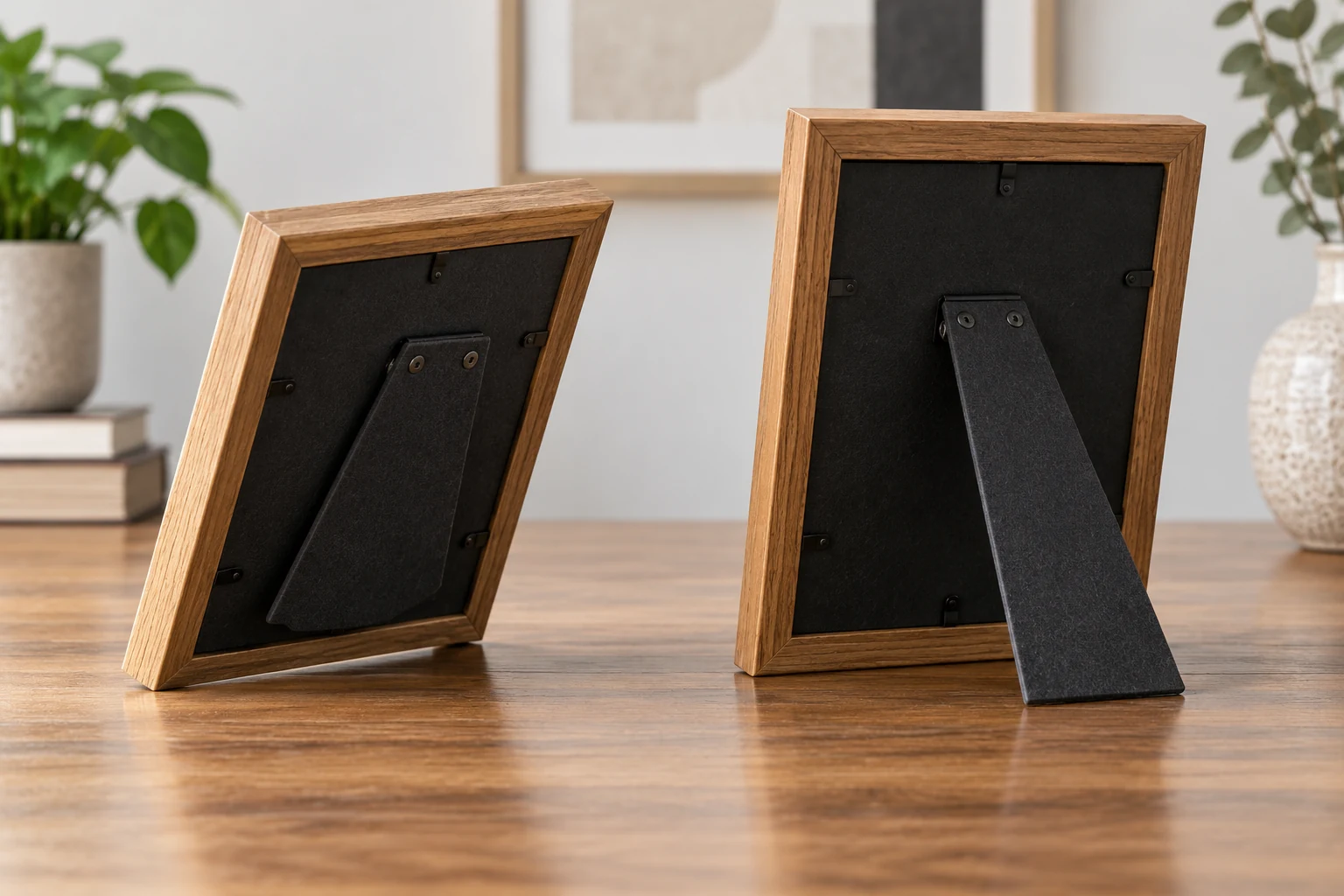
When a tabletop picture frame leans forward, start with the place where it stands. Its lower edge and easel foot both need a stable surface beneath them. A frame can look centered from the front while its rear support rests on a table runner, hangs over a shelf edge, or remains partly folded. Move the frame away from the edge before checking it. If the glass is loose, the frame is cracked, or the back has detached, stop the tabletop test and ask the maker or seller about the damaged part.
Two current offers show why the back matters. The Studio Décor mini frames are described with fold-out easels attached to their backing. The Neil Enterprises black wood frames are described with easel backs for tabletop display and hooks for wall mounting. Those descriptions establish intended display roles. They cannot tell you whether the easel on a particular delivered frame is open, intact, or supported by your furniture.
Describe when the frame leans
Before moving anything, watch what the frame does. Does it rock from side to side, lean forward and stay there, or fall only after someone closes a drawer beneath it? Look from the side as well as the front. A front view can hide the easel foot and the depth of the surface behind the frame. Keep hands near the frame while observing it so that a fall does not damage the glass or photograph.
Think back to the last change. Perhaps the frame moved from a broad desk to a narrow shelf, changed from portrait to landscape orientation, or received a thicker photo and backing. Write down the one change you can test first. If you change the surface, angle, and contents together, an upright result will not explain what caused the lean. A simple description such as “stable on the desk, leaning on the bedside shelf” gives you a useful comparison.
Take out the photograph if the frame opens easily and the maker's directions allow it. Testing an empty frame lowers the chance of damaging the picture while you inspect its back. Keep the glazing and fasteners in their intended positions. Do not force a back panel open or remove a part that holds the glazing. If you cannot safely open the frame, leave it assembled and support it by hand during the initial checks.
Check the surface and lower edge
Choose a clear, level area large enough for the frame's lower edge and rear easel foot. Remove papers, cords, and fabric that might sit under only one contact point. Set the frame down gently and look along the tabletop. Does the lower edge touch evenly? Does the easel foot touch the same surface, or is it on a soft runner or beyond the rear edge? A shallow shelf can support the decorative front while leaving the stand without a firm landing place.
Move the frame a short distance inward and set it down again. Leave enough depth for the easel to open as intended. If the frame now stands, the original location may have been the problem. A frame pushed hard against a wall can have its easel folded inward; moving it too far forward can leave the rear foot unsupported. Test the actual place where you intend to display it, rather than a temporary balance point at the shelf's edge.
Try a second clear spot on the same piece of furniture. If the frame is steady there, compare the two spots for unevenness, soft material, or an object beneath the lower edge. If it leans at both spots, inspect the frame itself next. This comparison does not prove a particular defect, but it tells you whether one location is especially troublesome. If the furniture rocks, resolve that movement before displaying a fragile frame on it.
Examine the lower corners. A molding may extend below the backing, or one corner may have a missing pad supplied with the frame. Look at the actual object in good light, because a product photo from the front may hide the contact points. Confirm that any supplied pads or feet are present as intended. Adding a random shim or adhesive pad can change the display angle and may conceal a loose easel, so use the maker's directions for replacement parts.
Inspect the easel back
Hold the frame while looking at its rear support from the side. Is the easel fully deployed, or is it folded partway against the backing? Is the support straight and attached securely? Open it according to the frame's instructions, without forcing it past its normal travel. A gallery photograph can show a frame standing, but it does not provide the hinge's safe range of motion for your delivered unit.
Set the frame on the clear surface with the easel open. The frame back, easel leg, and tabletop form a support shape that you can see from the side. If the lower edge touches but the easel foot does not, check whether the stand is folded or whether the frame is in an orientation that its hardware supports. If both touch and the top still comes forward, look for a loose connection or a back panel that is not seated. Stop if a part appears bent or detached.
Orientation deserves its own check. Some frames can stand in portrait and landscape positions; others have hardware intended for one position. The Neil Enterprises listing mentions vertical or horizontal wall mounting with its two hooks, alongside a tabletop easel back. That wording does not establish that the easel works at every angle in both orientations. Check the delivered hardware and its instructions before treating a different orientation as a repair.
Wall hooks do not support a frame on a table. They serve a separate mounting method and should not be used as feet or props. If you decide to hang the frame instead, follow the mounting guidance for the wall and hardware. The wall frame tilting guide addresses movement after hanging. This tabletop check concerns contact between the lower edge, easel foot, and furniture.
Check whether the back panel sits flat and closes with its intended fasteners. A photograph, mat, or replacement backing that prevents the panel from seating may affect the easel attached to that panel. Reassemble only as the maker directs; do not discard glazing or bend fasteners to make a thick stack fit. If the back cannot close securely, stop using the frame upright until the maker or seller explains the correct assembly or replacement part.
Compare the two tabletop offers
The Studio Décor listing describes mini frames for 3-by-3-inch photographs and fold-out easels attached to their backing. Its gallery shows a group of small white frames, with rear supports visible in one view. The listing supports the conclusion that the frames are intended to stand. It does not establish the condition of a hinge after delivery or tell you whether a particular ledge has enough depth for both contact points.
The Neil Enterprises listing describes black wood frames for 4-by-6-inch photographs, a tabletop easel back, and hooks for wall mounting. A gallery view shows the frames standing on a table. The description separates tabletop support from the hooks. Neither the image nor the description shows a close inspection of the back connection on your frame, so use the actual hardware to judge a lean.
Both offers contain multiple frames. If one frame in a pack leans, compare it with another unused frame of the same model on the same clear surface. You may see that one easel opens farther, sits straighter, or has a connection the other lacks. This is an observation, not permission to swap parts: the maker must confirm whether a part is interchangeable. Keep the packaging and instructions until you know whether the affected frame needs support or replacement.
Size alone is a poor substitute for checking the support footprint. A small frame can still need more surface depth than a narrow ledge provides once its easel opens. A larger frame can stand on a broad, clear desk if its intended support points meet the surface. When comparing an alternative, look at the back and the place where it will stand, along with the photograph size and style.
Reposition it or ask about a damaged part
If the frame stands steadily with its easel fully deployed on a clear surface, put it back in the intended display spot and test that spot again. Keep the full lower edge and rear foot supported. Leave enough room that a passing person will not brush the top. A slight move inward may resolve a location problem. If the frame stands only when balanced in one exact position, choose a broader location instead.
If it leans on several clear surfaces, inspect the easel connection again. A visibly bent, loose, or detached support calls for product help rather than a counterweight against the front. Record the product name and take a photograph of the back so the maker or seller can identify the part. Glue, tape, or a heavy object can mask movement without restoring the intended support, especially around glass.
A frame that stands but hides part of the photograph presents a different problem. The hidden picture detail guide checks the print crop, mat opening, and frame opening. You can investigate that after the whole frame stands safely. Changing the easel angle will not recover an image area covered by the mat or opening.
Before buying another frame, note the surface depth, orientation, lower-edge contact, and condition of the easel on the current one. Those observations tell you whether another frame with a different support footprint would suit the location. They also help the seller distinguish a damaged unit from a setup problem. Avoid assuming that another copy of the same model will fix a shelf that cannot support its rear foot.
If the lean appears only after the photograph goes back in, repeat the comparison with the frame supported in your hands. Notice whether the back panel sits flush before and after closing its fasteners. A photograph or mat that presses against the panel is a reason to check the intended assembly, not to force a tighter closure. Compare the contents with the opening and backing described for the actual frame. If the frame needs a different mat or backing to close properly, ask the maker which parts fit. Then set it down on the same clear surface used for the empty-frame test. Keeping that surface constant makes the changed contents easier to evaluate.
Finish with a controlled check. The frame should stand without a hand holding it, with both its lower edge and easel foot on the surface. Reinsert the photograph according to the frame's directions and check again. If the result changes after the back closes, revisit the panel and contents rather than adding a weight. Keep the frame away from the edge until it stands reliably in its normal display position.