Crypto Commerce
Xanye solar 4G outdoor router vs Boundless MQ20: which network needs a router?
Compare Xanye solar 4G outdoor router by internet source, coverage claims, power, weather exposure, and setup.
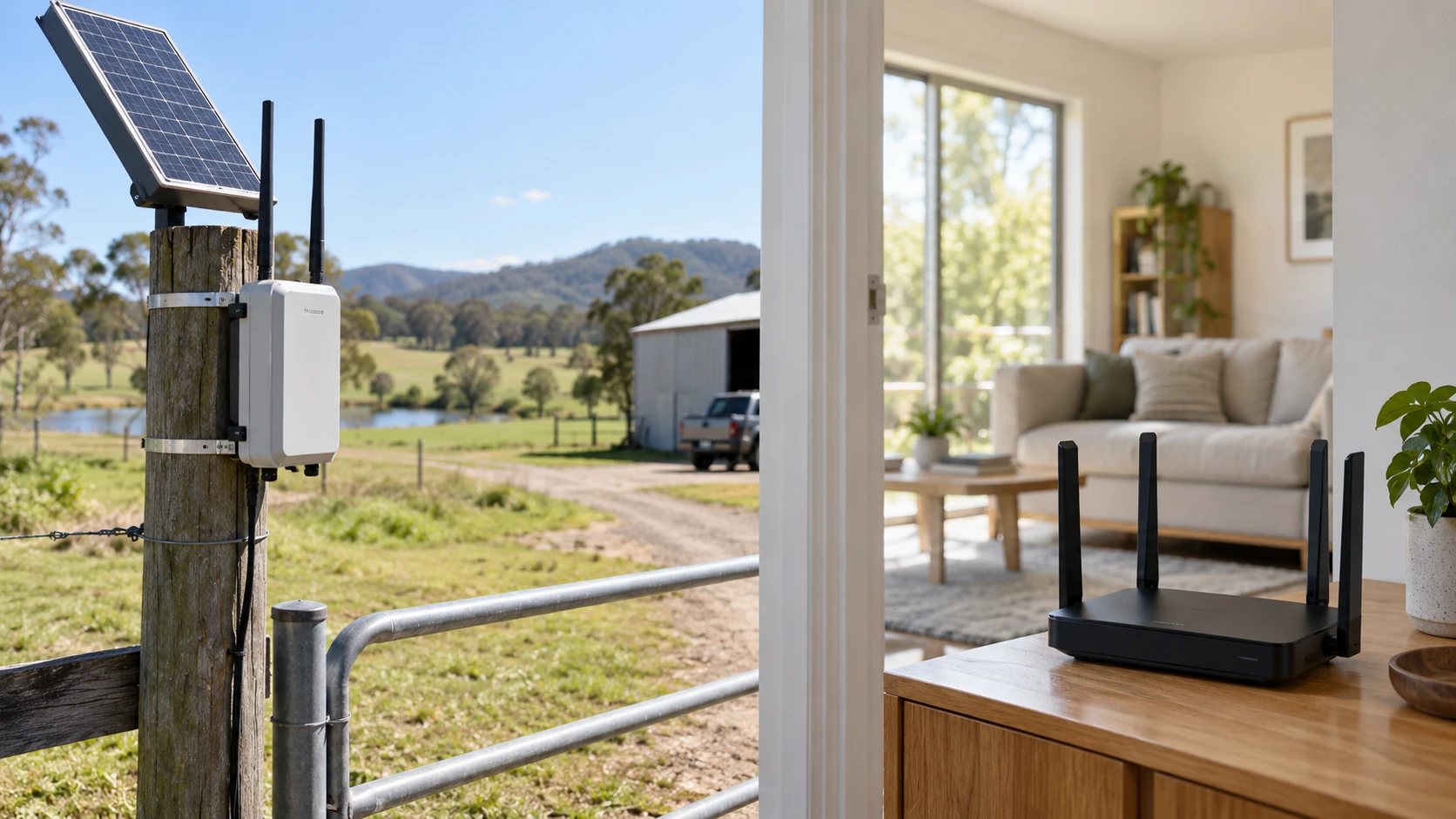
The Xanye solar 4G outdoor router and Boundless Devices MQ20 are both sold as routers, but they begin with different internet sources. Xanye describes a weather-resistant unit that uses a 4G connection, solar charging, and a 20,000 mAh battery for a remote site. Boundless describes an indoor Wi-Fi 6E router that distributes an existing internet connection across a home or office. Before comparing coverage numbers or the price on either page, identify where the internet connection comes from. A router that broadcasts a strong local signal cannot create an upstream service the site does not have.
This makes the intended location the main decision. A farm gate or temporary work area may need cellular service where a wired broadband connection is unavailable. A house with broadband may need better Wi-Fi between rooms and devices. The two listings give useful leads for those distinct problems, but neither page verifies actual signal quality at your address. Draw the site, identify its current connection, and mark the devices that need access. That simple map is more useful than choosing by the largest distance or speed in a Republeq's product description.
Identify the upstream connection — Boundless MQ20-80W-U Wi-Fi 6E router
Xanye calls its product a 4G outdoor router and says card-compatible and no-card-required configurations are available. Those phrases need exact explanation for the selected variant. Determine which cellular bands it supports, whether it requires a SIM or a particular service, which carrier works at the installation address, and what the monthly data terms are. A strong local Wi-Fi signal will not help if the 4G connection is weak, incompatible, or capped too tightly for the intended workload.
The Boundless MQ20-80W-U is listed as a Wi-Fi 6E router. Its page does not describe a built-in 4G cellular modem. Plan how it will connect to the modem or upstream gateway that supplies the home or office internet service. Check the physical internet input, the speed of the subscribed service, and the placement options for the router. If the broadband line enters a corner of a building, a central wireless position may require a cable run or another approved network arrangement.
Treat the Republeq's catalog use cases as examples, not service confirmation. Xanye mentions campsites, farms, construction sites, and remote work locations. Verify cellular coverage and carrier compatibility at each actual site, particularly if the unit will be moved. Boundless mentions gaming, streaming, video calls, and large downloads. Those activities depend on the broadband plan, the entire local network, and the wireless hardware in each device.
Coverage claims need a site map — Boundless MQ20-80W-U Wi-Fi 6E router
Xanye states a 50-meter coverage area. The listing does not define the test environment, antenna position, obstacles, or whether that number refers to its local wireless network. A metal shed, trees, walls, and terrain can change the result. Mark the intended mounting position and the furthest device on a site sketch. If a camera or sensor must work at the edge of the property, test that exact path before relying on a general coverage figure. Also ask whether the device supports the number and type of clients the installation needs.
Boundless says one MQ20 unit covers up to 3,000 square feet with eight high-gain antennas. A square-foot number is not a floor plan. Two homes with the same area can have very different wall materials, floors, and device locations. Place the router where the incoming connection and practical cabling allow, then check signal at the rooms that matter. If a mesh setup is proposed, confirm compatible additional units, placement, and backhaul arrangements for the exact MQ20 model. The title's "Easy Mesh" wording does not establish what comes in the selected single-pack offer.
Do not compare 50 meters directly with 3,000 square feet as if they measured the same thing. One is a distance and the other an area; neither listing gives a shared test condition. The useful comparison is whether the proposed router can serve the actual devices through the actual obstacles at the site. For a home, test the far bedroom and any outdoor seating area. For a remote installation, test the camera, controller, or laptop where it will be used, including at the time of day and season when conditions may differ.
Read speed numbers with the connection in mind — MSI Radix AXE6600 tri-band Wi-Fi 6E router
Boundless describes three bands: 2.4 GHz, 5 GHz, and 6 GHz. It advertises speeds up to 8.4 Gbps and gives separate download and upload figures in its product description. These are listed wireless capabilities, not a promise that an internet speed test will show those numbers. The result at a device depends on the device's own Wi-Fi hardware, distance, interference, router settings, and the upstream broadband service. Check what your computers and phones support before paying for a band they cannot use.
The published guide to the MSI Radix AXE6600 tri-band Wi-Fi 6E router gives another example of why a tri-band label needs a device-and-room plan. Wi-Fi 6E can help when compatible clients and suitable placement allow its 6 GHz band to be used. That does not turn the Boundless unit into a cellular router or guarantee coverage through thick walls. The guide is context for local Wi-Fi design; the selected MQ20 specifications and your broadband plan remain the facts to verify.
Xanye's short page does not give a comparable local Wi-Fi standard, cellular band list, or tested throughput. It says the device supports video streaming and real-time monitoring, but those use cases can consume substantial mobile data. Estimate the traffic for cameras, uploads, and people connected at the site. Ask the service provider about coverage, data caps, and traffic policy. A device that can send a video stream under favorable conditions may not sustain several continuous feeds on a weak or limited plan.
If the main goal is an outdoor camera, think through the video path end to end. The camera must connect locally to Xanye, Xanye must reach the carrier, and the viewing app or storage service must work over that connection. Test remote viewing from another network; a phone standing beside the router checks only part of the path. For a home office on Boundless, test a video call from the farthest regular workstation while other household devices are active.
Power and weather change the installation — Boundless MQ20-80W-U Wi-Fi 6E router
Xanye advertises solar power and a 20,000 mAh battery. Its page also makes an "up to 365 days" outdoor-use claim. That figure needs context: sunlight hours, battery charging rate, temperature, signal strength, and data use all affect runtime. The reviewed text does not state the solar panel's output or a measured operating profile behind the claim. Determine the exact mounting direction and shade pattern at the site, then ask how the battery is charged during prolonged cloudy weather. A remote router needs a recovery plan if its power runs down.
The Xanye housing is listed as IP66-rated with corrosion-resistant PVC/EVA material and tempered glass. IP66 is a stated enclosure rating, not an instruction to submerge the device or ignore connector sealing. Check how cables, SIM access, and mounting hardware preserve the weather protection of the installed system. The page mentions an operating range of 10°C to 60°C. Confirm whether the lower limit is intended as positive 10°C; that would be a serious constraint at a freezing site. Use exact manufacturer documentation for temperature and ingress limits before installing it outdoors year-round.
Boundless is presented as an indoor router. The reviewed page does not give an outdoor weather rating or a battery. Place it near a suitable power outlet and within the environmental limits of its manual. If the intended coverage includes a yard or detached building, plan an appropriate network extension instead of placing an indoor unit in rain or direct exposure. Its antenna and area claims do not change the installation environment for which it is documented.
The power plan should also cover outages. A home broadband router can remain on a backup supply, but the upstream modem and service may need power too. A solar cellular installation has its own battery and sunlight questions. Identify all devices in the chain that must continue operating for the required hours. Neither product listing establishes complete backup for an internet connection during a local power or carrier outage.
Security and maintenance are different jobs — Boundless MQ20-80W-U Wi-Fi 6E router
Boundless advertises a built-in firewall, malware blocking, ransomware and phishing protection, and MotoSync+ controls for setup, parental controls, alerts, and remote access. These are claims in Republeq's catalog that need scope and subscription details. Check how long updates are provided, whether any features require an account or paid service, and how to install firmware on the exact MQ20. A security feature name does not remove the need for strong account credentials, current devices, and a sensible guest-network policy.
Xanye's short description does not provide a matching security and update list. That is an information gap. Before putting cameras or work devices on a remote network, ask how administrator access is protected, how firmware updates arrive, whether remote management is enabled, and what happens if the cellular service changes. A remote site can be harder to visit for a reset, so an exact setup and recovery procedure matters as much as the initial "about five minutes" setup claim on the page.
Both devices should be configured with the selected offer in hand. Record the model and firmware version, change default credentials according to the manual, and test a normal restart. Keep carrier and broadband account details in the owner's private records, away from a label attached to an outdoor box. The product listings alone do not prove that the management apps or services will remain available for the life of the installation.
Check variants and the complete cost — Boundless MQ20-80W-U Wi-Fi 6E router
Xanye's saved description mentions card-compatible and no-card-required configurations without explaining their service requirements. Confirm the exact cellular hardware, bands, power accessories, and activation path for the selected offer. Boundless's pinned record identifies the MQ20-80W-U as a white single pack. Check that model, color, and package contents at checkout. A starting price may describe a different configuration from the one an installation needs.
Price the whole connection. Xanye may require a data plan, SIM or other service activation, a secure mount, and possible backup power. Boundless needs an upstream broadband service and perhaps a modem, cable run, or additional compatible access point. Read delivery, return, and warranty terms for the exact selected offer. If a router does not connect to the required carrier or serve the far room, the price of the box alone is a poor measure of value.
Choose the network problem first — Boundless MQ20-80W-U Wi-Fi 6E router
Xanye's solar 4G unit merits closer examination for a site with suitable cellular coverage, sunlight, and a need for a weather-resistant installation. Verify the exact regional version, carrier bands, data plan, real power budget, operating temperature, mounting instructions, and security updates. Its 50-meter and 365-day claims require conditions that the short marketplace description does not fully specify.
The Boundless MQ20-80W-U Wi-Fi 6E router suits a different investigation: distributing an existing indoor internet connection to compatible devices. Check the incoming broadband connection, client Wi-Fi capabilities, physical placement, mesh options, and terms for its listed protection features. Its advertised area and speed are starting specifications for a site test, not results guaranteed in every building.
Mark the upstream service, the router position, and the devices on a map. If the site lacks broadband, investigate cellular compatibility and power first. If broadband already reaches the building, test where the local Wi-Fi fails and design from that point. The two products answer different network questions despite sharing the word "router."