Skills & Planning
Storage clipboard buying guide: attached calculator or separate tool
Compare attached-calculator and separately chosen calculation roles for a paper task, retaining unresolved supply and performance questions before purchase.
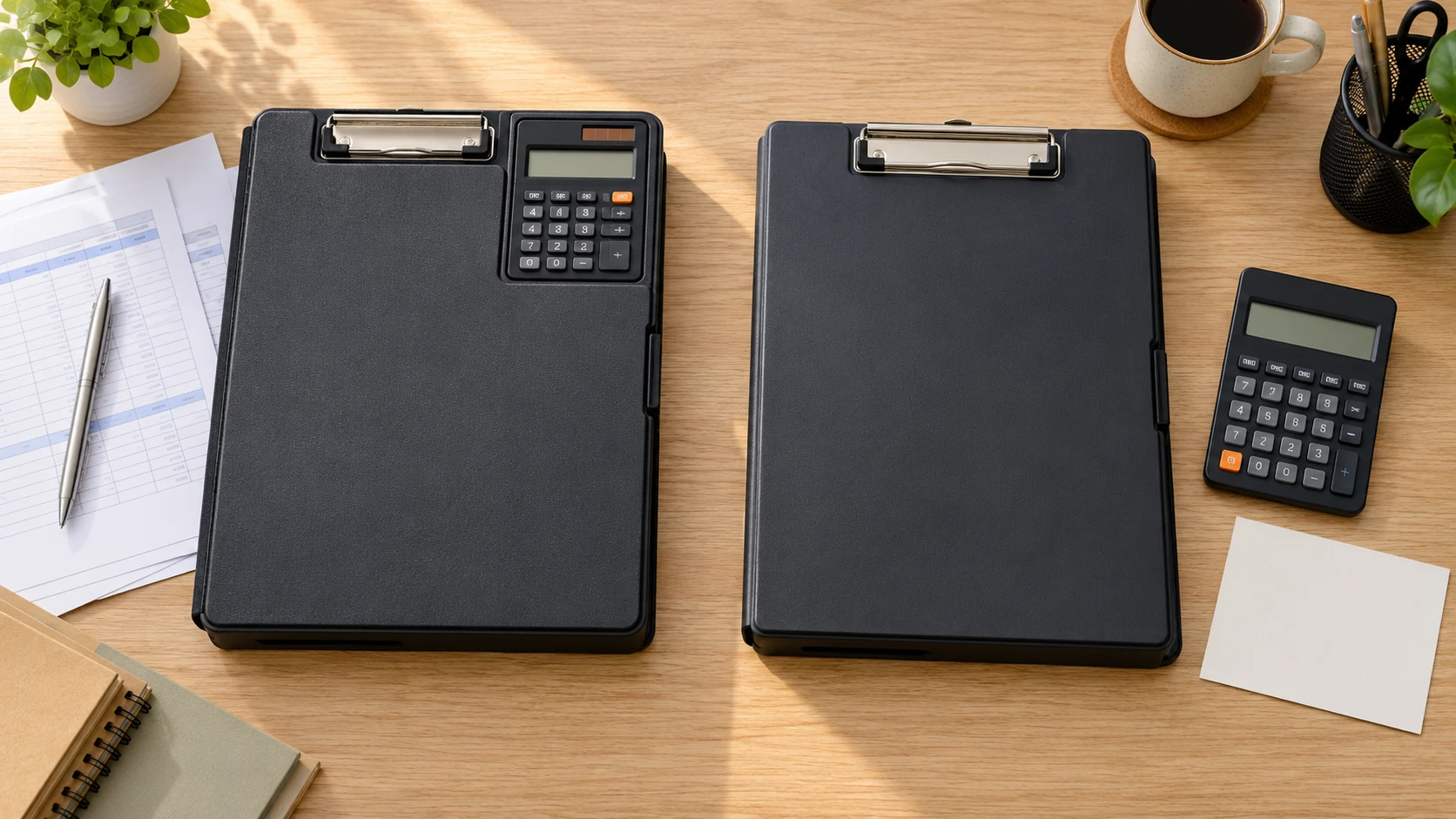
Storage clipboard buying guide questions become easier to answer when the calculator has a named job. Before choosing a board with a calculator attached or a board that carries separately chosen supplies, write down the paper task and the calculation it requires. This tutorial builds a short enquiry worksheet from those two roles. It does not operate a calculator, test a clipboard or promise that either arrangement suits a particular workplace.
Write the paper task before listing features
Start a private note with the actual paper activity. Describe what the user would record and where the calculation enters that activity. A statement such as “copy a separately checked total onto a form” is a different requirement from “perform the calculation on the board.” Keep the description at the level you can establish. This article supplies no accounting method, approved business process or permission to change an existing procedure.
Then identify the calculation tool already required by that task, if any. The responsible person may have an applicable device, software or checking process. Record that requirement without assuming a small calculator on a clipboard can replace it. If the requirement remains unknown, name who will resolve it. A convenient physical arrangement is only useful after the actual calculation role is clear.
Keep the note short enough to send to a seller or the person responsible for equipment. Include the exact proposed offer and the unanswered question. Avoid turning a general preference for fewer loose objects into a performance requirement that nobody has established. An enquiry can begin with an uncertain field, provided the uncertainty remains visible rather than being filled with a familiar-looking product feature.
Record the attached-calculator account accurately
The OIC-named slim clipboard storage box with calculator describes paper storage and a separate pen-and-pencil compartment. The title and description identify the calculator as part of this product account. Its gallery shows a charcoal storage writing-board form with a calculator header and a translucent compartment. This is an illustrated product arrangement, without an independent calculation, clip-force or storage-fit test.
Retain the identity discrepancy in the enquiry: the title uses OIC, while the captured brand field says Unbranded. Do not silently replace either field with a maker inferred from a similar product. Use the exact offer reference and ask the seller to confirm the supplied identity if it matters to the decision. The photograph has no contrary readable maker label that resolves that discrepancy.
The description names solar and battery power and says a battery is included. Those remain source statements. They establish no measured runtime, calculation accuracy, permitted professional use or replacement procedure here. The gallery's displayed digits are not a test result. Ask for the calculator specifications and instructions relevant to the actual task rather than treating its presence on the board as a complete functional approval.
Keep illustrated loose supplies separate from contents
The Saunders WorkMate II storage clipboard offer describes internal paper storage, a low-profile spring clip, six internal compartments with a cover and a closing latch. Its gallery shows the storage form opened with a divider, paper and small supplies. A loose calculator appears in that scene. The supplied inventory in the captured description does not establish that calculator as included.
Write “calculator inclusion not established” beside the scene rather than recording an included accessory. The same discipline applies to the pictured pencil, rubber bands and other small supplies. A photograph can explain how storage might be illustrated without turning every visible object into goods in the order. Ask the seller what the exact offer supplies before treating the scene as a complete equipment kit.
The title describes a bundle of ten each. Keep that as stated offer wording, without independently counting delivered units from the single illustrated clipboard. Confirm the order unit and contents before a purchase. This tutorial makes no pack-price comparison, shared allocation plan or claim that the bundle's size answers an individual's calculation-tool question.
Give the two calculator roles separate lines
On the worksheet, create one line for an attached calculator and another for a separately chosen calculation tool. Beside the first, record the applicable specifications still needed for the product's own calculator. Beside the second, identify the tool actually proposed and any unanswered carrying question. Do not assume a separate calculator fits inside a compartment merely because another calculator is pictured there.
For either role, ask what information would establish suitability for the task. That may include the responsible person's device requirements and the exact product documentation. This guide supplies no universal list of calculator functions or required checking standard. A task needing a particular feature should name it from its actual requirements, rather than from a shopping article's guess about what every user needs.
Keep physical location separate from function. An attached calculator may be visually easy to identify on a board, while its specifications remain unanswered. A separately owned calculator may already have a defined role, while its place during the paper activity remains unresolved. The worksheet can preserve those different states without ranking either arrangement or promising that fewer separate objects will prevent loss.
Add one question about the actual sequence
Describe when the calculation tool would be needed relative to the paper entry. Perhaps another person supplies the completed number, or perhaps the user needs access to the tool during the activity. Record what is known about that sequence. This is a task-description step, without a prescribed workflow, data-entry method or claim that one sequence is quicker.
If several people contribute to the task, identify who can answer the equipment requirement. Do not design a new handoff routine inside the purchasing note. A seller can answer what a product includes, while the task owner may need to answer whether its calculator is appropriate. Keep those responses in separate fields so an accurate contents answer does not become an unsupported approval of the whole activity.
Ask only the unresolved question that the responder can actually address. For the OIC-named offer, a seller enquiry might request the exact calculator specifications and confirmed supplied identity. For the WorkMate offer, it might request the actual supplied contents and applicable internal dimensions for a separately selected item. Neither request instructs the reader to open, adjust or alter unfamiliar equipment.
Use an imagined worksheet to check the distinction
Imagine that Jules needs a board for a fictional paper task. The first shopping note says “calculator included” beside both offers because both galleries show one. Jules checks the native accounts and corrects that field. The attached-calculator account names the calculator; the WorkMate account does not establish the loose pictured calculator as supplied. This example reports a correction to a note, without an actual order or contents inspection.
Jules then asks the task owner which calculation tool the activity requires. Suppose the answer identifies a separately approved device already available. That answer gives the worksheet a new fact about the fictional task. It does not establish the device's fit in either board, approve the attached calculator as an equivalent or prove that another purchase is necessary.
If the task owner instead needs more product specifications, Jules leaves the decision open and sends the specific enquiry. A later reply is retained with its conditions and exact offer reference. The fictional outcome is a clearer purchasing question. It promises no correct numerical output, completed paper task, successful equipment fit or reduction in lost supplies.
Read the completed worksheet back without the product pictures. Can another person identify which calculator is actually described as supplied, which tool is only proposed separately and which requirement still needs an answer? Add a source label where the distinction depends on memory. The worksheet should remain understandable after a gallery changes or a colleague forwards the note without its original images.
Keep an earlier version if a later answer changes the proposed role. A correction from assumed inclusion to unresolved inclusion is useful evidence about the enquiry, rather than something to conceal. Preserve the selected offer and the response that caused the change. That small history lets the next person continue the same question without repeating an assumption already found unsupported.
Keep paper capacity and visibility in their own checks
The clipboard size, clip capacity and storage guide owns the distinction between supported paper, the active clip stack and internal storage. Those fields need their own applicable product information. This tutorial does not turn a storage dimension into a calculator-fit guarantee or supply a clip-loading trial. Keep the calculation-role worksheet separate from that paper-capacity decision.
The clipboard form-header guide owns the actual form-and-clip visibility problem. An attached calculator's presence does not establish whether a particular form's first field remains visible. This article gives no page-shifting, clip-bending or form-redesign method. Retain a visibility question as a separate requirement rather than assuming the calculator arrangement has answered it.
Likewise, enclosed storage does not establish water resistance, confidentiality or security against access. The two descriptions supply no independent finding of those properties here. Keep the actual document-handling requirements with the person who owns the task. A calculator decision cannot settle how sensitive records should be carried, retained or protected in an unidentified setting.
Keep payment with the identified equipment order
Both captured product offers list cryptocurrency among accepted payment methods in structured data. That supports checking current payment choices if an authorised buyer decides to place an order. It does not establish which assets, networks or wallet services a later checkout will support. A payment option cannot identify the supplied calculator, settle the OIC brand discrepancy or approve the tool for the actual paper task.
Retain the exact selected offer and any contents clarification with the order note. If the product or package changes, revisit the worksheet's answers before relying on them. A response about one calculator or board should not silently transfer to another. Someone ordering on behalf of a user needs the identified goods and unresolved specifications, rather than a general instruction to buy the board shown in a picture.
If cryptocurrency is selected, read the transaction's current amount, asset, network and receiving details. This guide supplies no wallet address, network recommendation, transfer sequence, exchange rate or fee estimate. Ask the merchant or payment provider when an essential instruction remains unclear. A familiar token name or remembered detail from a previous order cannot establish the current payment requirements for a different purchase.
Check the merchant order status alongside any payment confirmation. Reconcile an uncertain existing attempt before sending another payment. Read the applicable delivery, cancellation, return and refund conditions, including any cryptocurrency terms. Keep the order and payment references with the supplier's response so a later enquiry identifies the actual transaction. Those records do not independently test the calculator, count delivered boards or establish storage fit. If another person submits the order, agree who will resolve a pending status question before either person begins another checkout.
Finish with a role and its remaining evidence
A storage clipboard buying guide can end with a short worksheet: the actual paper task, the calculation tool required, the proposed attached or separate role and the unanswered product question. Obtain the applicable answer before treating the arrangement as suitable. Keep paper capacity, form visibility and supplied contents distinct, and leave the purchase pending when the evidence still does not establish the combination you need.