Cameras & Video Gear
Check quick-release plate fit for cameras and gimbals
Match the exact camera, adapter, plate and receiving clamp before relying on a quick-release connection.
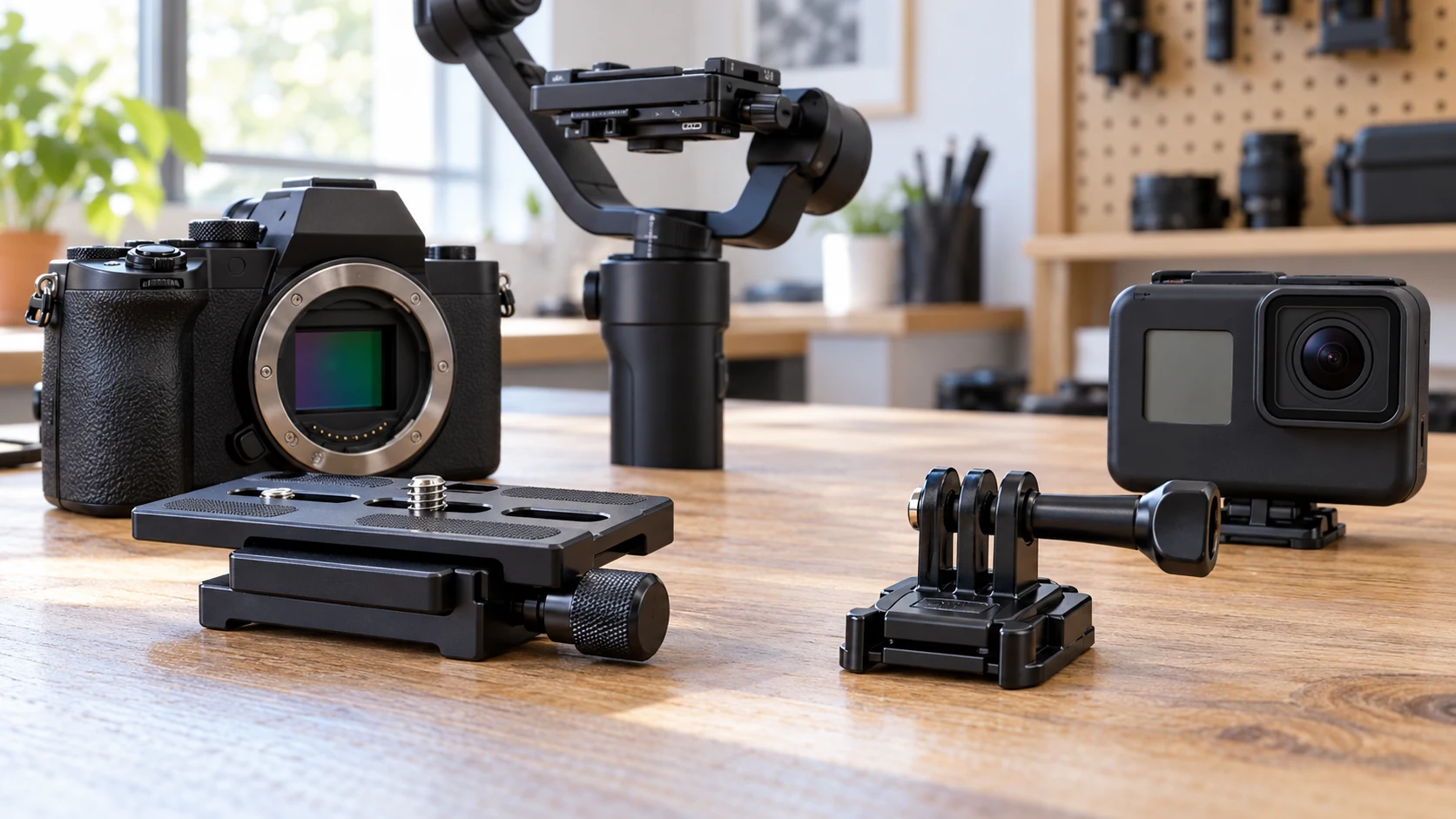
quick-release plate fit begins with the camera, mount and plate you actually have. “Arca-Swiss compatible” is a useful clue, but it does not describe every camera-side connector, clamp, locking movement or clearance in a complete setup. Before buying an extra plate, identify the exact model on both ends and decide whether the plate is meant for a camera body, a gimbal, an action-camera adapter or another support. A fast release is useful only when the entire connection is secure.
Two current Bigcan listings illustrate different roles. The Bigcan aluminum plate for named DJI gimbals describes an aluminum-alloy 100 × 80 × 39 mm piece, 78 g including the plate, with an Arca-Swiss mount claim and compatibility with DJI RS3 Mini, RS3 Pro, RS2 and RSC 2. The Bigcan SnapLock action-camera plate is smaller at 38 × 38 × 44 mm and 40 g, and names GoPro, Insta360 and DJI Osmo camera use. It describes a twist-and-press connection and a rotating ball-head joint. The shared accessory words do not establish that these two pieces can replace one another.
Identify the camera-side interface
Start with the camera or action camera you intend to mount. Look for its exact model and the kind of attachment point it exposes. A still camera body, a caged camera and an action camera may need different hardware between the camera and the quick-release base. A plate listed for a gimbal setup should not be chosen solely because the camera brand appears in a photo. Check the manufacturer's manual for your exact camera, cage or adapter.
Write down every part already in the chain: camera, cage or adapter if present, plate, clamp, head and support. If you bought a used tripod or gimbal, inspect its actual clamp instead of relying on the original product page. A previous owner may have changed the head or plate. The compatibility question concerns the hardware in your hands. A listing for a different revision may look similar while its locking details differ.
The SnapLock page explicitly names GoPro, Insta360 and DJI Osmo cameras and also mentions tripods, stabilizers and backpack mounts. Those are stated application contexts, not a blanket promise for every model or mount sold under those names. The plate's action-camera attachment and its support-side connection are separate checks. Verify both ends before assuming that one “compatible” label covers the whole path.
The gimbal-oriented page names four DJI models. Match the exact gimbal you own to that list. If the name is absent, ask for manufacturer confirmation rather than guessing from the shape of the clamp. The saved page does not supply a universal fit chart. Even for a listed gimbal, check whether your specific camera, lens or cage would obstruct the plate or balance adjustment. Model compatibility and whole-rig clearance are different questions.
Check the quick-release clamp geometry
An Arca-Swiss-style claim describes one family of sliding plate and clamp designs. It does not tell you how wide your specific clamp opens, where its stop pins sit or how its lock is operated. Read the actual support manufacturer's instructions. Inspect the slot and plate in good light for dirt, bent edges or a missing part. Do not force a plate that meets resistance. A snug-looking top view is not proof that the locking surfaces are fully engaged.
The broader gimbal plate listing describes a locking quick-release mechanism. The SnapLock listing describes twist-and-press mounting. Those are different actions, even though both are called quick release. Follow the instructions for the exact mechanism delivered. If a listing does not show the underside or lock detail you need, request that view or the model manual before buying. Do not borrow a release sequence from another plate and assume it applies here.
Our camera filter-size guide shows a similar accessory mistake: two numbers on camera equipment can describe different physical interfaces. Its lens-thread decision does not decide a tripod plate fit. Use the same discipline here by labeling the camera-side connector, support-side clamp and any screw or adapter separately.
When a plate arrives, start an unloaded fit check over a safe surface. Inspect the plate and clamp, insert the plate only as the manufacturer directs and confirm that the locking action completes. Gently test for movement before placing a camera on it. If the fit is uncertain, stop. Do not suspend an expensive or heavy setup over a hard floor while you experiment with a mechanism. This is a cautious inspection sequence, not a substitute for a load rating or official installation procedure.
Compare dimensions with real clearance
The gimbal-oriented Bigcan page gives 100 × 80 × 39 mm and 78 g including the plate. The SnapLock page gives 38 × 38 × 44 mm and 40 g. These are listing dimensions of two different accessories, not proof that either will clear your camera door, lens barrel, handle, microphone or gimbal arm. Measure the free area on the actual rig. Look at where the lock lever or adjustment knob will sit when the camera points in each intended direction.
A shorter plate may leave more room around a camera base, while a longer one can offer different adjustment positions. That is a design question to check on a model-specific drawing or the delivered item; the storefront dimensions alone do not quantify the usable travel in your clamp. Do not infer a load rating from aluminum construction or a product's weight. A 78 g plate can be paired with many different loads, but the safe limit belongs to the complete support chain.
For a gimbal, check whether the plate's position still lets you balance the actual camera and lens. The source listing names supported gimbals, but it does not test your particular payload or accessories. For a tripod, check the head and clamp. For a backpack mount, check how the action camera attaches and whether the mount itself is rated for that use. Each support context creates a different failure point. The plate's advertised compatibility cannot answer them all.
The seasonal tripod-planning guide helps make an inventory of the equipment carried for an outing. It does not certify a quick-release interface. Before packing, use that inventory habit to name the actual plate and clamp together. A spare plate that fits a different head is extra weight, not a solution when you need to move a camera quickly.
Keep mounting hardware and motion distinct
The SnapLock listing says its 360-degree ball-head joint allows rotation and angle adjustment. That feature may help position a compact action camera, but it also adds another joint to check for the intended use. Confirm the camera-side adapter, the joint and the base lock separately. Do not treat a rotating joint as evidence of a compatible tripod clamp or a secure attachment to a particular backpack strap.
The gimbal-oriented plate lists aluminum-alloy construction and a locking mechanism. It does not tell you whether your exact camera screw, cage slot or locating pin is included. The gallery image shows a mounting piece, but a photo cannot establish every delivered component or the fit of your camera. Read the current contents list and inspect the box on arrival. If a screw or adapter is missing, identify the correct part through the manufacturer rather than substituting one by appearance.
Check that any camera screw engages without cross-threading and does not bottom out before the camera is secure. Follow the camera and plate manuals for tightening; this article cannot prescribe a torque. If the camera can rotate on the plate, investigate the fit before attaching it to a gimbal. A support-side clamp may be tight while the camera-side connection is loose. Testing only one end hides that risk.
After the basic connection is stable, move the assembled rig slowly through the positions you intend to use, following the support's instructions. Look for collisions between the plate, lever, lens, handle and gimbal arm. Do this in a controlled place with the camera supported. A combination that locks at one angle may still be awkward to release or obstruct a control at another. Do not infer field readiness from one successful click.
Decide whether to buy a plate or another adapter
Make a two-column note: the interface your camera or adapter presents, and the interface your support receives. If they already match, an extra plate may be a convenient spare. If they differ, a plate alone may not close the gap. Identify the exact missing adapter or mounting component from manufacturer documentation. Avoid stacking unverified pieces simply because each product page says “quick release.” Every added connection needs its own fit and load check.
For a still camera on one of the named DJI gimbals, the first listing is a candidate worth checking against the gimbal revision and camera configuration. For a GoPro, Insta360 or DJI Osmo setup, the SnapLock listing offers a different candidate. These are product-specific starting points, not a recommendation to combine the two. Verify the current model, package contents, dimensions, locking procedure and complete support path before buying either.
If the listings leave a necessary measurement or accessory unclear, ask the seller for the manufacturer's drawing or manual for the exact SKU. Keep the reply with the order record. A reply that names only a brand family is weaker than one that identifies the camera model, adapter and receiving clamp. Do not silently turn a vague compatibility answer into a purchase guarantee. Record what remains unknown and wait for a usable answer when the camera's security depends on it.
After delivery, compare the model and parts with the listing before removing packaging or mounting an expensive camera. Try the unloaded lock, then mount and support the camera as the manufacturer directs. If the plate sticks, rocks, fails to latch or requires force, stop and document the mismatch. Preserve the product identity and contact the seller or manufacturer for the correct component. Grinding down a plate or defeating a safety stop would change the hardware beyond the stated compatibility.
Store each spare plate with the head or gimbal it actually fits, or label it with the verified combination. That small step matters when several black metal plates look nearly identical in a bag. If you switch between a still camera and an action camera, keep the corresponding adapters separate and inspect the full connection each time. A quick-release system should shorten an established routine, not replace the checks that established it.
A good quick-release plate fit is a verified connection from the camera through its adapter and plate to the actual receiving clamp. The two Bigcan listings name different devices, dimensions and locking actions. Match the exact hardware, inspect the unloaded connection and confirm the whole rig before trusting it. Shared accessory vocabulary alone cannot carry the camera.