Crypto Commerce
PTZZHEDM CMK4H23.8-i7-3610-16G-512G all-in-one PC all-in-one vs ViprTech Rebel 4.0 for a new desktop setup
Compare PTZZHEDM CMK4H23.8-i7-3610-16G-512G all-in-one PC by screen, graphics, storage, ports, offer identity, and desk needs.
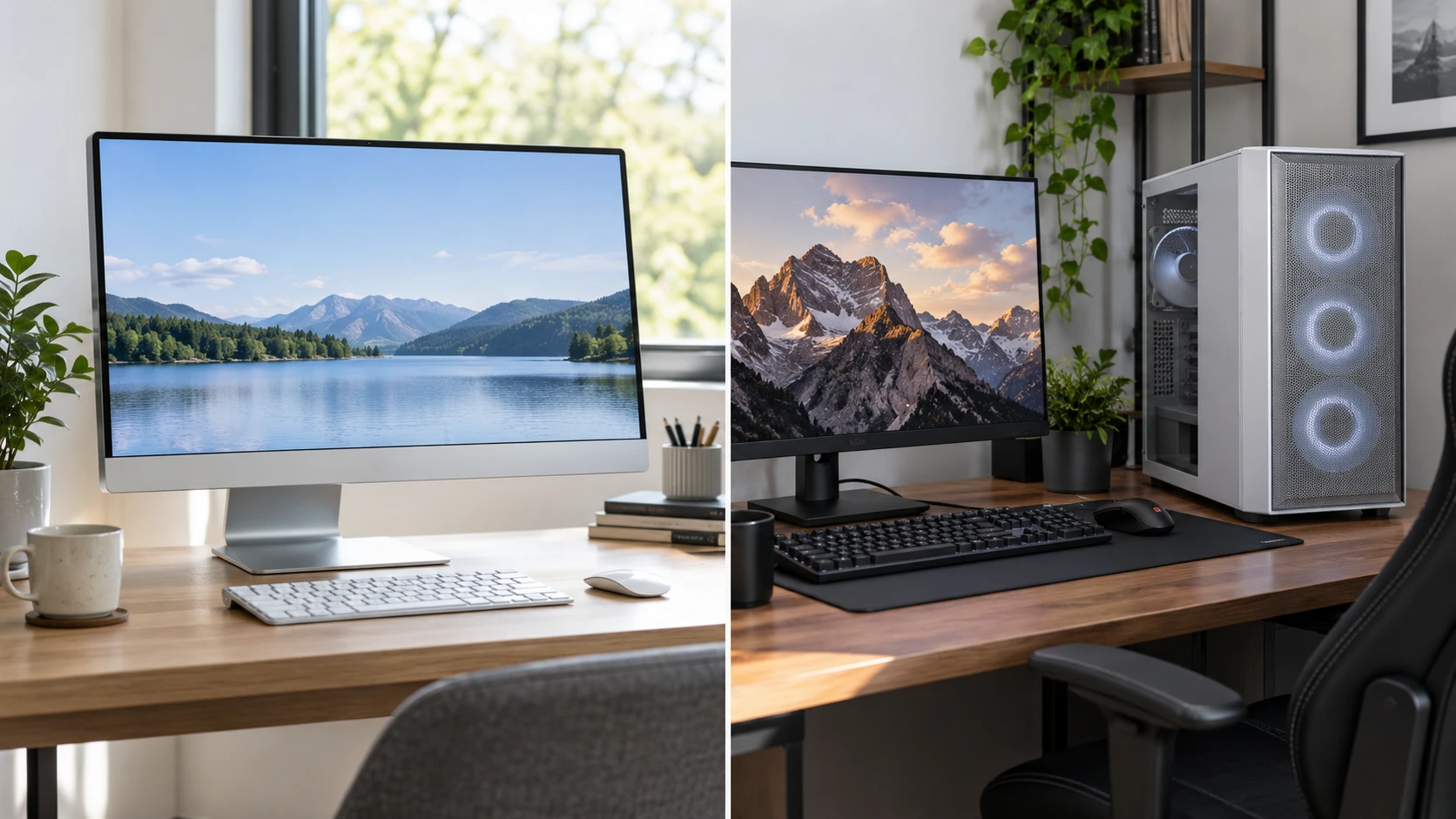
The PTZZHEDM CMK4H23.8-i7-3610-16G-512G all-in-one PC puts a computer and 23.8-inch touchscreen in one desktop unit. The ViprTech Rebel 4.0 is a separate gaming tower with a listed AMD Ryzen 7 2700 processor and NVIDIA RTX 4060 graphics card. Their live listings give enough details to sketch two setups, though neither page supplies a complete independent performance test. The choice begins with what must appear on the desk and which programs the computer needs to run.
PTZZHEDM's named configuration lists 16 GB of memory, a 512 GB solid-state drive, and Windows 10 Pro. ViprTech's white Rebel 4.0 lists 16 GB of DDR4 memory, a 1 TB NVMe drive, and Windows 11 Pro. Similar memory amounts do not make these computers substitutes. One includes its own screen and targets an integrated workspace; the other names a discrete graphics card and still needs a display. Price the complete working desk before comparing the starting prices on the product pages.
Decide where the computer and display will go — ViprTech Rebel 4.0 gaming desktop
An all-in-one can reduce the number of separate boxes on a desk. The PTZZHEDM listing includes a 23.8-inch touchscreen plus a wired keyboard and mouse. Measure the desk depth from the front edge to the back wall, then account for the display's stand, keyboard, and a comfortable viewing distance. The saved description does not give the stand footprint or adjustment range. Ask for the exact unit's dimensions before assuming it will fit under a shelf or beside another monitor.
ViprTech's Rebel 4.0 is a tower in a white U01 case, according to the listing. It needs a separate monitor, keyboard, mouse, and space for the case and its cables unless the selected offer includes extras not described here. A tower can sit on or beside the desk if the chosen position leaves the ventilation and access required by its instructions. Measure both the tower location and the display position. A powerful graphics card is less useful if the only available place for the case blocks a door or leaves its ports impossible to reach.
Think about daily access. A person who regularly uses USB devices may want ports at hand. Someone who wants a clear desk may prefer to keep a tower below the work surface, but that placement can make rear ports and cleaning less convenient. The all-in-one keeps more of the system at eye level, yet an integrated screen also means the computer and primary display share one physical unit. Check how each design fits the actual furniture before treating either form factor as automatically simpler.
The PTZZHEDM page groups several screen sizes and hardware configurations under one address. Its named model points to a 23.8-inch screen, Intel Core i7-3610QM, 16 GB RAM, and 512 GB SSD. The saved description also lists other screen and storage choices. Confirm the exact named combination in the cart and final order. A comparison built on the 23.8-inch model does not apply unchanged if a cheaper 21.5-inch or differently configured variant is selected.
Match processor and graphics to the software — gaming desktop and an office desktop
ViprTech lists an eight-core, 16-thread Ryzen 7 2700 with a stated boost speed up to 4.1 GHz. It also lists an RTX 4060 with 8 GB of dedicated graphics memory and ray-tracing support. These specifications identify the components claimed in the tower. They do not guarantee a frame rate in a particular game or a rendering time in a particular program. Those results depend on game settings, resolution, cooling, drivers, memory configuration, and the rest of the system. Look for measurements that match your intended software and display before spending for a performance target.
PTZZHEDM lists an Intel Core i7-3610QM in the named configuration. Its description does not list a discrete graphics card for this model. That does not tell us every graphics detail or prove how a particular game will run. If the computer will be used for spreadsheets, web apps, video calls, or a point-of-sale style interface, check the published requirements for those programs against the exact processor, memory, operating system, and graphics support. If a demanding game or creative application is essential, request full graphics specifications and a relevant performance demonstration.
The two processors come from different product designs and generations, so a label such as "i7" or "Ryzen 7" is too broad for a useful ranking. The Republeq's catalog pages do not give a controlled benchmark comparing these exact complete systems. A buyer should write down the three programs that matter most, their required operating system, and any graphics or memory recommendations. That short list will reveal whether the graphics card in the ViprTech tower is necessary or whether the included touchscreen in the PTZZHEDM unit serves the real job better.
The published guide comparing a gaming desktop and an office desktop provides a useful parallel. In both cases, the equipment should be judged by the work it will do and the full setup it requires. A graphics specification that matters for games can be incidental to a text-heavy office station. An included screen can simplify a desk while leaving a gamer shopping for a different display.
Screen choices change the total cost — ViprTech Rebel 4.0 gaming desktop
PTZZHEDM's 23.8-inch touchscreen is part of the named all-in-one package. Its short listing does not state a native screen resolution, brightness, refresh rate, or touch technology. Confirm those specifications before choosing it for detailed graphics, video editing, or a touch application that needs precise input. Try the interface from the normal seated position. Touch can be handy for occasional controls, but reaching across a desk all day may be uncomfortable if the screen sits far from the keyboard.
The ViprTech tower leaves the display decision open. That can be useful if you already own a monitor or want to choose screen size, resolution, and refresh rate for a specific game. It also adds a purchase if no compatible monitor is available. Verify the tower's exact video outputs and the display's input before buying cables. The listing's RTX 4060 name alone does not identify every connector or the timing supported by the selected graphics-card board. Make a complete list of the monitor, cable, input device, and audio equipment that the final desk needs.
PTZZHEDM says its HDMI and VGA connections can support other displays, but the reviewed text does not give a complete resolution-and-refresh table for each output. If you plan to use a second monitor, confirm whether the port is an output for the named variant and which signal mode it supports. A physical port is the beginning of a connection check, not proof of every multi-screen arrangement. The same applies to ViprTech: test the planned number and type of screens against the actual installed graphics card.
Ports, wireless connections, and everyday devices — ViprTech Rebel 4.0 gaming desktop
The PTZZHEDM description lists six USB ports, HDMI and VGA outputs, RJ45 Ethernet, 3.5 mm audio jacks, dual-band Wi-Fi, Bluetooth 5.0, integrated speakers, and a webcam. That is a broad connection list for an all-in-one. Check the location and version of each port on the exact ordered unit, especially if a printer, wired network, headset, or external storage device is part of the daily routine. The page's generic hardware options make a variant-specific diagram important.
ViprTech names Bluetooth and Wi-Fi antennas but does not provide the same complete port inventory in its short description. Obtain a rear and front panel diagram for the exact Rebel 4.0 configuration. Count the USB devices that will stay plugged in, the network connection you prefer, and the audio equipment you use. If the computer will sit below a desk, leave enough cable length for the chosen ports without putting a connector under tension. Connectivity is a practical feature only when the ports are reachable and compatible with your devices.
PTZZHEDM includes a wired keyboard and mouse in the saved description. That may be convenient for an office station, though the exact feel and layout are not described. ViprTech's listing focuses on internal components and does not confirm an included keyboard or mouse. Verify the package contents for the selected variant. Do the same for power cords, Wi-Fi antennas, and any accessories shown in pictures. Product photographs can show a complete desk scene without establishing that every item ships in the box.
Storage and operating-system details — ViprTech Rebel 4.0 gaming desktop
PTZZHEDM lists a 512 GB SSD; ViprTech lists a 1 TB NVMe M.2 SSD. Storage capacity affects how many applications, games, and large files can remain on the computer. The two pages do not provide comparable drive performance data or guaranteed usable space after system software. Estimate the space your current programs and files occupy. A user with several large games may value the tower's stated capacity; a shared office station may have different storage needs. Verify the exact drive in the variant selected at checkout.
The all-in-one's named configuration ships with Windows 10 Pro, according to the listing. ViprTech says Windows 11 Pro. Operating-system version matters because some applications and peripherals require a supported release. Check current support and upgrade eligibility for the exact hardware before using either machine in a new long-term setup. Do not assume that a machine listing an older Windows version can take every future update, or that an application used by your organization supports both versions equally.
The ViprTech page identifies an AM4 motherboard and a 550-watt power supply in its described configuration. Those details are useful for identifying the build, but they do not certify a particular upgrade path. Confirm case space, firmware, connectors, cooling, and warranty terms before planning to change the processor or graphics card later. An all-in-one raises different repair and upgrade questions because its display and computer share a chassis; ask for service and access details for the exact PTZZHEDM unit.
Check variant, condition, and support before ordering — ViprTech Rebel 4.0 gaming desktop
PTZZHEDM’s saved description names several screen, processor, memory, and storage options beyond the 23.8-inch configuration discussed here. ViprTech’s pinned record describes a white Rebel 4.0. Confirm the processor, memory, drive, operating system, screen size, and color on the final order page. A starting price can correspond to a different configuration. Save the selected details so the delivered computer can be checked against them.
The pinned PTZZHEDM description does not establish the selected item’s condition, warranty, or return terms. Check those on the exact offer. ViprTech’s current build also needs a review of warranty and service terms. If the computer will support work every day, ask who handles a fault and whether a whole unit or a component must be shipped for service.
Use the return period to verify the computer actually delivered. Check the named processor, installed memory, storage, operating system, and display or graphics-card identity in system information. Connect the normal monitor and peripherals, run the essential applications, and listen for unusual fan or drive sounds. A listing can describe one variant accurately while the buyer accidentally selects another. This inspection tests the item delivered against the purchased configuration.
Pick the desk that suits the job — ViprTech Rebel 4.0 gaming desktop
The PTZZHEDM CMK4H23.8-i7-3610-16G-512G is worth examining if an integrated 23.8-inch touch display, included keyboard and mouse, and a broad stated port list suit a compact station. Confirm its screen resolution, stand dimensions, exact variant, operating-system support, and item condition. The named processor and memory describe a configuration; they do not establish performance in every program you might install.
The ViprTech Rebel 4.0 gaming desktop is the candidate when a separate tower with an RTX 4060 and room for a chosen gaming display fits the plan. Verify the exact graphics card, output ports, cooling and case placement, included peripherals, and game performance at the intended resolution. Add the monitor and accessories to the total before comparing cost with an all-in-one package.
Write the whole desk on one page: screen, computer, keyboard, mouse, network, audio, power and the programs that must run. The two offers have different strengths on paper. The one that fills the real desk and software requirements with fewer unanswered questions is the one to test first.