Computer Accessories
Powered USB hub setup cost: check included cables and adapters
Compare two powered hubs by listing what the exact offer includes and what might need a separate purchase.
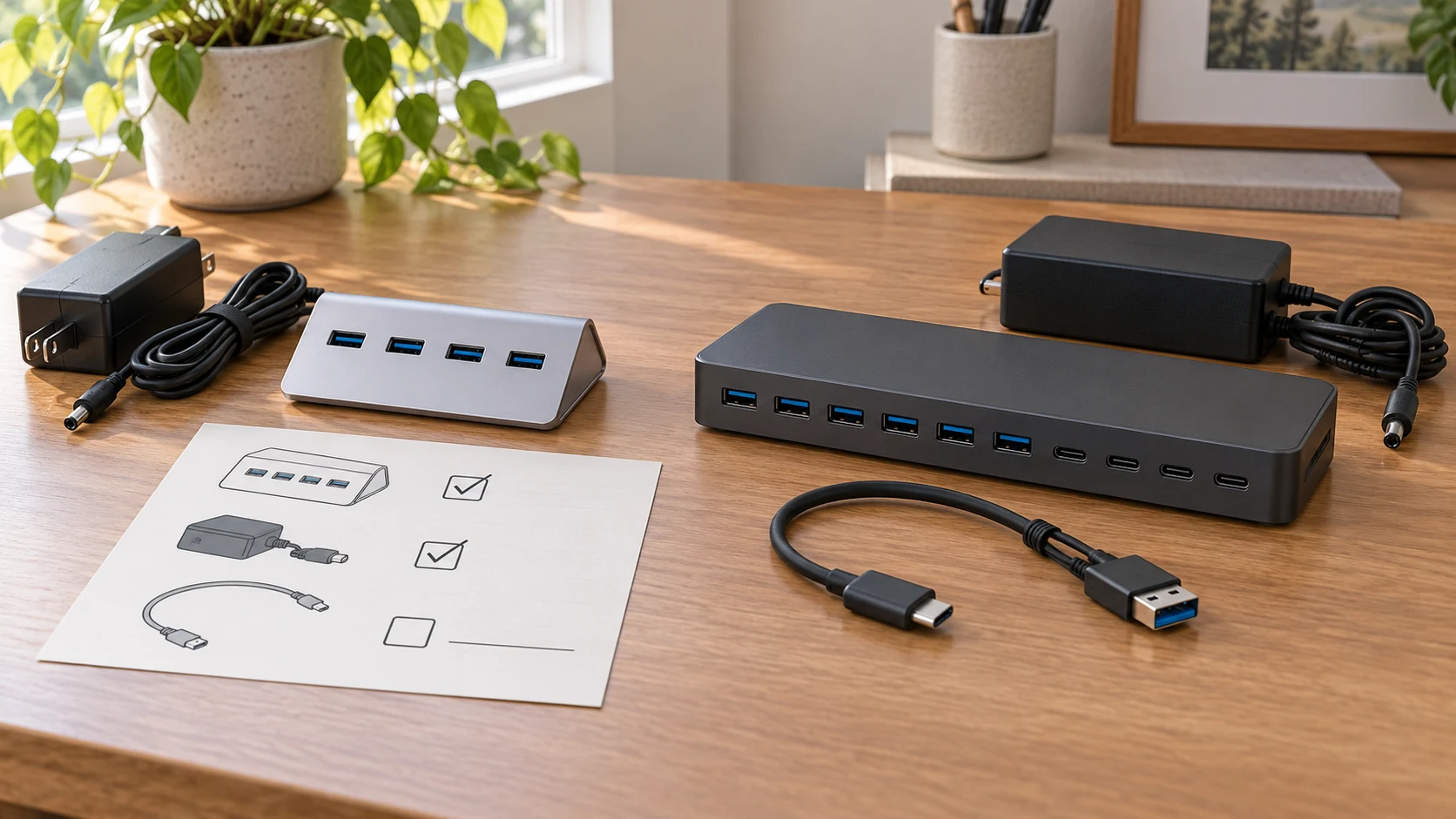
A powered hub can arrive with more than the hub itself. Before paying for a separate cable or adapter, check what the exact offer supplies and what your computer already accepts. That is the useful question behind Powered USB hub setup cost. The purchase basket may include the hub, its power unit, a cable to the computer and a connector adapter. A missing item can change the delivered total, while an unnecessary extra becomes another thing to store. The two listings here show why a picture of the hub is only the start of that inventory.
The FGDTREE Super Speed USB 3.2 four-port hub names a 5V/3A power supply in its description. Its first gallery image shows the hub itself, including the row of blue USB sockets and a side inlet, but it does not display the supplied power unit or an upstream computer cable.
The powered USB-C hub describes a 12V/5A adapter and a USB-C to USB-C cable with a built-in USB-A adapter for the host connection. Its gallery shows the hub, a power brick and the two-ended host connector arrangement. Those are different package accounts. Neither picture establishes every item that will be inside the delivered box, so the live offer and seller confirmation still matter.
Write the setup basket before comparing offers
Start with the connection you need to make, not with the largest socket count on a product card. Write down the computer port the hub will use, the peripherals that need seats, and whether the intended desk has an outlet within reach of the supplied power unit. A hub may expand a computer connection, but it cannot create an outlet or make an unspecified host connector fit. This short inventory keeps a separate cable purchase from being mistaken for part of the hub price.
Use four lines for each offer: the complete hub, its supplied power unit, the upstream cable, and any host adapter. Mark each line “included,” “already owned and verified,” or “unconfirmed.” If the exact product page says an item is included, keep that statement beside the item. If only a photograph suggests it, keep it unconfirmed until the package contents or seller answer resolves it. The line for an item you already own also needs a fit check. An old cable in a drawer is not automatically suitable for the intended connection.
This is a purchase worksheet, not an electrical specification. For port counts, data-rate labels and power-budget arithmetic, the separate USB hub numbers guide gives those quantities their own jobs. Here the aim is narrower: identify what must be bought to assemble the setup you actually plan to use. A buyer who needs one host cable may have a different basket from a buyer whose computer and supplied cable already match, even when both choose the same hub.
Separate the hub's power unit from its host cable
The FGDTREE listing says a 5V/3A power supply is provided. Record that as a stated inclusion for this exact offer, then verify the contents at checkout or with the seller. The gallery does not show the supply, and the description does not clearly identify an upstream cable or host plug. There is no basis here to add a particular cable to the included list. A buyer can ask for a package list and a clear image of the host lead before deciding whether a separate cable belongs in the basket.
The powered USB-C hub's description is more explicit about the host connection. It names a USB-C to USB-C cable and a built-in USB-A adapter, along with the supplied 12V/5A power adapter. A computer with the appropriate USB-C port may use the listed cable arrangement; a computer relying on USB-A would need to confirm the adapter arrangement and the computer's own support. The listing's compatibility language is a claim about that offer, not proof that every computer or peripheral will work in a particular installation. Keep the planned host and its ports in view when checking the offer.
Do not move a power brick from one hub to the other merely because both listings mention external power. The descriptions give different voltage and current labels. Connector shape, polarity and the manufacturer's required input are separate checks. If the supplied unit is absent or damaged, ask for the exact replacement specification for that hub. Treat an unverified spare as a missing piece in the worksheet until its suitability is established. That avoids assigning a low setup cost to an arrangement that cannot safely be assembled as described.
Read a gallery for identity, then stop where it stops
The first FGDTREE image is useful for identifying the physical hub. It shows a slanted silver housing and four blue USB sockets. It does not show a wall plug or the complete path to a computer. The product title and native description, rather than the image, provide the power-supply statement. If a current seller listing presents a different accessory picture or a revised bundle, preserve that difference and ask which package is actually offered. The picture should not be used to fill a gap in the written contents.
The powered USB-C hub gallery includes a separate power brick and a host connector that appears to present USB-C and USB-A ends. That visual is consistent with the listing's cable and adapter wording. It still does not prove the exact delivered cable length, plug clearance at your computer, or whether a third-party accessory is compatible. The product title and description also describe the socket mix differently, so a shopper who needs a particular output arrangement should confirm the current variant rather than resolving the discrepancy by counting a single image. A total-cost comparison built on the wrong variant would be misleading.
One image per listing is present in these captured native galleries. A photo is good evidence for the complete hub's visible shape and for some pictured parts. It is weaker evidence for every piece inside packaging. If a retailer adds a new gallery image later, revisit the exact offer before relying on an old worksheet. Write down the product identity and the package answer together so the answer does not float over to a similar hub or a different seller bundle.
Price the missing pieces only after the package is clear
Once the four lines are resolved, use the live checkout total for the hub and add the delivered cost of only the separately required items. Include shipping and tax where the checkout actually supplies them. Do the same for the other offer with the same intended computer and peripherals. The comparison is then between two workable setups rather than two bare product-card prices. This article does not quote a current price for either hub; those figures can change and have to come from the selected live offers.
Keep an “unconfirmed” line out of a claimed savings figure. If the FGDTREE offer does not state its upstream cable clearly, a buyer cannot honestly count that cable as free or decide that it must be bought. Ask first. The same rule applies to an adapter already on hand: its existence does not establish that it fits the hub and host. A complete comparison waits for those answers, even if the two hub cards are otherwise easy to read.
Ask the seller to identify a missing part by its role, not by a familiar plug shape. An upstream cable joins the computer to the hub; the external supply feeds the hub from an outlet. An adapter may change the host connector on a supplied cable, but it does not turn an unrelated power brick into the specified supply. Put the seller's answer next to the exact product URL and variant. If the answer names a separate item, check its delivered cost in the same checkout context as the hub. If the seller confirms that the item is in the box, remove it from the extra-purchase line. This small correction can change the comparison more than a headline about how many ports the housings have.
There is also a difference between a needed extra and a convenience extra. A longer cable, a spare power unit or an additional adapter may make a particular desk arrangement easier, but the exact offer should first be tested against the intended setup. If the included parts cover the use, optional extras belong in a separate line. That makes the base comparison repeatable and keeps personal preferences from appearing as required product costs.
Use the same desk plan for both offers
Draw the route from the computer to the hub and from the hub to the outlet. Then mark where the peripherals will sit. For the powered USB-C offer, check whether the described host cable and adapter arrangement reaches the planned computer port. For the FGDTREE offer, request the missing upstream-connection detail before treating the route as complete. Both product descriptions refer to powered use, but neither source gives permission to assume that any unlisted extension lead or unrelated adapter will work.
A portable setup changes the basket. A buyer who moves the hub between desks may value the ability to keep a verified cable with each computer, while a buyer with one fixed workstation may need only the supplied connection. The physical plan tells you whether an extra cable is necessary for your own use; the product card alone cannot answer that. Keep each computer's port and the selected product variant on the worksheet, especially if you revisit the decision after a device change.
The adjacent microSD adapter compatibility guide deals with a different physical item, but its distinction between a pictured accessory and a usable slot fit is a useful reminder. For these hubs, the corresponding check is the complete host connection and the exact supplied parts. This article does not diagnose a failed USB connection or promise transfer performance. It keeps the purchase list honest before setup begins.
Keep the answer with the exact offer
Save the product URL, the chosen variant, the package-contents statement and any seller answer beside your worksheet. Note which item was confirmed by a written description and which was visible only in a gallery. If an offer changes before purchase, review the missing-piece lines again. A new photo, a different bundle name or a revised cable statement can alter the basket without changing the broad label “USB hub.”
At checkout, compare the delivered total for each complete, verified setup. If a necessary part remains unconfirmed, ask the seller for the package list and host-connection details before placing it in either cost column. The useful saving is a purchase you can avoid because the exact offer already supplies a suitable component; that conclusion requires the component and its fit to be established for the computer you will actually use.