Cameras & Imaging
microSD card SD adapter compatibility: check slot fit before choosing a card
A physical-format check for a full-size SDXC card versus a microSDXC card supplied with an SD adapter, with host support verified separately.
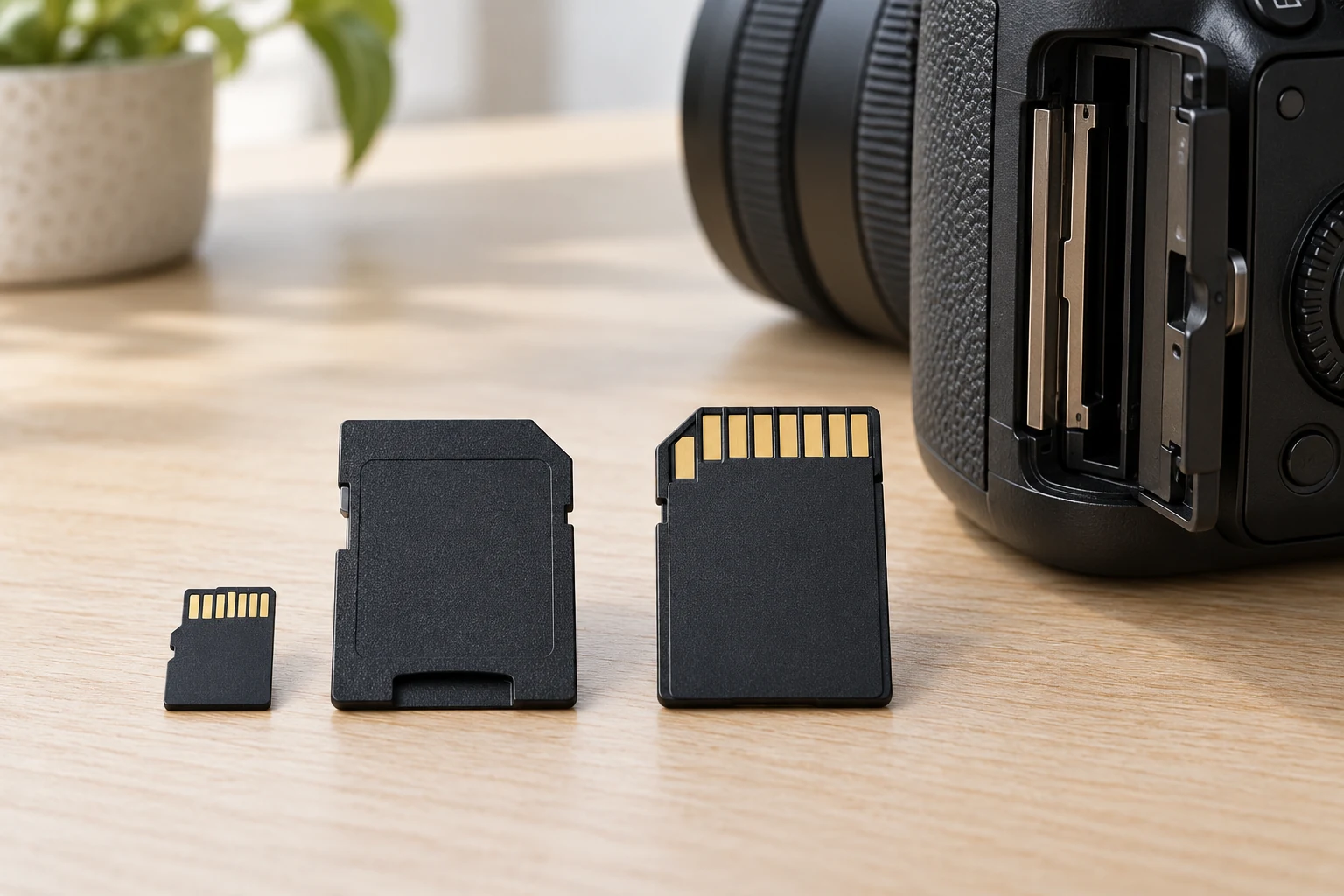
Start a microSD card SD adapter compatibility check at the device, not at the card package. A full-size SD slot and a microSD slot have different openings. A microSD card supplied with a full-size SD adapter may fit the larger opening when the card is seated in the adapter. That physical arrangement is only the first question. The device's own instructions still control which card types and capacities it accepts. If you cannot identify the slot or find those instructions, pause before buying a card for that device.
Two current SanDisk listings make the choice concrete. The SanDisk Extreme 512GB microSDXC listing describes a microSDXC card supplied with an SD adapter. Its native photograph shows the small card beside a full-size adapter. The SanDisk Ultra 256GB SDXC listing describes a full-size SDXC card, and its photograph shows that card alone. These are different physical packages, even though both names contain SDXC. The listings do not identify your camera, computer or reader as compatible.
Neither listing should be treated as a promise about recording in an untested device. A seller may mention speed classes, video use or read speeds, but those statements do not establish what a particular host slot will accept. This guide focuses on the card, adapter and slot relationship. It makes no price, performance or universal fit recommendation. The useful purchase decision is whether the actual device needs a full-size card directly, a microSD card, or a microSD card that can be placed in a supplied adapter.
Identify the opening before choosing media
Look for the memory-card slot in the exact device model's manual. Note whether it says SD, SDHC, SDXC, microSD, microSDHC, microSDXC or another format. A picture of the opening can help you recognize its physical size, but the text beside it matters too. A full-size SD card will not go into a microSD-sized opening. A bare microSD card should not be placed loosely in a larger SD opening. Use an appropriate adapter only where the host instructions permit that card and adapter arrangement.
Do not identify a slot from the camera's general product family alone. Two models that look similar can specify different media. A computer may also have a card reader with an opening that differs from the camera's slot. Write down the exact host model, the printed slot label and the manual's supported card types. If a device has more than one slot, identify the one you intend to use. The card must match that slot's stated format, not merely the size of another opening on the device.
The physical comparison is easiest with the devices powered down and no card being forced into place. The accepted Extreme listing's photograph shows a small microSDXC card and a larger adapter with an opening for it. The accepted Ultra listing's image shows one full-size SDXC card. These images support the package distinction; they do not demonstrate a successful insertion or recording test in a host. If the card or adapter resists the slot, stop and check the orientation and instructions instead of pushing harder.
Read what each card package actually includes
For the Extreme offer, the listing describes a 512GB microSDXC card with an SD adapter. The photograph also shows both pieces. Keep the card and adapter together when comparing the offer with a full-size slot. If your device calls for microSDXC in a microSD opening, the small card is the relevant piece; the larger adapter is a separate supplied accessory. If your device calls for a full-size SDXC opening, ask whether it supports a microSDXC card in an adapter before assuming that the outer shape settles the question.
The Ultra offer is a 256GB full-size SDXC card. Its product image does not show a separate microSD card or adapter, and the accepted listing does not establish that either comes in this package. A buyer who needs a microSD-sized card should not plan to shrink this full-size card. A buyer whose verified host accepts full-size SDXC can consider the direct card format, while still checking the device's stated capacity and any other restrictions. The two listed capacities differ, so a host's capacity limit matters independently of shape.
Both offers use the SanDisk name, but the shared brand does not make their package contents interchangeable. Read the exact product title, capacity and image together. Do not substitute a similar listing, another capacity or a bundle photograph when checking what arrives in the box. If a listing's image and written package contents disagree, ask the seller which items are actually included before ordering. The presence of a card in a photograph is not proof that an adapter, reader or case comes with it.
Separate physical fit from host support
A full-size adapter gives the small card an outer form that can be presented to a larger slot. The card inside remains the microSDXC product named by its listing. The adapter photograph cannot prove that your host supports that card's capacity or use. Likewise, a full-size SDXC card can have the right outline for a slot while exceeding a device's supported capacity. Check the host documentation for both the card family and the capacity you intend to buy. If the documentation is unclear, ask the device maker about the exact model and card specification.
Keep capacity and speed markings in separate columns as you compare. The Extreme product is labeled 512GB; the Ultra product is labeled 256GB. Each listing also presents speed-related language. A capacity figure answers how much storage the offer names, while speed markings describe a different attribute. Neither number replaces the host's compatibility statement. Avoid assuming a camera will record a particular mode merely because a card listing names video classes, or that a reader will deliver a stated transfer rate with every computer.
Some devices specify the card format but give a separate maximum capacity. Others name tested cards or note firmware requirements. Those details belong to the device's own current documentation, not to either card listing here. If the manual says only SDHC, do not infer SDXC support from the similar initials. If it lists a maximum smaller than the card you are considering, do not treat the adapter as a way around that limit. The adapter addresses the physical presentation of the microSD card; it is not evidence of a changed host specification.
Check any reader you use after recording as a separate host. A card may fit and function in a camera yet need a compatible reader for transfer to a computer. The CFexpress Type B bundle guide examines whether a bundle's second item is SDXC media or a USB reader for a different card family. This article asks a narrower question: whether the full-size SDXC card or the microSDXC card with its supplied SD adapter matches the slots and supported formats in your own workflow. It does not select a CFexpress card or promise an offload speed.
Choose the path that matches your workflow
If the exact device manual calls for full-size SDXC and supports the capacity you want, the Ultra listing offers the card in that physical form. The Extreme listing offers a microSDXC card and supplied adapter as another package to evaluate, but verify that the host accepts that arrangement before buying it for the same slot. The decision is not settled by the fact that both can appear full-size when the small card is in its adapter. One is a full-size card; the other remains a small card inside an accessory.
If the primary device calls for microSDXC, the Extreme offer's small card is the relevant format to check. The supplied SD adapter may be useful for a second, larger reader or slot only after checking that second host's support. The Ultra full-size card cannot be used in the smaller opening. Think through where the card will be inserted first and where files will be read later. Writing those two host models next to the card format is more reliable than assuming every device in the workflow uses the same slot.
If you are choosing for several devices, do not use one device's compatibility result as proof for the others. A camera, drone, tablet and computer may each name different card formats or capacity limits. The accepted product listings mention possible uses, but do not verify your exact models. Build a short list: primary device, its slot, accepted format and capacity; then any reader or second device and its own requirements. A shared card is a possibility only when every relevant host accepts the actual card and the needed physical connection.
The camera lens mount variant guide handles another camera-accessory identity problem: two lenses with similar descriptions but different named body mounts. The same habit of checking the exact interface is useful here, but a lens mount is not a memory-card slot. Do not use lens fit as evidence of card support. Read the host's card specification and the exact card listing instead of relying on a general camera brand match.
Check the package at setup
When the card arrives, compare it with the listing you chose before opening or inserting anything. For the microSDXC offer, confirm that both the small card and full-size adapter are present, because that pairing is part of the accepted package. For the full-size SDXC offer, confirm the card identity and capacity on the item itself. If the contents differ from the listing or the adapter is missing, stop and contact the seller. Do not assume an unrelated adapter or card reader will supply the same connection.
Follow the host manual for insertion direction, power state and removal. Seat a microSD card in its supplied adapter as the adapter and device instructions describe; do not leave it partly exposed. Never force a card that resists, and do not insert a loose microSD card in a full-size slot. If a card is not recognized, remove it according to the host instructions and check the exact card type and capacity before repeating a test. Repeated insertion cannot repair an unsupported format or a damaged connector.
Document the result in terms of the actual parts. Record the device model, slot label, card model and capacity, whether the SD adapter was used, and what the device displayed. If the manual permits the format yet the device still rejects it, use the device maker's diagnostic or support guidance. The listing alone cannot identify whether the issue is a card, adapter, slot, software state or setup step. Avoid treating an error message as proof that one specific part is defective without further evidence.
The purchase check ends when you can name the exact card and the exact host requirement. The SanDisk Extreme offer is a microSDXC card with a pictured full-size SD adapter; the SanDisk Ultra offer is a pictured full-size SDXC card. Choose only after verifying the primary slot and capacity, then repeat that verification for any other reader or device you plan to use. Physical fit is visible, but supported operation needs the host's own specification and a careful setup check.