Cameras & Imaging
CFexpress Type B card bundle compatibility: choose SDXC media or a USB reader
A buyer’s comparison of two Delkin Type B card bundles that checks the camera slot, the second supplied item and the computer offload path.
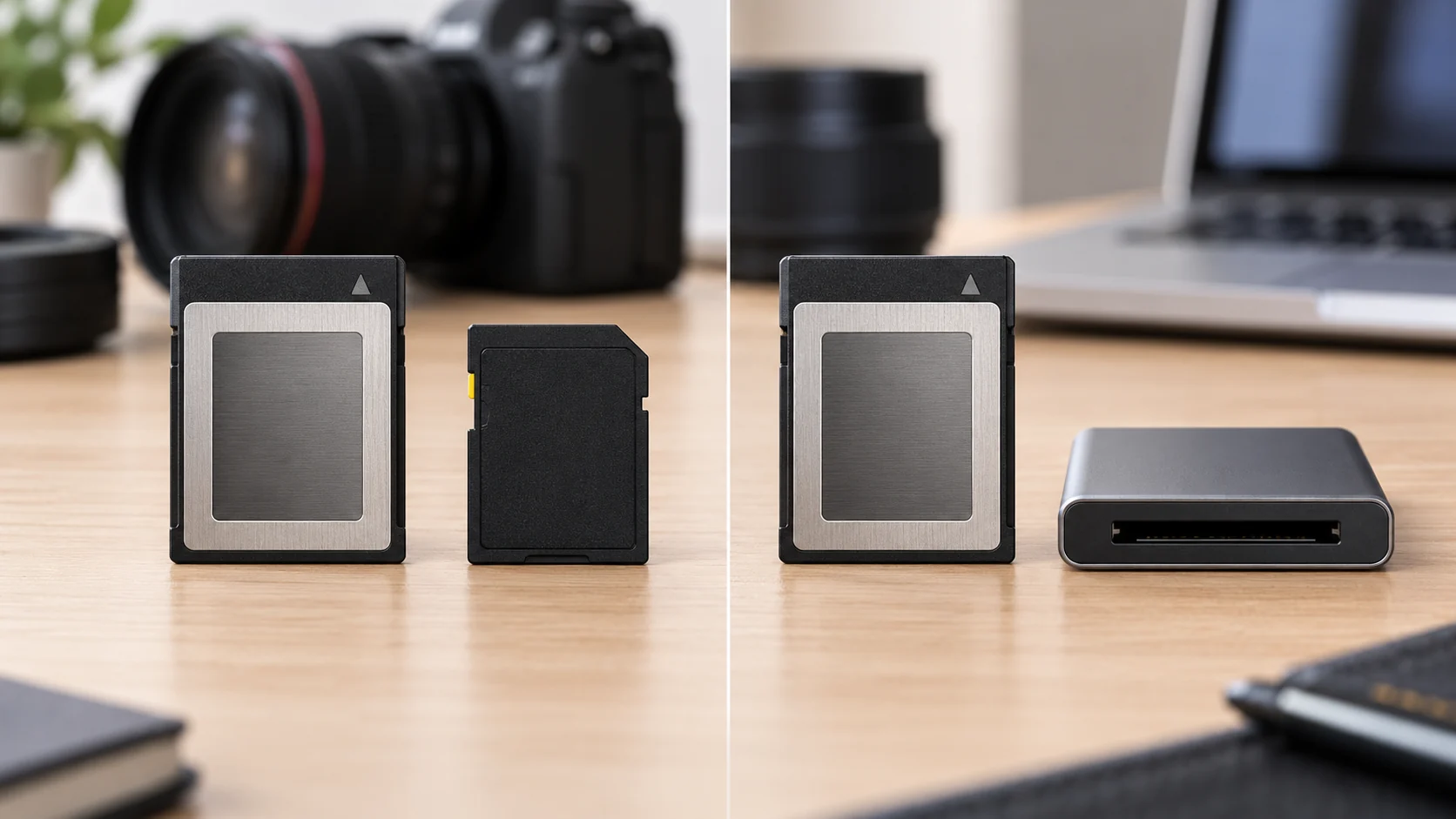
CFexpress Type B card bundle compatibility begins with the camera you actually use. Both Delkin bundles discussed here include a CFexpress Type B card. Once you confirm that your exact camera accepts the Type B card, ask which second item has a documented place in your work. A second card will not solve a missing computer reader, and a reader will not become a second recording card.
One adds an SDXC card; the other adds a USB memory card reader.
Identify what each box is said to contain
The Delkin POWER card bundle listing names a 256GB POWER CFexpress Type B G4 card and a separate 128GB POWER UHS-II V90 SDXC card. Its product image depicts those two cards with those capacities and format markings. The listing describes the pair as media for demanding capture work. It does not identify a particular camera, promise that one camera has slots for both cards, or state how a camera would use them together. Treat the SDXC card as an additional physical item whose fit needs its own check.
The Delkin BLACK card and reader bundle names a 325GB BLACK CFexpress Type B 4.0 card paired with a USB 3.2 memory card reader. Its image shows the card beside the reader. That makes the second object a transfer accessory, rather than another memory card. The listing describes offloading to a computer, but it does not specify the reader's computer connector, operating-system requirements, cable contents, or measured transfer rate. Confirm those details for the exact reader before treating the kit as a complete offload setup.
These are separate offers, with different stated Type B capacities and different second items. The 256GB and 325GB figures refer to their respective Type B cards. The 128GB figure belongs to the SDXC card in the POWER bundle. Do not add the three figures into a single offer or compare the reader to storage capacity. As observed for this guide, both product pages show an unavailable state and no usable current price. Availability and final order terms need a fresh check when you are ready to buy; there is no supported price winner here.
Start with the exact camera's media specification
Write down the full camera model and, if applicable, its model revision. Find its own supported recording-media statement. Look for the words CFexpress Type B, not merely CFexpress or a broad reference to professional memory cards. A Type B card named in a retail bundle cannot establish that an unnamed camera accepts it. If the camera documentation lists conditions by recording mode, firmware, or card performance, keep those conditions with the exact model. A product title is only one side of that comparison.
Compare the camera’s documented requirement with the card’s actual format. If your camera accepts CFexpress Type B under the conditions you need, both bundles have a potentially relevant main card. If its documentation does not establish that support, pause the comparison and obtain the camera's specifications. Do not buy either bundle based on the visual resemblance of cards, a similarly named camera, or an assumption that all CFexpress variants fit the same slot. A card that fits a reader in a product photograph is not proof of camera compatibility.
The G4 and 4.0 names appear in the respective Delkin listings. They identify the offers as sold, but the captured product descriptions do not give a shared tested write-speed result for these two cards in your camera. A capacity difference also does not tell you how much video a particular recording mode will hold. File sizes and recording requirements belong to the camera's chosen mode and settings. If a sustained-write requirement determines your purchase, obtain exact manufacturer information for the card and exact camera mode rather than ranking the bundles from their names alone.
Check whether the SDXC card has a defined job
The POWER bundle's additional card is SDXC, with UHS-II and V90 labels in the listing and image. Those are card attributes to compare with a host's requirements. First ask where that card would go. Your camera may have an SD slot, another device may use SDXC, or you may have no current use for it. An SDXC card included beside a Type B card does not establish that the camera accepts both formats. Find a model-specific storage-slot diagram or specification before assigning the card a role.
If the camera has more than one media slot, read what its manual says about each slot and the recording modes you plan to use. Some shoppers want a second medium for a specific workflow, but a two-card bundle does not prove simultaneous recording, automatic backup, overflow behavior, or the ability to record a selected mode on either slot. Write down the particular behavior you require, then compare it with the manual. When the documentation is silent, leave the feature as a question for the camera maker or a qualified seller rather than treating the second supplied card as a guarantee.
The SDXC card could also serve a second device with documented SDXC support. In that case, record that device's exact supported format, capacity limits and any relevant speed requirements. A matching card label can make the bundle useful across two devices, but only if the two host checks pass independently. Avoid calling the SDXC item spare Type B media. It has a different named format and cannot be counted as another copy of the main card. If you will not use it, do not assign it value solely because the bundle contains two cards.
The V90 marking can be important when a device's documentation calls for a particular video speed class. It does not establish that any unspecified camera records a particular resolution or frame rate onto this card. The listing also does not show measured results for your capture duration or temperature. Record the host requirement first. If it names a speed class or tested media list, check the exact SDXC model against that source. If it does not, the V90 label alone cannot settle your recording-plan question.
Check the reader's place in the offload path
The BLACK bundle puts its second item on the computer side of the workflow. Map the offload path before treating the reader as ready to use. A reader can be useful when you need a way to transfer files from a CFexpress Type B card outside the camera. Start with a short path written in order: card, included reader, computer port, storage destination. The captured product page names USB 3.2 and describes computer offloading. It does not identify every connector or cable in the box. Check the exact included reader's interface and your computer's available ports before you assume you can connect them without another item.
A USB version printed in a listing is not a measured transfer result. The computer port, cable, reader, card and destination drive can each affect an actual transfer. Nor does the listing prove an operating system will recognize the reader in a particular setup. If you depend on a fast offload before another shoot, request the reader's exact model and supported host requirements, then compare them with the computer you will use. Keep any expected time estimate separate from the advertised interface label until you have applicable evidence.
The reader bundle contains one stated memory card. If your camera workflow calls for a separate SDXC card, that item is not supplied by this offer. Conversely, the POWER bundle's SDXC card does not supply a USB reader. You might already own suitable equipment on either side. Check it by exact identity before counting a bundle's second item as redundant. A reader already in a drawer may have a different supported card format; an SD card already on hand may have a different capacity or rating. An inventory list with model names is more useful than a generic note saying “reader” or “spare card.”
Once files reach a computer, an offload is not automatically a verified backup. The listing does not describe file-copy software, verification or an archive process. Decide where a transferred copy should live and how you will confirm the files you need are present before clearing any card. If this purchase is meant to support a time-sensitive job, test your exact reader and computer path with noncritical files under the instructions for that equipment. Do not infer a safe delete or format step from a bundle description.
Use one small comparison record
Make a two-row note for the exact offers. In the first row, write “256GB Type B card plus 128GB SDXC card”; in the second, “325GB Type B card plus USB 3.2 reader.” Next to both rows, record your camera's proven Type B support and the source for it. Then give each second item a separate question. For the SDXC card: which exact device and slot will accept it, under which intended mode? For the reader: which exact reader connector and computer port will complete the transfer path? If you cannot fill in an answer, you have a specific question to resolve before spending money.
Consider a photographer who has documented Type B support and a second SDXC slot but no evidence about recording to both slots in the chosen mode. The POWER bundle may supply two physically relevant card formats, but the requested two-slot behavior remains unresolved. The next question goes to the camera manual, not the bundle image. Now consider someone whose camera supports Type B and whose computer lacks a confirmed reader. The BLACK bundle gives a reader to investigate, but its USB connection details remain a separate requirement. Neither example establishes support for a named camera or computer.
This kind of interface check appears in other camera accessories too. The camera filter size guide distinguishes a lens's focal length from its filter-thread diameter before matching a filter. The specific numbers and products in that guide do not apply to memory cards. The relevant habit is to name the host's actual interface and the offered item's corresponding format. Here those fields are camera media type, any SDXC slot requirements, and the reader's computer connection.
A digital photo frame storage guide also asks readers to check a particular device's SD or USB import instructions. It covers a different device and different files, so its media limits cannot be borrowed for this camera purchase. Its distinction between internal storage, a removable card and an import path is useful when writing your own equipment note. The Delkin POWER bundle adds removable SDXC media; the BLACK bundle adds a reader for moving files. Neither product page supplies the host documentation that completes those routes.
Leave the purchase decision tied to confirmed equipment
The purchase decision can favor the POWER bundle if you have confirmed a real use for its 128GB SDXC card and the exact camera or second device accepts that card under your intended conditions. Choose the BLACK bundle if you have confirmed the included reader's connection to your computer and offloading is the missing part of your Type B workflow. Both choices still require the primary Type B camera check. These are conditional decisions about supplied hardware, not promises that either offer is currently in stock, faster in your setup, or better priced.
If either host check remains unanswered, keep the precise question on your list. Ask for the camera's supported media specification, the second slot's documented behavior, or the reader's exact interface as appropriate. Revisit the live offer and complete checkout terms after those answers are in hand. Keep the answer with your equipment note so the second item earns its place in the purchase.