Cameras & Imaging
phone tripod mount compatibility check: phone, base, shoes
Measure the cased phone, identify the tripod base interface, and plan microphone or light clearance before choosing a clamp.
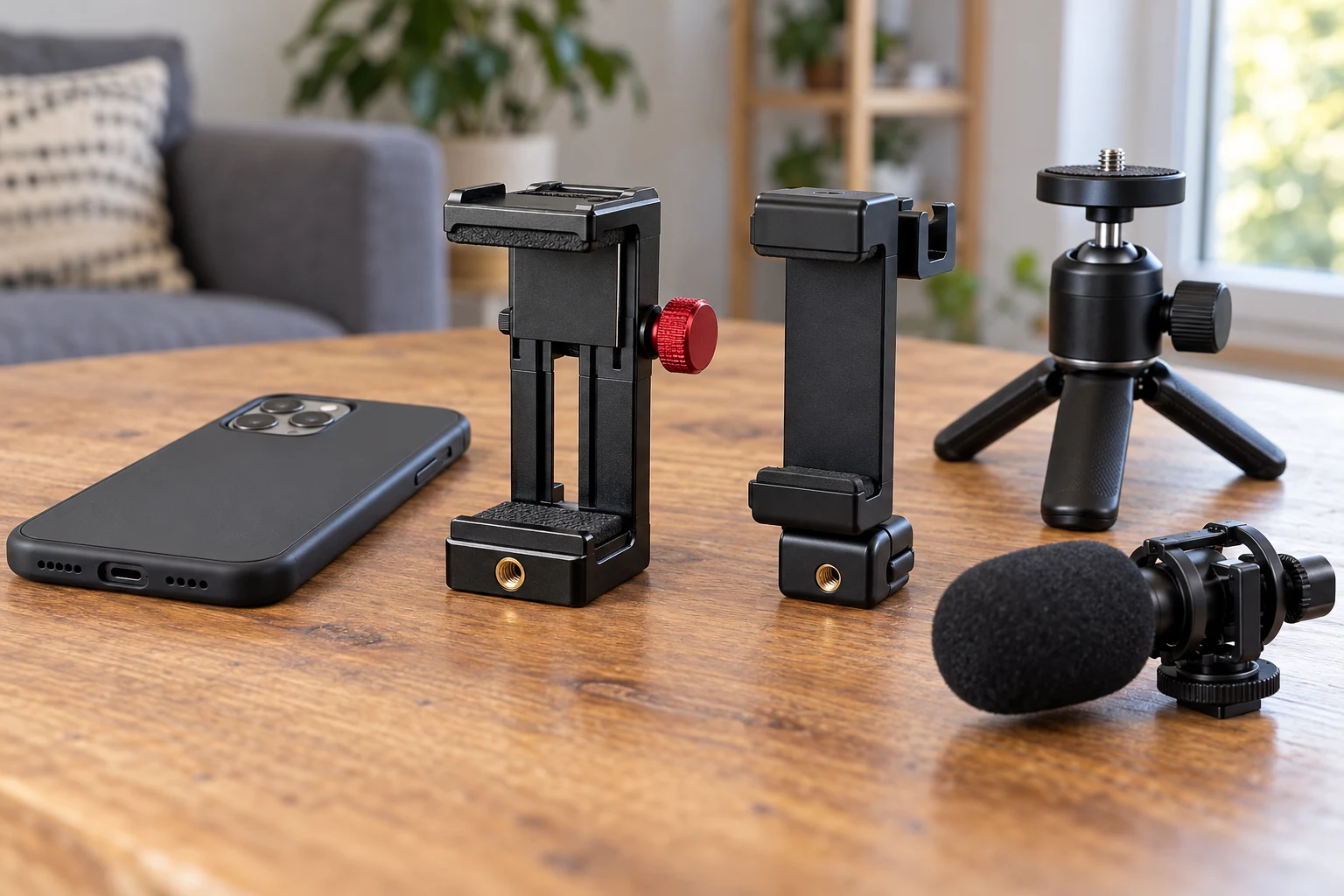
A phone tripod mount compatibility check begins with three things you can examine before buying: the phone's width with its everyday case, the connection on the tripod head, and the space needed for any microphone or light. A listing may name a popular phone or show a clamp on a tripod, yet your case, mounting plate, and accessory shoes determine whether that arrangement works. Put the pieces you already own on a table and identify each interface before deciding which holder to add.
Two current listings illustrate useful differences. The PICTRON metal phone clamp describes a 1/4-inch screw port, an Arca-style fitting, and three cold shoes. The ST-06S phone holder describes two cold shoes and a phone-width range of 2.36 to 3.54 inches. Their first images show actual adjustable clamp bodies, but the photographs cannot establish that either will fit an unnamed tripod, cased phone, or loaded accessory. Check the exact selected variant and maker instructions for every connection.
Measure the phone as you will use it
Leave on the case you normally use to record. Measure across the dimension that will sit between the clamp jaws, including any side grips or raised edge. Some cases add bulk in the corners or around a camera island. A nominal phone-model claim may refer to a bare device, and the width of a case varies. If you plan to remove the case for filming, write that down as an intentional setup choice and confirm the phone still sits securely against the holder's pads.
The ST-06S listing gives a 2.36-to-3.54-inch phone width range. Compare your measured width with that range, but do not stop at the number. The camera bump, button positions, charging cable, and clamp-pad shape can affect placement. The PICTRON listing names several iPhone generations but does not provide the same measured clamp range in the captured product description. Ask the seller for the exact jaw limits if your cased phone is near an edge, rather than treating the model names as a fit test.
Set the proposed clamp position on the phone with your hands before purchasing a specialized accessory. Which side holds the power button? Does a jaw cover a volume key, interfere with the lens, or trap a cable? A clamp that grips at the center in portrait mode can meet different controls when rotated to landscape. If the mount rotates, check both orientations. Do not force the jaw around a thick case or rely on friction at the edge of the stated opening.
Identify the tripod connection below the holder
Look at the top of the tripod you own. Does it expose a threaded stud, hold a removable quick-release plate, or end in a proprietary head? The holder's bottom fitting has to meet that actual top interface. A 1/4-inch socket on a phone holder is useful only if your tripod or plate has the matching screw and can support the complete setup. An Arca-style base is a different connection path that calls for a compatible clamp. A cold shoe is generally an accessory position, not the tripod's primary support.
The PICTRON page describes both a 1/4-inch port and an Arca quick-release fitting. That gives two possible paths on paper, but it does not prove a particular plate or Arca clamp will lock safely. Inspect the exact dimensions, shape, safety stops, and locking procedure for your tripod head. The published tripod quick-release plate compatibility guide treats the plate-to-head fit as its own decision. This article focuses on the phone holder's clamp, base, and accessory layout, and keeps that plate check separate.
The ST-06S first image shows a base with a small foot and adjustment hardware. Its listing names gimbals as possible uses, but the saved text does not establish that your specific tripod head or gimbal accessory receiver matches the pictured foot. Identify the exact supported mounting standard from the model documentation before treating the foot as a universal adapter. A visually similar slot can use a different locking method or clearance, and a loose base is a poor place to discover that difference after the phone is loaded.
If your tripod has a plate, remove the plate and inspect its top screw and anti-twist features. Some phone clamps turn easily on a single screw if the base is not tightened correctly. Follow the mount and plate instructions for tightening, and check whether the phone can be rotated without loosening the support connection. Do not add improvised spacers or tape to make a mismatched base seem firm. Use a maker-supported adapter or select a holder with the needed interface.
Keep accessory shoes in their proper role
Both captured listings mention cold-shoe locations for a small light or microphone. The PICTRON description says three shoes, with two on the sides and one at the rear. The ST-06S page describes two. Count alone does not determine whether your accessories can be mounted together: a microphone body, windscreen, cable, or light panel may block a neighboring slot or intrude into the phone's view. Draw the equipment around the phone, then inspect the clearances in the chosen orientation.
A shoe location is not a promise that every accessory will work electrically. Many cold-shoe accessories are held mechanically and connect to the phone or another device through a separate cable or wireless link. Verify that microphone connection, connector type, cable length, and app support independently. Keep cables away from the clamp's moving parts and from the tripod's adjustment knobs. Do not infer that a shoe carries power or audio just because the accessory can slide into it.
Start with the phone alone on the holder and tripod. Add one accessory at a time, keeping the total load within the smallest relevant rating from the holder, head, and tripod. The captured pages do not provide a tested load limit for your assembled rig. If the mount droops when a light is added, stop and identify which joint moves. A second shoe does not cure a loose ball head, narrow tripod footprint, or a mount that grips only the case edge.
Decide between the two actual forms
The PICTRON first gallery image shows an upright metal clamp with visible side threaded holes and a prominent adjustment knob. Those features help you recognize the clamp's moving parts, though the single photograph does not show every attachment detail named in its description. Its page emphasizes Arca-style and threaded connection options along with three shoes. Consider it if those exact interfaces match your support and your accessory layout needs the shoe positions; verify the phone jaw range and complete rig clearance separately.
The ST-06S first image shows a slimmer hinged arm, horizontal adjustable jaws, and a base foot. Its listing gives a measured phone-width range and describes rotation and pitch adjustment. That may suit a setup where a specified cased-phone width and two accessory shoes are enough. It does not establish that a named phone with an unusual case will fit, or that the pictured base mates with every tripod. Match the phone, base and orientation rather than selecting it because the product description calls it broadly compatible.
Think about the use location. A desk video call may need stable eye-level positioning but only one cable and no extra shoe. A standing demonstration may need a light and microphone kept clear of the frame. A travel tripod may use a compact head with limited space around its knobs. The right holder is the one whose interfaces fit that setup. Extra fittings have little value if they make the clamp crowded or leave the support connection uncertain.
A car suction mount poses a different support problem. The published parked-car suction phone-mount guide deals with placement on a vehicle surface. It cannot certify a tabletop tripod clamp or cold-shoe arrangement. Keeping the two use cases separate prevents a “phone mount” label from standing in for the exact mechanical interface required here.
Assemble and test without risking the phone
Build the support in stages over a padded table. Fit the holder to the tripod without a phone, using the maker's instructions. Check whether the base seats fully and whether the tripod locks it. Then add the phone with its normal case and center it between the jaws. Gently test the clamp and move the assembly through the intended portrait and landscape positions. If any connection turns or slips unexpectedly, remove the phone and correct the actual joint before adding accessories.
Extend the tripod only as its own instructions allow. A tall support with a loaded phone and side-mounted light can be less stable than it appears in a product image. Position legs on a level surface away from a doorway or cable route. Do not judge stability by holding the phone while another person lets go. Release it briefly in a controlled test with a padded surface below and keep a hand ready until you know the full assembly is secure.
Inspect the phone's screen and cameras after clamping. A jaw should not hold a side button down, press on a cracked area, cover a lens, or bend a cable. If the mount uses a rotating joint, lock the intended angle according to its instructions and check that it stays there after a few adjustments. The goal is repeatable positioning without over-tightening. If the mount only works when forced beyond a comfortable grip, it is the wrong fit for this phone and case.
Add the microphone or light next, one piece at a time. Make sure its shoe actually locks, its cable reaches without tugging, and its weight does not tilt the clamp. A cable loop can catch when you rotate the phone, so run it with enough movement but away from the tripod's legs and adjustment knobs. Test the complete setup for the shot you intend to make. A product page photograph of an accessory shoe is not a substitute for testing your particular accessory dimensions.
Keep a short compatibility record
Before ordering, write down the cased phone width, the intended orientation, the tripod head or plate interface, the accessory shoes actually needed, and any cable that must remain connected. Compare those facts with the selected mount's stated dimensions and supported connections. If a listing is silent about a critical measurement, ask for it or choose a model with enough information. Do not fill the gap with a claim based on a similar-looking mount.
After assembly, record the parts that worked: holder model, tripod head or plate, phone and case, and the position of any light or microphone. That small record makes a later replacement easier and helps distinguish a phone-width problem from a tripod-base problem. If you change to a thicker case or different plate, repeat the relevant fit check. Compatibility belongs to the assembled set, not to a product name in isolation.
A sound phone tripod mount compatibility check therefore travels from phone to clamp, clamp to tripod, and only then to shoes and accessories. The two captured products offer different stated openings and base options, but neither is universal from a listing alone. Measure the cased phone, identify the real support interface, inspect accessory clearance, and test the assembled setup over a safe surface. That sequence gives you a reason to select the holder and a clear place to investigate if it does not fit.