Outdoors & Mobility
how to position a suction cup phone mount in a parked car
Use seated-view, surface and phone-grip checks before relying on a removable car phone mount.
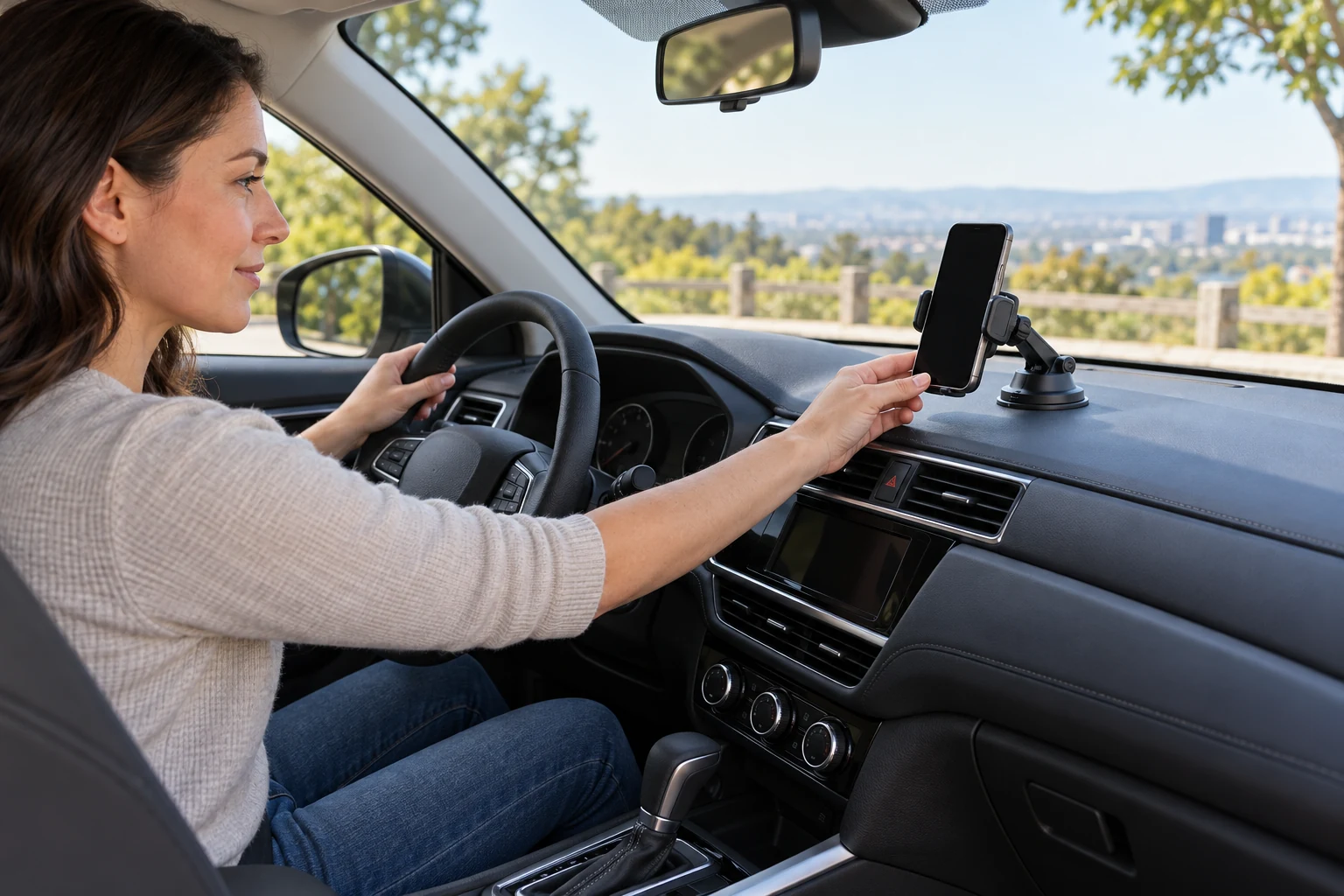
A phone mount should be positioned while the vehicle is parked, before a route begins. The right location keeps the screen in a glanceable place without blocking the driver's view, dashboard controls, vents needed for visibility or any airbag deployment area. This how to position a suction cup phone mount guide uses a simple seated-view method: choose a permitted surface, test reach and sightlines with the engine off, then check that the holder stays secure through normal adjustment. Follow the vehicle and mount makers' instructions and local placement rules.
Begin with the purpose of the mount. Navigation calls for a screen that can be seen briefly without reaching across the cabin; recording or passenger use may require a different position and may be subject to different rules. Do not copy a product photo into your own car without looking at its windshield, dashboard shape and controls. If no position satisfies the vehicle's safety instructions and applicable law, do not install a suction mount there.
The tripod plate compatibility guide separates the camera-side and head-side interfaces. A car mount similarly has separate surfaces and joints: the suction base must suit the vehicle surface, the arm must hold its position and the phone clamp must suit the actual phone. The tension rod installation guide starts with a real span and supported contact points. This guide starts with the parked car's permitted mounting area and driver sightline.
Choose a permitted surface from the seated view
Sit in the normal driving position with the vehicle parked and identify any areas the vehicle manual prohibits covering. Check the full view through the windshield and side windows, the instrument cluster, defrost outlets, hazard controls and airbag locations. A position that looks tidy from outside can obscure a pedestrian at the edge of the windshield from the seat. Test with a cardboard phone-size placeholder before pressing a suction cup onto any surface.
The Hemmotop suction mount listing describes a twelve-inch metal arm with three rotating ball heads and a phone clamp. It names smooth surfaces including glass and smooth metal. The listing's claim that it grips smartphones of any size should not replace a fit check with your actual phone and case. A long arm can bring the screen closer but also changes the clearance needed around controls and passengers.
The Tmengdao suction mount listing describes a foldable or extendable arm, 360-degree adjustment and a vacuum-style suction base. Its promotional description says it can be moved without adhesive, but it does not prove every dashboard texture will hold. The native image shows a suction base and adjustable joints. Treat the seller's stability and universal-fit language as claims to check against the current maker instructions and your actual surface.
Do not mount on a textured, curved or delicate trim surface merely because a suction cup can touch it. The cup needs the surface conditions its maker specifies. A vehicle maker may restrict attaching accessories to certain glass or dashboard areas. Avoid putting a mount on a windshield if local rules or the vehicle instructions prohibit that position. Test the position before setup with the phone at its expected viewing angle, because the clamp and arm occupy more space than the cup alone.
Mock the reach and sightline without installing
Hold the mount and phone together at a candidate position while another person watches from outside if that helps, with the vehicle stationary. Can you see the screen with a short glance rather than leaning or turning your body? Can you still read the instrument panel and reach essential controls? Does the phone cover a line of sight to road users, signs or the curb? If a long arm must cross a vent or control panel, shorten or reposition it.
Move the steering wheel through its normal adjustment range if the vehicle allows and check whether the mount would be struck or concealed. Consider passengers and front-seat airbag paths. A mount that sits clear with an empty seat could intrude when someone enters, moves the seat or opens a glove box. Keep the phone away from hot surfaces and defrost airflow if the device or vehicle maker warns about them. Exact safe clearances belong to their instructions.
Try both portrait and landscape phone orientations while parked. A landscape screen can expand farther toward the windshield edge or instrument cluster. A thick protective case can change where the clamp's pads land, and a charging cable can tug on the holder. Insert the actual phone rather than judging from a bare device's dimensions. Verify that the clamp does not press side buttons or cover a required port.
If you use the mount for a camera or passenger recording, distinguish that setup from navigation. The listing's mention of vlogging does not authorize a driver to operate a camera while moving. Position and start any allowed recording while parked and follow local law. Do not adjust joints, unlock a phone or test suction by driving on a rough road. The first decision is whether the intended use has a lawful, unobstructed placement at all.
Prepare the cup and surface as instructed
Once a permitted spot is selected, read the mount's supplied instructions for cleaning, temperature range, lever or vacuum action and removal. Many suction cups work best on a clean, smooth surface, but the exact preparation may differ. Clean the surface only with methods the vehicle maker permits; harsh products can damage coatings or trim. Do not add adhesive, water or a dashboard pad unless the mount maker expressly calls for it.
Press and secure the suction mechanism according to its instructions while the vehicle remains parked. Avoid forcing a lever or overtightening a knob. Route the arm into a compact position before placing the phone in the clamp so its weight does not pull the cup during setup. If the base does not seat fully or loses suction immediately, stop and choose a different permitted surface or a different mounting method. Do not treat a partially held cup as a temporary driving solution.
The Hemmotop listing's three ball heads and the Tmengdao listing's foldable arm are different adjustment mechanisms. Set one joint at a time and check its hold before moving the next. The goal is a short, stable reach with the phone visible, not maximum extension. A long extension can magnify movement and use more cabin space. Tighten only within the maker's instructions and avoid placing the phone where a sudden stop would send it toward an occupant.
Fit the phone into the clamp with the case attached if that is how it will be used. Check that both sides make intended contact and the phone cannot slide out under a gentle parked-vehicle hand check. Never rely on a seller's universal-phone phrase without this physical test. If the clamp opens against the side buttons or misses the phone's edges, the combination is unsuitable even if the suction base attaches firmly.
Recheck the complete setup before departure
Return to the normal seated posture, close the door and inspect the finished setup. The screen should be readable without blocking the instruments or exterior view. The mount should not interfere with steering, shifting, climate controls, defrost, mirrors, airbag areas or passenger space. Plug in a charging cable only if it can be routed without crossing controls or becoming entangled. This final check matters because the phone's weight can change an arm's position after the empty holder was tested.
Set the route and audio while parked. Use whatever hands-free and distraction rules apply where you drive, and do not interact with the phone in motion. A mount is a holding accessory, not permission to read messages or adjust a video. If the screen slips or the cup loosens during a journey, pull over in a safe permitted place before touching it. Do not try to catch a falling phone while driving.
Reinspect suction after temperature changes, cleaning, long storage or moving the mount to a new surface. A cup can lose its hold without an obvious crack. If the vehicle is parked in hot sun or freezing conditions, follow the accessory's stated limits and remove it when appropriate. Check the arm joints for looseness before each trip where the phone will be used. A quick parked check is less disruptive than discovering movement after departure.
Before relying on a new position, take the phone out and reinstall it several times while parked. A repeatable clamp action is easier to use than one that needs a special squeeze or catches the case edge. Check whether the holder still points where intended after each removal. If a joint rotates freely or a lock cannot hold the phone at a modest angle, stop using the accessory and consult its maker rather than wedging an object into the mechanism.
Consider the route of any charging cable before departure. A cable can snag on the gear selector, steering column or passenger movement even if the holder itself is well placed. If a tidy route is unavailable, start with a sufficiently charged phone or use another vehicle-approved power arrangement. Do not thread a cable through an airbag seam or beneath trim as an improvised installation. The article addresses a removable accessory, not permanent vehicle modification.
Know when this mount is the wrong accessory
If every permitted suction position blocks sightlines or controls, a different vehicle-approved mounting approach may be needed. A shorter arm, a different cup location or an accessory designed for a specific car might resolve the geometry, but do not assume any alternative is universally safe. Compare its attachment method, phone grip and vehicle restrictions separately. The suction products' promotional photos cannot establish compatibility with a dashboard they never show.
If the phone is very large or its case adds substantial thickness, seek the holder's actual grip range and weight limit from the maker. Neither native description used here provides a trustworthy dimensioned range for every phone and case. Avoid inventing one from a photograph. Likewise, do not infer that a suction cup intended for smooth glass will hold on soft-touch textured dash material. Mark those as unknowns until the exact specification is available.
When removing a suction mount, use the maker's release method and support the arm so it does not snap into trim or glass. Clean any permitted surface residue using vehicle-safe instructions. Store the mount where its cup will not be distorted and its clamp will not be forced open. This how to position a suction cup phone mount guide ends where it began: a parked, unobstructed sightline and a physical fit check matter more than a universal-fit claim.