Cameras & Imaging
Plan an outdoor phone tripod setup around the surface
Choose a suitable support surface before extending or loading a phone tripod: compare a ground-fixed stand with a free-standing three-leg form and test each setup deliberately.
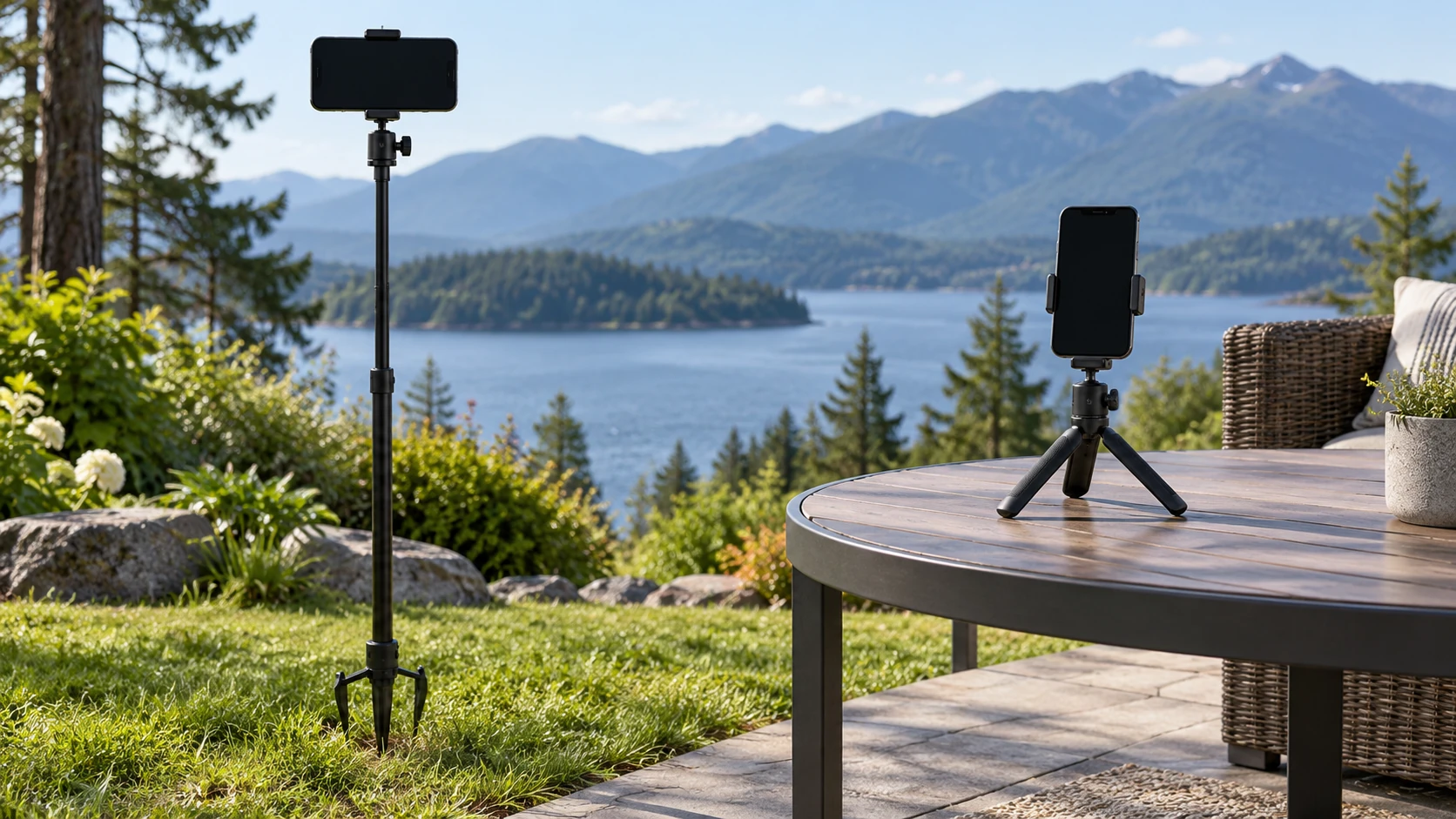
An outdoor phone tripod setup begins with the surface under the support, not with its maximum advertised height. Soil or grass may give a ground spike somewhere to enter; a patio table or other level, firm platform calls for a free-standing base. Neither arrangement is secure merely because the phone fits the mount. Check the actual location, the support's contact with it and the phone's balance before filming. This guide covers that sequence for two different catalog examples. It does not establish their wind ratings, load limits or compatibility with a particular phone.
Choose the place before opening the tripod
Walk to the intended camera position and inspect what the legs or spike will touch. Look for a level area, loose ground, slippery surfaces and obstacles around the footprint. A ground spike needs a surface that permits insertion without hidden utilities, hard paving or damage to property. A table tripod needs enough clear, stable area for all of its feet, away from an edge. If the site does not provide the right support, change the position rather than trying to make an unsuitable base behave as though it were fixed.
Decide where the phone should point and how high it needs to be only after identifying a safe base. A taller position may improve the frame, but extension also changes how a stand feels when touched or exposed to movement. The listing's height claim alone cannot tell you how the whole setup will behave on a particular patch of ground. Start low, mount the phone, and raise the support in small steps while checking the frame and stability each time.
Use a ground spike only where it can seat safely
The HENYGEN ground-spike phone tripod is listed as an adjustable outdoor phone stand. Its native gallery shows a long pole with ground-contact spikes. That visible design explains why it may be considered for a suitable grassy or soil surface, but the image does not prove secure seating in every soil type or weather condition. The listing names 1.24 m in the product title; treat that as a seller description, not a reason to extend the stand fully before testing it.
For a ground spike tripod, inspect the spot before inserting anything. Avoid a place where you cannot determine what is below the surface. Press the support into suitable ground according to its actual instructions, then check whether it remains upright without the phone. If it shifts under a gentle setup check, move to another location or another kind of support. Do not use the phone as a weight to test an uncertain anchor. After mounting, confirm that the phone and holder stay centered and that the desired angle does not pull the pole to one side.
Ground fixation can also be a poor fit when filming from decking, stone, a protected lawn or a rented event space. A spike should not be forced into a hard surface or used where it could damage the site. If the surface cannot accept it, the product's outdoor label does not solve that mismatch. Find a level platform for a different support or choose another camera position. Keep the decision tied to the place you can actually use.
Check every foot of a free-standing base
A second example is the magnetic selfie tripod listed with a remote. The native catalog record identifies it generically as a camera-accessory tripod, and its gallery shows a compact three-leg phone support. The listing URL describes magnetic and remote features, but that address and a still image do not establish that a particular phone attaches magnetically, that a remote is included in the delivered offer, or that the stand is stable on uneven ground. Confirm those points in the current offer before relying on them.
For a free-standing phone tripod, unfold the legs completely on a firm, level area and make sure each foot contacts the surface. Keep it away from the edge of a table or ledge. Attach the phone using the supported holder or magnetic method only after checking the exact phone and accessory requirements. A phone that appears centered from the front may still load one side more heavily when tilted. Rotate and tilt it to the intended frame, then check whether the base remains planted. If one foot lifts or slides, reset the position before recording.
Do not place a compact tabletop base directly on irregular soil merely because it is portable. Its feet may meet different heights and leave the stand rocking. Conversely, a ground spike offers no useful anchoring on a patio table. The two products solve different contact problems. Choose by the available surface and the actual attachment method rather than by the shared word “tripod” in their names.
Mount the phone and test the real frame
Before leaving either support unattended, check the phone's fit in its holder or attachment and the full movement of the head. The phone tripod mount compatibility guide covers the separate question of whether a phone and mount fit. A surface check cannot answer that question. If the mount fit is uncertain, settle it before proceeding with this outdoor setup. A compatible mount still needs a suitable base and deliberate placement.
Frame a short test shot at the height and angle you intend to use. Watch for a tilted horizon, blocked lens, loose joint or movement when the controls are touched. If the site is breezy, observe the setup under the conditions present rather than relying on a listing photograph. There is no verified wind tolerance for these two examples in the evidence here. If the frame or support moves, lower the stand, relocate it or pause the recording. Avoid promising that a weight, accessory or improvised anchor will fix an untested setup.
Plan how you will start and stop recording without pulling on the support. A remote feature, if present and compatible, could change how often you touch the phone, but the current gallery does not prove that feature works with your device. Confirm the delivered controls and their instructions. If you must tap the screen, do a final stability check after touching it. Keep bags, cables and passersby clear of the legs and camera path.
Make the surface decision before comparing features
A useful way to decide between these forms is to write down the surfaces you will actually use. If the session is on a grassy area where insertion is permitted, the ground-spike design may be relevant. If the session is on a patio table, the three-leg form may be relevant. If you expect both situations, one setup may not cover them equally well. This is a surface decision first and an accessory decision second. A seller's mention of outdoor photography describes an intended use; it cannot replace checking the real place, permission to use it and the support's behavior there.
Think about movement around the camera too. A stand in the path of people, pets or equipment may be bumped even when its base initially looks steady. Move the camera position out of traffic rather than relying on a passerby to notice a thin pole or low tripod legs. If the scene requires a particular angle, consider whether a safer position can still capture it with a small change in framing. A support that passes a stationary check can still be a poor choice in a crowded area. The catalog pictures cannot describe the foot traffic or obstacles at your location.
For a tabletop position, evaluate the furniture as part of the support system. A small tripod cannot make a wobbling table firm. Put your hands on the table before opening the legs and check whether it shifts during normal use. Look at the edge distance from every direction, including the side toward which the phone will tilt. An apparently wide stance can lose useful margin when a phone is angled outward. If the table rocks or the feet cannot sit fully on its top, move to a more suitable surface. Do not infer from a studio product photograph that the same stance will be reliable on a narrow outdoor rail.
For a ground position, inspect the terrain around the intended anchor as well as the point where the spike will enter. A slope changes the angle of the upright; nearby stones or roots may prevent a consistent seat. Do not pound the stand into hard material or assume its included parts are designed for that force. Follow the actual maker instructions for insertion and removal, and choose another position if those instructions cannot be followed. Once inserted, look at the stand from two directions before attaching the phone. That simple visual check can reveal a lean hidden by the camera's own screen.
Phone orientation matters after placement. Switching from portrait to landscape, or tilting downward for a close shot, changes where the phone's mass sits relative to the support. Make the change slowly while holding the phone. Check whether a holder remains closed or a magnetic connection remains aligned in the orientation you need. The saved listing and gallery do not provide an independently verified holding-force figure for either example, so this must be an observed setup check. If the phone cannot stay attached in the intended orientation, do not record from that configuration.
Finally, rehearse the start of the session with no valuable shot at stake. Mount the phone, frame briefly, touch the controls you will use, then look again at the legs or spike and the resulting footage. A moving horizon or a base that shifts is a reason to stop and reposition. This rehearsal also reveals whether sunlight, a cable or the photographer's own movement will interfere with the view. It does not certify performance for later weather or a different surface; repeat the key checks whenever the setup changes. Keep the phone in hand while making a material adjustment to the support.
Pack down without losing the setup details
When you finish, remove the phone before collapsing or pulling up the stand. Check that the mount, feet and spike are clean and intact according to the product instructions. Note the surface and height that worked if you expect to film at the same place again. That practical note is more useful than assuming a prior setup will work on every outdoor surface. The quick-release plate compatibility guide addresses a different connection point when a setup uses a separate plate; do not assume either example includes such a plate.
For the next outdoor phone tripod setup, use the same order: choose a permitted and suitable surface, select the matching base, secure and balance the phone, then test the actual frame. The ground-spike example is a candidate where insertion is appropriate; the compact three-leg example is a candidate on a firm level platform. Their catalog descriptions and pictures help identify those forms, while site conditions, delivered parts and phone fit still require direct checks.