Crypto Commerce
OBSBOT Tiny 2 Lite 4K webcam vs NexiGo N660P for classes and calls
Compare OBSBOT Tiny 2 Lite 4K webcam by tracking, video mode, microphones, mounting, and privacy.
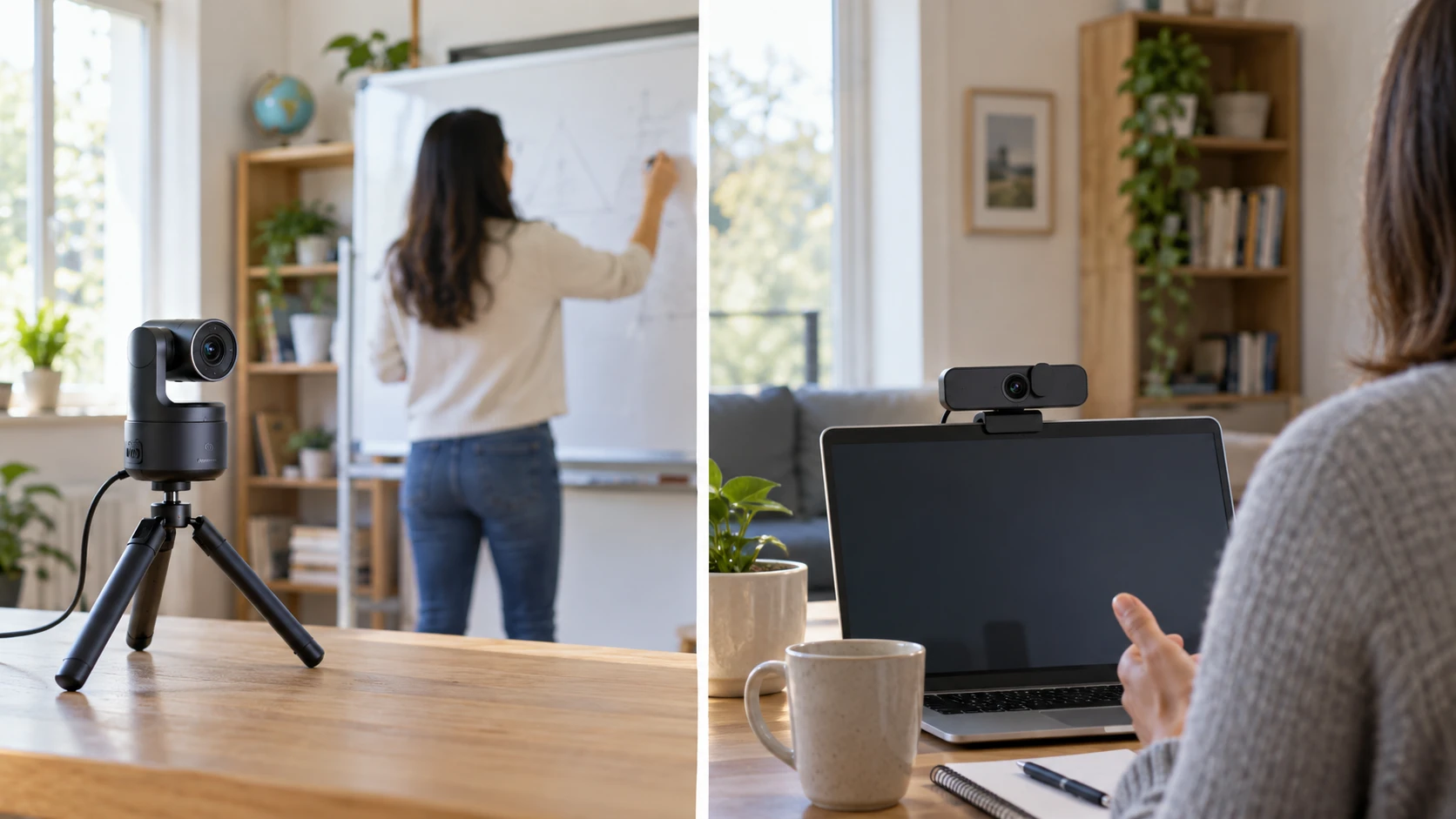
A webcam that stays pointed at a seated caller has a different job from one that follows a teacher across a whiteboard. Both need a clear picture, but framing, control, privacy, and microphone placement change with the room. OBSBOT's Tiny 2 Lite listing centers on motorized tracking and flexible orientation. NexiGo's N660P-PINK listing centers on a fixed USB webcam with autofocus, automatic exposure, a long cord, and a sliding privacy shutter. Choose around the presentation you actually give rather than the largest video number in a product title.
The OBSBOT Tiny 2 Lite 4K webcam row names a 1/2-inch CMOS sensor, 4K imaging, up to 60 frames per second, Auto PTZ, and several tracking modes. It also lists gesture commands, saved camera presets, dual microphones, and portrait, landscape, or inverted mounting. The interview audio check before recording guide is a useful companion because both webcams include microphones, yet neither listing proves that its mic will sound right in your room. The NexiGo N660P 1080p webcam row states 1920-by-1080 recording at 60fps, autofocus, automatic white balance and exposure, a stereo noise-reduction microphone, a sliding shutter, and a 6.5-foot USB cord.
Decide whether the camera should move — NexiGo N660P 1080p webcam
OBSBOT says its Auto PTZ and adaptive tracking can follow an upper body, a hand, or a defined zone. That can help a presenter who steps away from a desk, turns toward a demonstration, and returns to the same mark. The row also says you can save camera-position and tracking presets. Those settings sound useful for repeating a classroom or product-demo layout, but a tracking feature is only helpful if it follows the intended subject without distracting jumps. Practice a full five-minute segment with the actual board, table, and other people in frame.
Gesture Control 2.0 is described as letting the presenter show a palm to lock tracking or point to zoom. Hands-free operation can be useful away from the keyboard, yet it can also be triggered or missed in a busy scene. Test gestures from the farthest point where you plan to stand and with the room lighting that will be used. If a co-presenter enters, check whether the camera changes its target. Keep a simple manual framing option ready for any segment where the camera's movement would distract from the content.
NexiGo's saved row does not describe motorized movement or subject tracking. Its autofocus and automatic exposure address a different need: keeping a stationary caller acceptably sharp and exposed as they lean forward or the room light changes. A fixed frame can be easier for a seated interview, a shared screen presentation, or a call where several people need to remain visible. Place the webcam where the whole needed area fits before the session. If people move outside that frame, reposition the camera or use a wider setup rather than assuming autofocus can follow them.
Match resolution and frame rate to the call — NexiGo N660P 1080p webcam
OBSBOT lists 4K imaging and up to 60fps, but the saved description does not specify every resolution-and-frame-rate combination. Do not infer that 4K and 60fps are available together in every application. NexiGo explicitly states 1080p at 60fps. Even there, the conferencing app, USB path, and host computer may use a lower setting for a live call. Check the webcam settings in the actual software, record a local sample, and then inspect what the receiving caller sees. A high-resolution local file does not prove a video service will transmit the same image.
For a lecture or product demo, put small text or an object with fine detail at the distance viewers will see it. If OBSBOT's 4K mode helps, you should be able to notice it in the recorded sample rather than only in a specification. For a seated call, composition and lighting may have a larger effect than the difference between a 4K-capable sensor and a 1080p output. Compare at the same viewing size and with the same lamp. A camera pointed toward a bright window can make a face dim even when its sensor has many pixels.
The NexiGo listing names automatic white balance and exposure control for dim or backlit conditions. That is a feature claim, not a promise that every mixed-light scene will look natural. Try a daytime call and an evening call. OBSBOT's row describes high-resolution imaging but does not give a matching account of its exposure controls. Check current software or manual settings if you need to lock brightness or white balance during a lesson. A sudden exposure change while someone holds up a white page can be more distracting than slightly softer detail.
Put the microphone where the voice is — NexiGo N660P 1080p webcam
OBSBOT lists integrated dual microphones. NexiGo lists a stereo microphone with omnidirectional pickup and a noise-reduction claim. Those descriptions do not give a measured voice comparison. Move to the farthest speaking position, record a paragraph, and listen on headphones. A webcam above a distant monitor may capture more room sound than a headset or microphone placed closer to the speaker. In a classroom, check how the voice sounds while facing the board, not only while looking into the camera.
The related guide's audio checklist matters because a video test can look successful while the microphone is silently set to the laptop or a headset left on the desk. Select the intended input in the operating system and again in the meeting application, then make a short call to someone in another room. Ask whether words remain clear when a fan runs, paper moves, or the presenter walks. If a dedicated microphone is already part of the setup, keep its placement consistent while comparing the webcams' video features.
Noise reduction can also remove quiet syllables along with background sounds. Record natural speech, a pause, and a louder passage. Listen for sudden changes in level or words that disappear at the end of sentences. Neither saved Republeq catalog record states the exact microphone-processing controls available in every app. If a meeting service applies its own noise suppression, test with that setting as it will be used. The best webcam picture is of limited value when listeners must ask for every sentence to be repeated.
Check placement, cables, and orientation — interview audio check before recording
OBSBOT says Tiny 2 Lite can mount on a tripod, monitor, or desk, and can be used in portrait, landscape, or inverted positions with image rotation. That flexibility may suit vertical recordings or a demonstration table. Each placement changes the camera angle and the microphone distance. Put the lens close to eye height for a call, then check how it looks from the other person's view. For a tabletop demonstration, make sure the camera can show hands and materials without hiding the presenter's face when that matters.
NexiGo lists a 6.5-foot USB cord and plug-and-play operation without extra drivers. Measure the route from the computer to the planned camera position rather than using the straight-line distance across the desk. Leave slack for raising a sit-stand desk or moving a monitor arm. The saved row does not specify the cable's USB connector shape, so check the current product photos and the computer ports before relying on direct connection. An extension or hub can add another fault point; test the final cable route before the first live class.
Both listings describe PC or Mac use. NexiGo's row gives a long list of older Windows, Mac, Linux, Chrome OS, and Ubuntu versions. That list does not establish how every present-day release handles its software controls. OBSBOT names plug-and-play use without an app and deeper options through SDK, OSC, Stream Deck integration, and hotkeys. If those advanced controls are essential, verify the required software, permissions, and current operating-system support. A basic video feed and a motorized preset may have different setup requirements.
Make privacy and control visible — NexiGo N660P 1080p webcam
NexiGo explicitly lists a sliding privacy shutter that covers the lens when the webcam is idle. That is a straightforward physical control a user can see. The OBSBOT saved row does not name a physical shutter. Do not infer it has or lacks one from the short catalog description; check exact model photographs and the current manual if a shutter is a purchase requirement. In either case, also learn which app has camera permission and whether a meeting is still active before leaving the desk.
A motorized webcam can make it less obvious where the lens is aimed after a preset changes. Save a neutral home position and confirm it before a call begins. A fixed webcam has fewer framing changes, but it still deserves a preview before joining. If the camera feeds a classroom, tell participants when recording starts and where they will be visible. OBSBOT's tracking modes and the NexiGo privacy shutter address different kinds of control; neither removes the need for a clear session routine.
Rehearse the whole session — NexiGo N660P 1080p webcam
Set the camera at its intended location and record a ten-minute practice session. Include the seated opening, a move to the board or object table, screen sharing, a return to the chair, and the closing. Watch the file at normal size and listen from beginning to end. For OBSBOT, note whether tracking and zoom support the explanation. For NexiGo, note whether the fixed frame includes everything and whether autofocus or exposure changes draw attention. Test the same meeting app, computer, and room that will be used live.
If the room has several presenters, invite them to join the rehearsal. A tracking camera may need a constrained zone or a saved preset for a two-person exchange. A fixed camera may need a different physical location to keep both speakers visible. When a remote audience is involved, ask one viewer to describe what they can read or hear from the far side of the connection. The local preview can hide compression, app defaults, and audio routing mistakes.
NexiGo's N660P is the clearer catalog choice for a seated setup that values a specified 1080p60 mode, physical shutter, and long USB lead. OBSBOT Tiny 2 Lite deserves attention when the presenter moves and saved PTZ positions or hands-free control would reduce interruptions. The useful test is a complete lesson or call rehearsal, including audio. That shows whether the camera follows the work instead of forcing the work to follow the camera.