Crypto Commerce
MOTU M2 audio interface bundle vs Rockville R-TRACK Recording Interface Bundles
Compare MOTU M2 audio interface bundle by included gear, inputs, outputs, monitoring, loopback, MIDI, and computer compatibility.
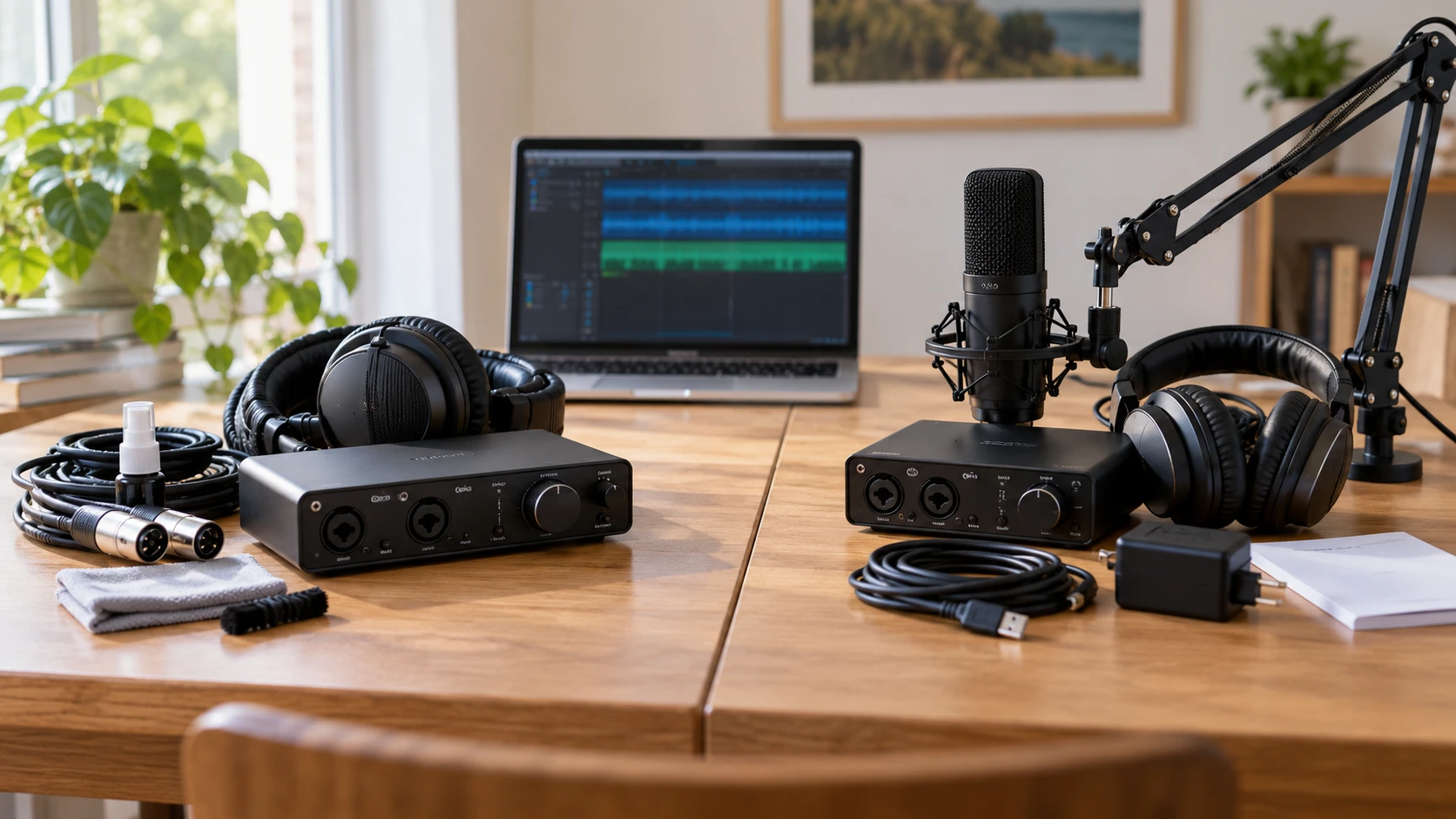
Both listings put a two-input recording interface in a bundle, but the packages solve different first-day problems. The MOTU M2 audio interface bundle includes the interface, Sony MDR7506 headphones, two XLR cables, and a small headphone-cleaning kit. The Rockville R-TRACK package lists its interface, an RCM01 microphone, boom, headphones, USB cable, power adapter, and manual. If you do not already own a microphone, that difference may matter more than a converter specification. If you already have microphones and need computer-audio loopback for streaming, the MOTU listing gives a clearer account of that feature.
Neither bundle is automatically a complete recording studio. You still need a computer or other compatible host, software, a suitable recording space, and the right cables for the actual microphones or instruments you plan to use. A bundle title can also change independently of the interface itself, so check the current itemized contents before paying. The following comparison separates interface features from accessories and treats performance numbers as claims in Republeq's catalog until an exact model and test conditions are confirmed.
Inventory the box before comparing sound quality — Rockville R-TRACK recording bundle
MOTU's saved listing names an M2 2x2 USB-C interface, MDR7506 headphones, two XLR cables, and a 4-ounce cleaning spray with cloth. It does not list a microphone. A pair of XLR cables is useful for connecting compatible microphones, but cables do not make a recording without a source. Check the length and connector type of the cables in the exact offer. If you plan to record an acoustic instrument with a microphone, budget for a suitable mic, stand, and any room treatment you need. If you already have those, the included cables and headphones may be enough to begin testing.
Rockville's saved listing names an RCM01 microphone, boom, headphones, a Type-A-to-Type-B USB cable, external power adapter, and manual with the R-TRACK interface. That is more physical starting equipment for a voice recording. It does not establish that the microphone, boom, and headphones meet a particular professional standard. Ask whether the microphone is a condenser or dynamic design, its connector, and whether it requires the interface's 48-volt phantom power. Also check how the boom attaches to your desk and whether the supplied cable reaches the planned position. The saved excerpt does not provide those accessory details.
An interface bundle can be good value when its accessories match your use. It can be wasteful if the buyer replaces most of them immediately. Write down what you already own, then price only the missing pieces. For an interview with two people in the same room, you may need two microphones and two appropriate stands even though the Rockville box lists only one microphone. For a solo presenter who needs to hear computer playback, the MOTU's headphones and loopback may be more relevant than an extra bundled mic. Neither product page promises the exact editing software or license you may expect from other retailers' interface packages.
The two input paths — Rockville R-TRACK recording bundle
Rockville describes two combo XLR and quarter-inch mic or line inputs, each with a gain control, 25 dB pad, and 48-volt phantom power. Its second channel also lists a low- or high-impedance selector for instrument use. A pad can help when a strong input would overload the preamp; phantom power supports compatible microphones that need it. The right setting depends on the connected device. Confirm how the controls are labeled on the unit actually shipped, and do not turn on phantom power merely because it is available. Follow the microphone manufacturer's requirements and connect equipment at low monitor volume.
MOTU's excerpt describes M2 mic preamps, use with a mic, guitar, or keyboard, and two input and output meters on a color LCD. It does not detail every jack or switch in the saved text. Obtain the current M2 manual for the exact input types, phantom-power arrangement, and direct-monitoring options before assuming it matches Rockville control for control. The LCD meter is a practical feature for setting levels because you can see the signal at the interface. The display alone will not prevent clipping elsewhere in software, so check the recording track too.
Both interfaces are described as 2x2 devices. In practical terms, two distinct input channels can support a two-microphone conversation or one microphone and one instrument if the connected gear and software are configured correctly. It does not mean every bundle includes two microphones or that two headphones can plug in independently. Rockville's excerpt says its USB connection sends channel 1 and channel 2 independently to recording software. Confirm that your software selects those channels as separate mono tracks when separation matters. A stereo track can combine voices in a way that is harder to edit later.
Monitoring while you record — interview audio setup check
Rockville lists a front-panel blend knob between direct and computer playback, separate main and headphone volume controls, signal and peak lights, and a mono/stereo output switch. Direct monitoring is useful because it can let you hear an input before the computer processes it. The blend helps balance your live voice against playback, though its behavior should be confirmed in the manual. If a host computer returns the same input to headphones with noticeable delay, you may hear a distracting echo. Turn off unnecessary software monitoring or adjust the blend after checking which path is active.
MOTU emphasizes low-latency computer monitoring and states a 2.5-millisecond round-trip latency under a specific test setup: 96 kHz with a 32-sample buffer. That is a configuration claim, not the delay every computer and project will achieve. Drivers, plug-ins, buffer settings, and CPU load all affect observed responsiveness. Its color LCD meters can help set input levels without watching software. Ask whether you will monitor directly through hardware, through the recording application, or through a plug-in chain. The answer changes how much a published latency number matters.
The related guide on an interview audio setup check encourages a short test before a real session. With either interface, record thirty seconds of each planned source, speak at realistic volume, and listen back on headphones. Check for clipping, an unexpectedly quiet microphone, cable hum, phase problems, or a missing channel. Confirm that the file saved where you intended. A rehearsal catches setup errors that converter specifications cannot reveal.
Computer sound, loopback, and MIDI — Rockville R-TRACK recording bundle
MOTU's listing specifically says its driver supplies loopback channels for mixing computer playback with live interface inputs inside the host. That can help with streaming, screen capture, or a remote interview when the software setup supports it. Loopback also creates a risk of recording a guest twice or feeding a delayed copy back into a call. Test the signal route with a private session before broadcasting. Check the current driver for your operating system, since the saved excerpt does not establish identical loopback behavior across every platform.
Rockville lists MIDI input and output, which can matter if you use an older keyboard, drum machine, or controller with five-pin MIDI connectors. MIDI carries performance messages, not the instrument's audio. You may still need an audio cable from the instrument's output to record its actual sound. The saved MOTU bundle excerpt does not mention MIDI, so do not infer its absence or presence from silence; check the current M2 hardware specification if MIDI is important. Conversely, Rockville's saved text does not identify a dedicated loopback feature, so do not assume that the MOTU-described workflow is built into the Rockville driver.
Rockville also lists both quarter-inch left and right outputs and XLR left and right outputs, plus a headphone jack. The MOTU excerpt speaks about main and headphone outputs without a full connector list. Match the monitor speakers you own to the actual interface sockets, and check whether the outputs are balanced and what cable is needed. If you use powered studio monitors, lower the volume before connecting or changing routing. Two output connector styles do not necessarily mean four independent output channels; confirm whether they carry the same stereo pair.
Specifications need comparable test conditions — Rockville R-TRACK recording bundle
The MOTU page claims an ESS Sabre32 Ultra DAC, 120 dB dynamic range on main outputs, and a microphone-input equivalent input noise of minus 129 dBu. Those are technical performance claims. The Rockville page lists up to 24-bit, 192 kHz operation, signal-to-noise and dynamic-range figures, and several input sensitivities. These numbers measure different parts of the signal path under conditions the excerpts do not fully align. A 192 kHz sampling ceiling is not evidence that a recorded voice will sound better than one captured at a lower supported rate. Likewise, a quoted output dynamic range should not be compared directly with a mic-preamp noise figure.
For most home speech and music work, the more immediate questions are whether the interface accepts the intended source, offers enough clean gain, provides stable drivers, and lets you hear a trustworthy monitor mix. Test a quiet voice passage and a loud one. Leave headroom rather than pushing every signal close to digital full scale. If you hear noise, isolate the microphone, cable, gain setting, electrical environment, and software before blaming converter quality. Republeq's product descriptions alone do not provide controlled side-by-side recordings of these two bundles.
Rockville's excerpt describes USB 2.0 Type-B connection and an external power option as well as USB bus power. MOTU's title calls its interface USB-C. Check what cable and computer port are required by the exact package, especially if you use a laptop with only USB-C ports. An adapter may solve a connector mismatch, but it should support data and sufficient power. Verify current driver support for your operating system and recording application. The Rockville text includes older operating-system references; do not infer that an old compatibility line proves support for a current system.
Which package fits the session? — Rockville R-TRACK recording bundle
For a first solo voice setup with no microphone, the Rockville R-TRACK recording bundle supplies more of the physical recording chain in the saved offer. Its direct/DAW blend, input pad, instrument option on channel two, and MIDI ports may also suit a small music workstation. Verify the microphone and accessory contents, driver support, and how the two channels appear in your software before treating the bundle as ready for a specific session.
For a creator who already owns microphones and wants clear interface metering or driver-based loopback, the MOTU M2 bundle is the more directly documented option in these excerpts. The included MDR7506 headphones and XLR cables could complement existing gear, while the claimed low-latency setting deserves testing on your computer. Confirm the current accessory list and monitor connections. Whichever you choose, make a short test recording, save it, and play it back before an interview or stream. That is the quickest way to prove the full signal path works in your own setup.