Crypto Commerce
Momo M5 body camera vs Dag CS11 body cameras: a long shift or quick WiFi review?
Compare Momo M5 body camera by recording plan, storage, mounting, night use, and saved price.
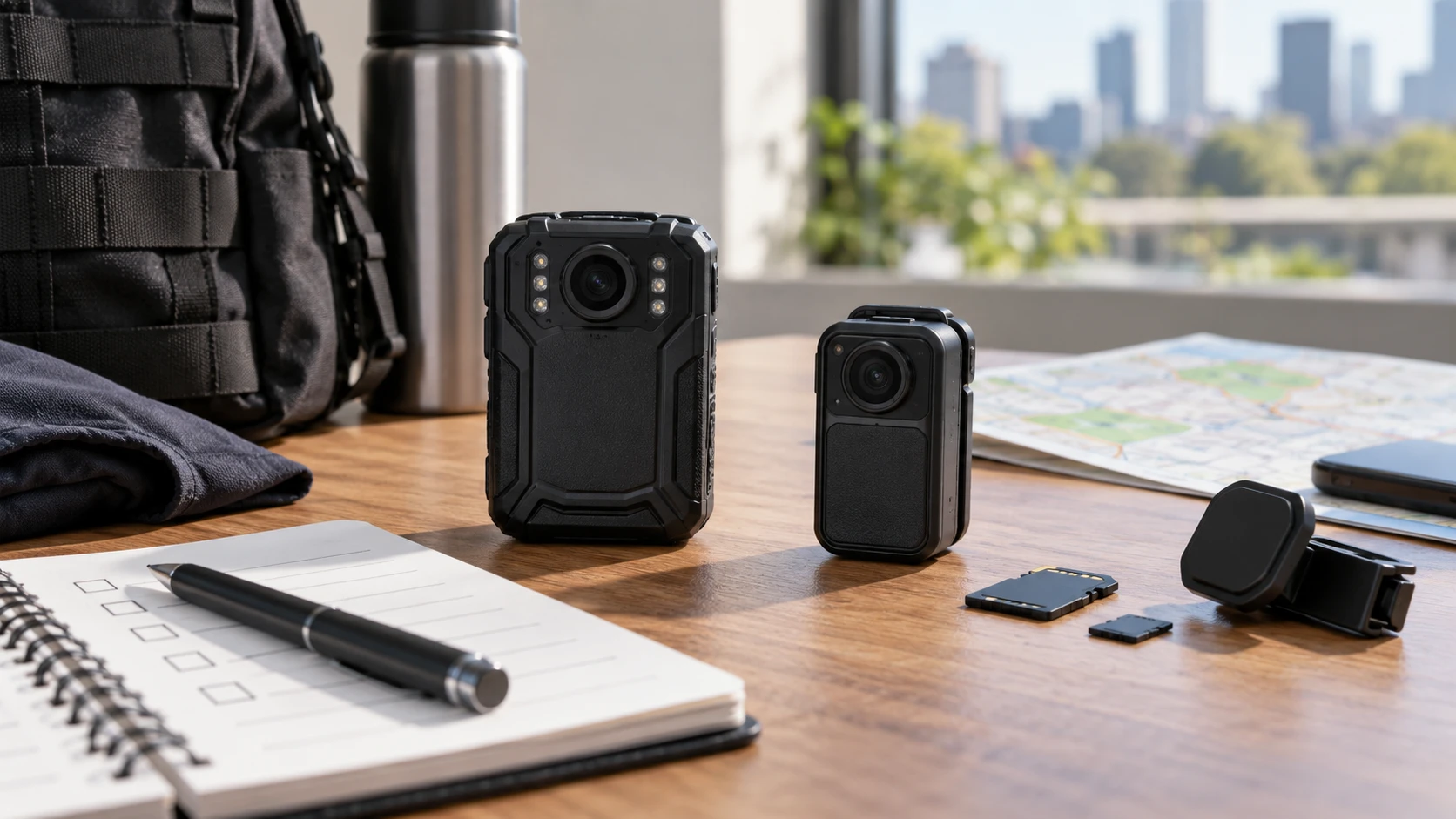
Two wearable cameras may solve different recording problems even when both are sold as body cameras. The saved catalog describes the Momo M5 with a 4,200 mAh battery, a stated 15 hours of 1080p recording with infrared off, 64 GB in the product title, and an IP67 shell. The Dag CS11 lists a 1,000 mAh battery, up to four hours of continuous recording, external TF-card storage, hotspot WiFi monitoring, and a magnetic clothing mount. The buyer should decide how long a recording period must be and how footage will be checked before comparing the resolution labels.
The Momo M5 body camera is listed at $311 in the September 30 snapshot. Its row says it records video and audio, takes photos, and plays recordings on the device. It lists 2560-by-1440 video at 30 frames per second, six infrared lights for night recording, loop recording, multiple modes, red and blue flashing lights, and an alarm sound. The listing claims a scratch-resistant ABS shell, IP67 water resistance, and up to two meters of drop resistance. Those are product claims, not a field test or a guarantee of usable evidence after every impact.
The related guide to body-camera viewpoint checks discusses how to examine framing in a recording scenario. It does not test either camera here. The Dag CS11 WiFi body camera is listed at $229. It records 1080p video with synchronized audio and offers night vision, video, photo, and playback modes. The description names hotspot WiFi for real-time monitoring, pre- and post-recording, file protection, and clips up to 60 minutes per file. Its TF-card slot accepts cards up to 256 GB, but the saved excerpt does not say a card is included.
Write the recording schedule before buying — Dag CS11 WiFi body camera
The M5's stated 15-hour recording figure applies to 1080p with infrared off. The row also says its battery takes five to six hours to charge with a standard adapter and USB cable and gives up to 25 hours of standby time. Standby is not continuous recording. If a shift includes night recording, a higher resolution, frequent playback, or flashing lights, the actual runtime may differ. Ask for measured runtime under the intended settings and plan a charging routine. A camera that is on the uniform but has no battery left at the important time does not meet the purpose of carrying it.
Dag gives up to four hours of continuous recording from its 1,000 mAh battery. That may suit a short event, site visit, demonstration, or several bounded clips with a recharge between uses. It is a harder fit for a full workday of continuous capture unless an approved power arrangement or a different recording schedule is available. The saved description does not name charge time or whether the unit can record while charging. Confirm those points in current instructions before making an all-day plan. Four hours is an upper-bound claim, not a guaranteed shift length.
List the start and end times for real use. Is the camera needed continuously, only while a person is in the field, or only when a defined interaction begins? How long does it take to return to a charger? The answer may make the M5's larger listed battery valuable. If short clips are the job, the CS11's quick review features may matter more. Battery labels alone cannot rank complete systems because resolution, screen use, WiFi, infrared lights, temperature, and battery age can all affect runtime. Test the chosen settings before relying on any maximum.
Plan storage and file handling — Dag CS11 WiFi body camera
The M5 product title specifies 64 GB. The saved body text does not explain whether that capacity is built into the unit, removable, or reserved in part for system files. Confirm the exact storage arrangement and export method in the current listing or manual. Loop recording is named, which can be helpful when a camera must keep recording as storage fills. It can also overwrite older files. Work out how recordings will be saved before enabling a loop in any setting where a clip must be preserved. Verify the actual overwrite and file-protection behavior from the unit's instructions.
The CS11 uses external TF cards up to 256 GB and can format them. A large maximum card size is useful only with a reliable card of the supported type, capacity, and speed. Check the box contents before assuming a card is supplied. Format a new card according to the camera's instructions, then make and play a test clip. The listing says clips may be up to 60 minutes per file. That file length does not prove the battery will run for 60 minutes in every mode or show how the camera splits a longer session; test the transition at a file boundary if continuous capture matters.
For either device, plan who may view and copy the recordings. Keep original files with clear timestamps and make a working copy for review when the footage matters. The catalog does not describe encryption, tamper-evident logs, automatic cloud backup, or chain-of-custody controls for either model. Avoid assuming consumer recording features meet a particular organization's evidence policy. If a workplace has rules for retention or consent, use those rules when deciding whether and where a body camera can record. The purchase decision also needs a workable file-handling process.
Frame the scene from a person, not a product photo — Dag CS11 WiFi body camera
A wearable camera records the view from its mount. The CS11 description names a lightweight magnetic clothing mount and says the unit can fit in a pocket. A pocket location can obscure the lens or turn it away from the action; a magnetic mount may shift when clothing moves. Check that the mount stays in place while walking, bending, or reaching. The M5 row does not specify its included clip or mounting accessory. Confirm it before planning where the camera will ride on a uniform, bag strap, or jacket.
The related viewpoint guide is useful because a camera can be recording without capturing the thing a wearer thought it saw. Make a short test at the intended mounting point. Walk the actual route, look down at notes, turn to speak, and review the clip. Check whether hands, a coat edge, or a seat belt blocks the lens. A high resolution file of a shirt pocket is less useful than a lower-resolution file pointed at the scene. Test audio too: fabric rub, traffic, and a muffled microphone can make spoken context hard to understand.
The M5's 1440p-at-30-frames claim and the CS11's 1080p label do not establish a sharpness winner in low light or motion. Lens quality, exposure, compression, and stabilization are not compared in the snapshot. If a recording must show a small detail, conduct a realistic test at the expected distance and lighting. The CS11 row does not state its field of view; the M5 row does not provide one either. Ask for the current lens specifications, then verify framing through actual footage.
Look at low light and weather separately — Dag CS11 WiFi body camera
M5 lists six infrared lights for night recording. CS11 lists night vision without a light count or a measured range in the saved excerpt. Neither listing provides side-by-side video from the same dim street or indoor corridor. Before relying on nighttime capture, make a test in the lighting that matters. Infrared may change how colors appear, and reflective surfaces can affect the picture. Ask whether an indicator light stays visible and whether the camera's current settings allow the desired recording behavior. Follow any applicable workplace rules for visible recording indicators.
M5 claims IP67 water resistance and short immersion; it also claims a two-meter drop limit. The CS11 excerpt does not name an ingress-protection or drop rating. That absence is a reason to check the exact current model documentation if rain is routine. IP ratings describe particular test conditions, while a worn unit may have an open port or a damaged seal. Inspect covers and ports before wet use, and follow the manual's drying and charging guidance. A weather rating should not be treated as permission to charge a wet device.
The M5's alarm sound and red/blue flashing lights may have specialized uses, but they can be distracting or inappropriate in ordinary recording. Check whether those features can be disabled and whether their use is allowed in the setting. The CS11 emphasizes lightweight wearing and hotspot viewing. Decide which kind of interaction is expected: visible alerting, discreet documentation, or live inspection of framing. The snapshot cannot decide the operational or policy question for a particular organization.
Review footage while the camera is still in the field — guide to body-camera viewpoint checks
M5 can play recordings on the device according to its row. That can help someone confirm that a clip exists before leaving a site, though a small built-in screen is not a substitute for a later full-size review. The saved text does not specify screen size or export port. Check how files leave the unit and whether playback lets the user identify a needed event quickly. For a long shift, review and backup may be a bigger time cost than pressing the record button.
CS11's hotspot WiFi supports real-time monitoring, and its video, photo, and playback modes allow a short review cycle. The description does not say whether hotspot mode supports file transfer, remote storage, or a particular phone operating system. Verify the app or local connection workflow before buying it for rapid handoff. Test whether the preview stays connected at the actual working distance. A live preview is valuable when a wearer needs another person to check framing, but it can consume battery and attention; the four-hour claimed runtime may not include continuous hotspot use.
The CS11 also lists pre- and post-recording and file protection. Those features can help preserve context around a manual trigger if the implementation and settings match the workflow. Ask how much pre-event video is buffered, which modes allow it, and how a protected file is marked. The snapshot does not answer those details. Run a controlled test and confirm that the file on storage contains the expected lead-in, event, and trailing portion. A feature name on a product page is only the start of a retention plan.
Compare the saved cost with the whole kit — Dag CS11 WiFi body camera
The M5's saved $311 price is $82 above the CS11's $229. The M5 listing names 64 GB in its title and a larger battery, while the CS11 may require buying a TF card and planning more frequent charging. Current prices and included accessories may differ. Add a compatible card, charger, spare mounting pieces, and time needed for file handling to the comparison. If the M5's 64 GB is not configured as expected, its included-storage advantage needs re-evaluation; confirm that from the exact SKU.
Choose the M5 first when recording periods may span most of a shift, weather exposure is plausible, and on-device playback is useful. Verify its mount, storage arrangement, and runtime in the chosen recording mode. Choose the CS11 when short sessions, magnetic mounting, external card flexibility, and live WiFi preview fit the work. Verify a supplied card, hotspot behavior, and charge plan. In both cases, make a test clip from the real wearing position, export it, and view it on another screen before relying on the camera for an important recording.