Crypto Commerce
MeLE Quieter4C mini PC for a fanless work desk
The MeLE Quieter4C mini PC has a specific appeal for a desk with several displays: its description lists two HDMI 2.0 outputs and one USB Type-C display output, each capable of 4K at 60Hz, in a fanless enclosure. Whether it suits your desk depends on the connections your screens need and where you can place a case whose surface, according to the description, can reach 55°C to 70°C. Plan both before choosing it. For MeLE Quieter4C mini PC , verify each step.
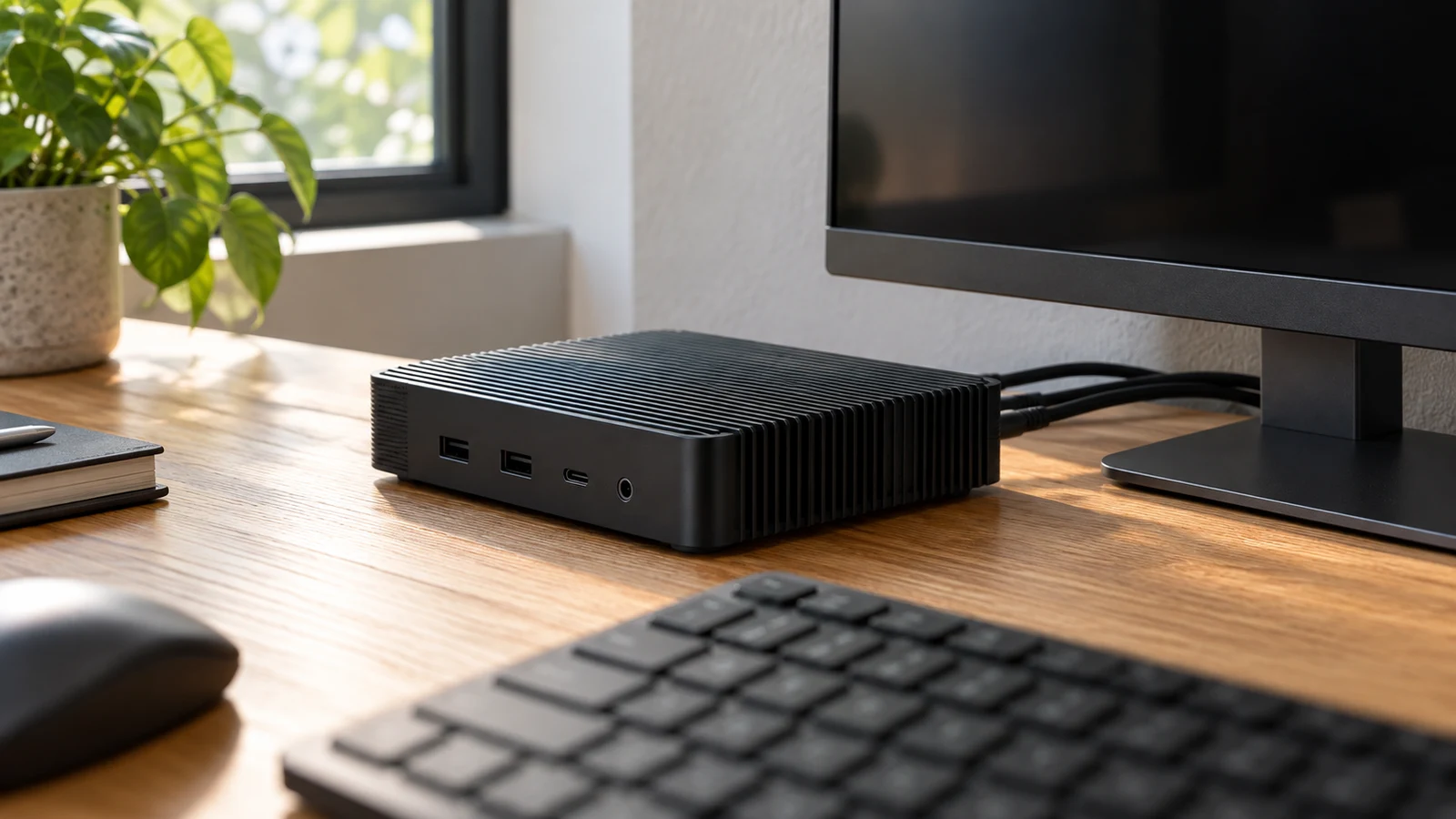
The MeLE Quieter4C mini PC has a specific appeal for a desk with several displays: its description lists two HDMI 2.0 outputs and one USB Type-C display output, each capable of 4K at 60Hz, in a fanless enclosure. Whether it suits your desk depends on the connections your screens need and where you can place a case whose surface, according to the description, can reach 55°C to 70°C. Plan both before choosing it. For MeLE Quieter4C mini PC, verify each step.
The configuration discussed here has an Intel N100 processor with a stated burst speed up to 3.4GHz, 8GB LPDDR4x memory and 128GB onboard storage. It includes Windows 11 Pro and a VESA mount. Those details identify the starting configuration; they do not establish how quickly your particular applications will run or whether the mount fits your monitor. A useful buying decision connects each stated feature to something you actually need at the desk.
Begin with the work you want visible at the same time. Perhaps a document occupies one screen while a reference file stays open on another, with a third display reserved for a work queue. This gives each output a purpose. If your routine uses only one screen, the other outputs may have little immediate value, and the case position or peripheral connections may deserve more attention.
Compare Computer Memory And Storage Without Adding Them Together: The MeLE Desk Configuration
The MeLE description specifies 8GB LPDDR4x at 4266MHz and 128GB onboard storage. It also identifies an M.2 M-Key SSD expansion slot using PCIe 3.0 x4. For this desk decision, record the supplied configuration separately from anything you hope to install later. The description establishes a storage expansion route, but it does not state that the supplied memory is upgradeable. Do not build a future memory upgrade into your purchase plan without confirmation.
If capacity labels are making the comparison harder, Compare computer memory and storage without adding them together provides a separate guide to that question. Here, the practical task is to decide whether this supplied configuration matches your application requirements and file needs. Keep the MeLE's stated 8GB memory and 128GB storage visible as separate entries while comparing it with another machine.
For example, someone keeping work documents primarily in an employer-managed system has a different storage question from someone retaining project folders locally. Write down what must remain on the computer, including any applications your employer requires. The description does not provide an available-space figure after setup, so avoid treating the advertised storage capacity as a promise of free space for your files.
If expansion is necessary from the beginning, settle the installation details before ordering an additional drive. Ask which physical SSD sizes and capacities are supported, whether a drive is already fitted in the expansion position, and what access or installation work is required. The slot specification does not answer those questions. It also does not establish the speed of a particular drive you might choose.
The processor's “up to 3.4GHz” wording needs similar care. It is a stated burst specification, not a measured result for a long work session. Although the description presents the computer for business tasks, it supplies no application-specific test results. If a spreadsheet, specialist program or remote-work tool is essential, compare its published requirements with the exact configuration and seek confirmation where the match remains unclear.
The display connections are more directly actionable. MeLE states support for triple-screen output through two HDMI 2.0 ports and one USB Type-C port, each capable of 4K at 60Hz. Write down the input you intend to use on each monitor, along with the desired resolution and refresh rate. This makes it possible to ask about the complete proposed connection instead of asking only whether the computer supports three screens.
A desk with two HDMI-connected monitors and a third screen intended for USB-C gives you a concrete configuration to check. Confirm the third screen's input requirements and the cable needed for video. The MeLE description establishes video output through USB Type-C; it does not specify monitor power delivery, docking behavior or every function a USB-C accessory might expect. Keep those capabilities separate when evaluating a one-cable arrangement.
The supplied description also leaves the complete peripheral port inventory unresolved. It names the display outputs and wireless features, but does not enumerate every connection for a keyboard, webcam, headset or external drive. Before committing to the desk layout, ask for the full port list and connector positions. A drawing of your intended cable connections can make this question easier to answer than a broad request about accessory compatibility.
For wireless use, the MeLE lists WiFi 5 and Bluetooth 5.1. These are stated connection specifications, not a test of reception at your desk or compatibility with a particular accessory. If the computer will sit behind a screen, ask about any placement instructions relevant to wireless operation. If wired networking is essential, confirm the physical network connection you need; the description's Wake on LAN entry does not provide a complete Ethernet port specification.
The software description says that 64-bit Windows 11 Pro comes pre-installed and also names Windows 10 Pro, Ubuntu and Debian support. That gives you an operating-system starting point. It does not confirm your employer's management software, a particular Linux release or a peripheral driver. For a work-managed desk, send the exact configuration to the person responsible for your applications before assuming the machine can join the existing setup.
Placement deserves equal attention to the connections. The stated surface-temperature range of 55°C to 70°C means you should avoid planning around frequent contact with the enclosure. Fanless does not mean cool to touch. Follow the manufacturer's handling and placement instructions, and avoid prolonged contact with hot surfaces as the description advises. A position beside your usual hand-rest area warrants reconsideration before you route the cables.
The included VESA mount creates another placement option, subject to confirming fit. Check the mounting pattern and whether your monitor or stand already occupies the attachment points you would need. Also ask for the computer's dimensions, permitted orientation and required clearances. The supplied description does not give those measurements, so a tidy-looking space behind a monitor is not enough to establish a suitable installation.
Think about occasional access as well as daily use. A rear-mounted computer may require you to reach around the screen to change a connection or inspect a cable. Find out where the connectors and controls sit, and plan access that follows the manufacturer's handling instructions. The description's fanless design and hot-surface warning can both be true; neither the absence of a fan nor the included mount settles the placement question by itself.
ASPIRING Computer Alternative: Differences That Could Change The Connection Plan
The ASPIRING computer alternative is the black H3D N100 8+256 configuration. Its description also identifies a fanless Intel N100 mini PC, but the useful comparison here concerns what would change at a MeLE-based desk. ASPIRING lists a different display connector mix, more supplied storage and an explicit memory expansion limit. These differences deserve attention if they solve an unresolved requirement in your proposed setup.
ASPIRING specifies two HDMI ports and one DisplayPort, with support for three independent displays. MeLE specifies two HDMI 2.0 ports plus USB Type-C for its triple-screen arrangement. If your third monitor is intended to use DisplayPort, the ASPIRING connector list gives you a different connection path to investigate. However, its supplied description does not state a resolution and refresh rate for every output, so do not transfer MeLE's 4K at 60Hz specification to it.
The ASPIRING configuration lists 8GB single-channel DDR4 memory, expandable to 32GB, and a 256GB SSD. Its storage support description names MSATA, a PCIe 3.0 slot for NVMe SSDs, and SATA 3.0 for a 2.5-inch HDD or SSD. Ask which positions are occupied and which combinations can be used together before planning an upgrade. A list of supported storage connections does not establish that every position is free in the supplied unit.
For peripherals, ASPIRING supplies a more detailed inventory: two USB 2.0 ports, two USB 3.0 ports, two Gigabit Ethernet ports and an audio input/output connection. This can help you assess a desk with several wired accessories. It is a difference in the available descriptions, however, not proof that MeLE lacks an unlisted connection. Resolve the MeLE port inventory before ruling it out for that reason.
ASPIRING lists dual-band WiFi and Bluetooth 4.2 as standard, while WiFi 6 and Bluetooth 5.2 are selectable options. Verify the configuration being ordered if those options matter. Its description also says wireless peripherals are not included by default. For MeLE, the description confirms a VESA mount but does not establish a complete accessory bundle. Check package contents for either choice instead of assuming your desk will be ready from the box alone.
The shared N100 name does not establish identical sustained performance or enclosure temperatures. ASPIRING's supplied description gives no surface-temperature range, so it cannot support a claim that the alternative runs cooler to the touch. Keep the comparison tied to documented differences. If thermal behavior during your actual workload will decide the purchase, ask for relevant operating information for the exact configuration rather than drawing a conclusion from the shared processor.
ASPIRING Computer Alternative Or MeLE: Resolve The Remaining Desk Questions
Before choosing, send a compact description of your intended setup: monitor models and connections, required wired accessories, and the proposed computer position. Request confirmation of anything still unresolved, particularly the MeLE's complete port inventory and mounting clearances. If expansion is part of the plan, include the proposed drive or memory requirement in that same inquiry. Specific questions are more useful than asking whether a machine is suitable for office work.
Keep commercial checks separate from the hardware decision. At checkout, confirm the selected configuration, current total and any delivery or return terms you need to understand. If paying with cryptocurrency, check the currency and network actually offered and read the displayed payment instructions. No price, payment deadline or refund outcome follows from the computer specifications, and none should be assumed when comparing these two products.
The MeLE Quieter4C mini PC remains a candidate when its HDMI and USB-C display arrangement matches your screens and you can provide a suitable position for the stated hot enclosure. Before ordering it for your work desk, resolve the physical placement and the exact cable connections you will use. If the remaining obstacle is DisplayPort access or a documented memory upgrade route, compare the ASPIRING configuration on that specific requirement and confirm the selected unit's details.