Computer Accessories
keyboard tray total cost: count the fit and mounting extras
A practical cost checklist for two under-desk tray formats, focused on fit and mounting rather than unverified price claims.
Start with the complete purchase, not the tray alone
Keyboard tray total cost is the amount required to put a usable tray at the right desk, with the right keyboard and mouse, without an unplanned mounting trip. The item price is only one part of that decision. Measure the desk, identify its edge and underside, look at the mounting hardware shown for the exact unit, and set aside time for assembly and adjustment. If a tray needs a different desk or a set of parts that are not included, an attractive listing can become an expensive choice. This guide does not assume either listing's current price or a particular installation charge; both can change.
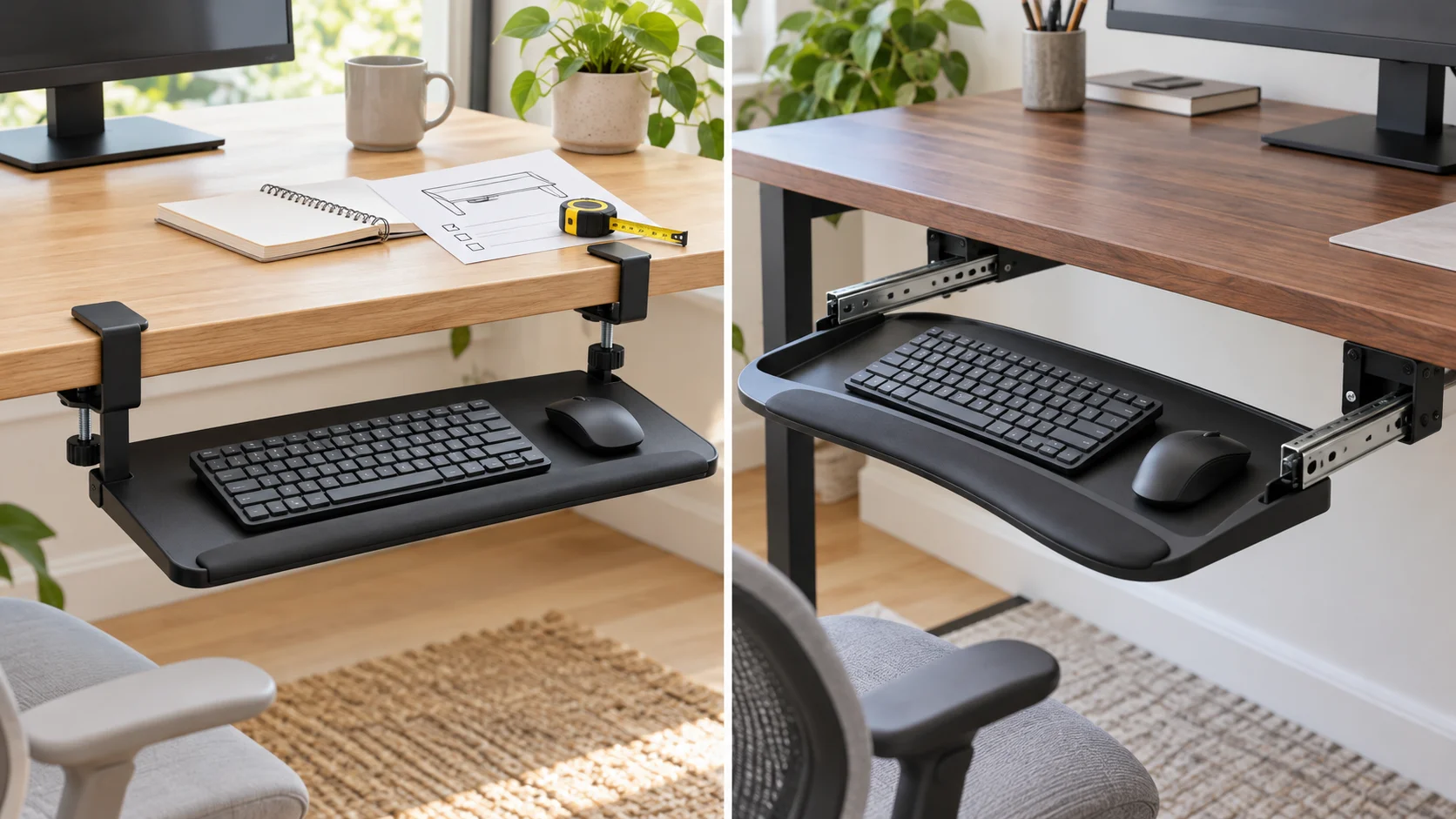
Two current product pages illustrate the choices. The clamp-mounted slide-out keyboard tray is pictured beneath a desk, holding a keyboard and mouse on one black platform. Its listing describes a 25.6-inch tray width, 30 inches including clamps, and an 11.8-inch depth. The NUYADA under-desk keyboard tray appears with mounting rails in its gallery. Those are different mounting approaches. The pictures show the product type and parts, but they do not prove either will fit your particular desk or arrive with every fastener your installation needs.
Measure the space the tray has to occupy
Write down the clear width beneath the desk where your knees and chair normally sit. Also measure depth from the front edge to any support bar, drawer, cable tray or frame member. A published platform width is not the same as the total width needed by clamps or sliding rails. For the first listing, the title itself distinguishes the tray width from the wider span including clamps. Check the seller's complete dimensions for your chosen variant and allow room for the hardware on both sides. For the second, the gallery includes dimension graphics, but confirm that the delivered color and configuration match the listing before drilling or buying additional pieces.
Then check vertical clearance. A tray below the desktop consumes some knee room even while pushed in. Sit at the desk in your usual chair with your hands where you expect the keyboard to rest. Note the distance from the desk underside to your thighs and the chair arms. If the tray or rail housing would crowd that space, its nominal ability to slide out will not solve the problem. A fit problem can turn into a return, a different chair position, or a second purchase. An inexpensive ruler and a few minutes of measurement are more useful here than guessing from a room photograph.
The keyboard and mouse matter too. Measure the actual devices, including a wrist rest if you intend to keep one on the platform. Leave enough lateral space to move the mouse without running into the keyboard. The first gallery photo shows both on one platform, but your devices may be larger. The second gallery shows a molded tray in black and white depictions; it does not establish which color or device arrangement a particular order supplies. Treat the visual as a shape reference, then verify the selected variant and usable surface before committing.
Compare the mounting methods and likely extras
A clamp-mounted tray avoids a permanent hole in the desktop when its clamps fit the edge and the desk structure permits clamping. That can reduce the need for tools, but it creates its own fit checks. Measure desktop thickness at the proposed attachment points, inspect any apron or rounded lip, and look for enough clear front edge for both clamps. A drawer front, decorative trim or metal crossbar can stop a clamp from sitting flat. Do not rely on a clamp photograph to infer the allowable thickness range; confirm the delivered instructions and stated range for the exact model.
The rail-mounted tray shown with the NUYADA listing raises a different set of questions. Its gallery shows a tray and separate rail pieces. Before estimating the work, determine whether the desk underside has a solid, accessible place to secure them. Some desks have thin panels, hollow construction or a frame that blocks the rail path. The listing images cannot tell you what is inside your desk. Check the manufacturer's installation directions, screw length and desk material before making a hole. If the instructions call for pilot holes or a particular tool, include the tool or installer in your cost plan.
Make a short parts inventory when the package arrives. Compare it with the supplied instructions: rails, brackets, clamps, screws and any spacers should be accounted for before assembly. The product gallery is not a substitute for the box contents. If a fastener is missing or a mounting piece differs from the pictured configuration, stop rather than substituting an unknown screw. A mismatched screw can damage the desk or fail to hold the tray. Contact the seller about the exact unit and part instead of buying an improvised replacement that may not fit the design.
Ask whether the installation requires a second person. Holding a rail under a desk while aligning its fasteners can be awkward, especially if you must keep the tray square to the front edge. Moving a monitor, cable bundle or desk to reach the underside also takes time. None of these tasks has a universal amount, but they are part of keyboard tray total cost for a buyer who pays for help or must take the desk out of service. List the tasks before purchase so the time does not appear as a surprise after delivery.
Estimate the work without inventing a price
Use a simple worksheet with separate lines for the selected tray, tax and delivery, required tools, any desk-safe mounting supplies, optional installation help, and possible return shipping. Fill in only amounts that you can verify from the current checkout, installer quote or retailer policy. Mark unknown items as unknown rather than entering a convenient estimate. A product page may show a price today and a different one when you buy. The same is true of delivery availability, so a fixed number here would be misleading.
For a clamp option, the work line might be small if the desk edge fits, the parts are complete and you can adjust it yourself. It could rise if the desk needs relocation or another edge is needed. For a rail option, the work may include measuring, marking, drilling and testing the slide. It could be straightforward on a compatible solid desk, or unsuitable on a thin or obstructed underside. The goal is to identify which situation you actually have, not to declare one method cheaper for every room.
Consider the cost of reversibility. If the desk belongs to an employer, landlord or shared workspace, ask who is allowed to modify it. A clamp may be easier to remove, provided its pressure points will not damage the finish. A rail installation may leave holes after removal. That difference is relevant when a move or desk replacement is likely. Check the actual desk and its rules; the product listings do not grant permission to modify a surface or promise that either mounting method will leave it untouched.
Check fit before choosing a variant
Shopping pages often group several versions under similar words. Keep a record of the exact variant, color and mounting parts selected at checkout. The NUYADA gallery includes both black and white tray depictions, so it is especially important to confirm the delivered version rather than treating every image as a promise of one color. The first page shows a black clamp-mounted tray in use. Neither image set proves the exact finish, hardware count or maximum load of an order unless the selected variant and written specifications say so.
Look at the keyboard's cable or wireless receiver path. A sliding platform changes the distance to the computer as it moves. Leave slack so a wired keyboard does not pull against a port, and route any cable away from the rails. If your desk already has a cable tray underneath, measure the clearance between that tray and the proposed keyboard platform. Relocating the cable tray is another potential task in the total cost. Confirm the final route only after the product is fitted, without trapping a cord between moving parts.
Ask whether the height and reach will remain comfortable in normal use. The clamp listing advertises height adjustment in its title, and the other gallery refers to a four-position arrangement. Those statements identify features to check in the instructions; they do not prove a precise ergonomic result for your body. Test the installed position with shoulders relaxed and elbows at a comfortable angle. If the tray makes you lean forward or forces the chair back, the purchase has not solved the workspace problem that prompted it.
Count the possible return and replacement work
Read the current return terms for the exact seller before opening hardware or drilling. Find out whether assembly, altered parts or damage to packaging affects a return, and whether you would pay to send a large tray back. Record the policy link or a dated copy with your measurements. If the fit remains uncertain, the possible cost of a return belongs in the decision. That is a reason to verify dimensions and desk construction while the package is still unopened, not a reason to assume a return will be free.
Durability is also part of long-term cost, but a photograph cannot predict years of use. Examine the delivered slide for smooth travel, the security of its attachment, and any play at the intended working height. Follow the maker's load and maintenance instructions. Do not overload a tray because a product picture shows a keyboard and mouse. If the rails bind, the clamps shift, or the unit differs materially from its listing, document that condition and contact the seller before continued use.
A related workspace guide can answer a neighboring question without replacing these checks. The public video-call desk guide discusses monitor and desk choices for calls. Use it if the larger work surface is also changing. The public desk pad dimensions guide covers a separate keyboard-and-mouse surface decision. For this tray purchase, the decisive facts remain the exact desk edge or underside, the included hardware, the selected tray variant and the installation path. A general desk plan cannot certify a mount on a desk it has not seen.
Make the final comparison at your own desk
Put the two mounting options side by side on paper. For each, record usable platform dimensions, total installed footprint, desk compatibility evidence, box contents, tools, installation time, return conditions and the current checkout total. Leave a cell blank if the seller has not supplied an answer. This makes missing information visible. A lower advertised tray price should not decide the purchase if the corresponding mount is incompatible, while a more involved mount should not be dismissed merely because it needs a drill that you already own and can use safely.
Check the measurements twice before ordering: once at the desk, once against the exact listing and instructions. If one approach clearly fits and the other remains uncertain, choose based on that evidence rather than the difference between current quoted totals. If both fit, compare the verified total and the amount of work you are willing to do. If neither fits, keep using the current desk arrangement while looking for another solution. Avoiding a forced purchase is a valid way to control keyboard tray total cost.
Check the desk, mounting hardware and installation work before comparing a keyboard tray purchase.