Crypto Commerce
Evertech 8-channel DVR camera kit DVR Kit vs Defender PhoenixM2 for camera monitoring
Compare Evertech 8-channel DVR camera kit by wiring, power, storage, viewing, expansion, and night-vision claims.
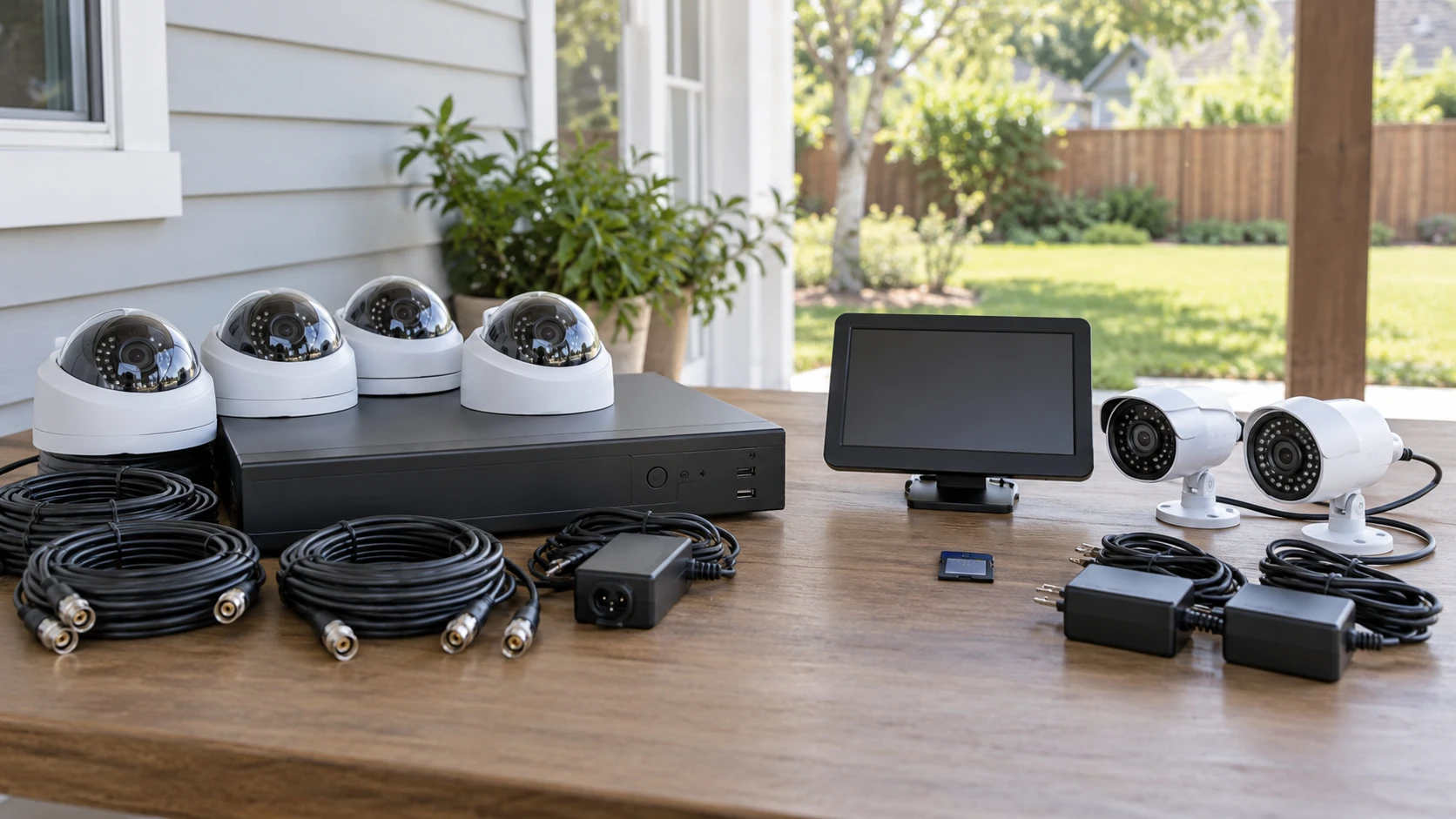
A camera system is easier to choose after tracing where its video and power will go. The Evertech 8-channel DVR camera kit includes four dome cameras, an eight-input recorder, and a preinstalled 4 TB hard drive according to its listing. The Defender PhoenixM2 package includes two cameras, a seven-inch local monitor, and a 32 GB SD card. Defender says its system works without Wi-Fi or an internet connection, although each camera still needs plug-in power. Evertech describes smartphone remote access through its recorder. These are different viewing and installation plans, not just different camera counts.
Neither excerpt supplies a full cable map for every included component. Evertech lists BNC camera inputs and a 12-volt system power requirement, but you should confirm the exact camera cable and individual power supplies in the box. Defender states that its cameras need power, but does not explain the camera-to-monitor video transport in the saved text. Before buying either kit, map the intended camera positions, available outlets, cable routes, local viewing point, and recording schedule. That sketch will reveal the questions a feature list cannot answer.
Locate the cameras before comparing channels — Defender PhoenixM2 camera system
Evertech supplies four dome cameras and a DVR with eight BNC camera inputs. Four unused inputs could allow expansion, but the saved description does not say additional cameras are supplied or that every camera format works at every resolution. The included domes have fixed 3.6 mm lenses and are described for wall or ceiling mounting. A fixed lens gives a set field of view; it does not let you zoom optically to correct a poorly chosen mounting point. Ask for the camera's field-of-view specification and test whether a person at the intended doorway would be recognizable, not merely visible.
Defender supplies two cameras and says the system can accommodate four in total. Expansion would require compatible additional cameras, separate purchases, and suitable power. The listing describes metal, vandal-resistant housings rated for indoor or outdoor use. It does not identify the rating standard or the exact environmental limits in the saved excerpt. Confirm mounting hardware, operating temperature, weather sealing, and compatible camera model numbers. A stated capacity of four cameras is not evidence that a particular third-party camera can join the system.
Put each camera on a floor plan before counting channels. A wide view of a driveway may miss a face at the front door, while a tight view of the door may not show a vehicle. Consider entrances, blind spots, existing light, and the path people actually take. Do not aim cameras into neighbors' private spaces or assume local rules permit recording audio. Check applicable rules and household expectations. The right number of cameras is the number that covers legitimate points of interest with useful detail, not simply the maximum number of recorder ports.
Follow the video and power paths — security camera wiring plan
Evertech's DVR lists eight BNC inputs and selectable camera output formats including AHD, CVBS, TVI, and CVI. The supplied camera is listed at 1920 by 1080 pixels, with an analog or HD-analog output selected by a switch. Check how each included camera is set and what cable length and connectors are provided. A switch in the wrong position could produce no picture or a lower-quality signal. The recorder lists HDMI and VGA outputs for a local display. Confirm whether a monitor and video cable are included; the saved package description does not list one.
The included Evertech camera specification names DC 12 V at 500 mA. The DVR also has a 12 V power requirement. Do not assume one supply can safely power every part unless the installation guide explicitly says so. Count outlets and identify where power distribution will be installed. If cable runs cross walls or outdoor boundaries, follow the electrical and weatherproofing instructions for those runs. An analog video cable and a power lead may need different connectors even when sold together. Check whether the camera kit includes the full run length you need before drilling.
Defender advertises operation without Wi-Fi or internet. Its seven-inch monitor provides local viewing without requiring a smartphone, according to the saved description. The cameras still require plug-in power, so an apparently convenient placement may be impossible if the nearest safe outlet is far away. The excerpt does not specify whether video travels by a dedicated radio link, cable, or another connection to the monitor. Check Republeq's product page for the actual connection diagram, supported range or cable length, and what obstacles can reduce a signal if radio is used. Do not equate no Wi-Fi with no wiring.
The related guide on a security camera wiring plan discusses a different pair of outdoor camera systems, but its central check applies here: plan power and video paths before installation. Evertech and Defender have their own requirements, so do not transfer connector or range specifications from that guide. A sketch showing camera, power source, recorder or monitor, and any network link is more useful than a generic wired-versus-wireless label.
Storage and what the numbers can support — Defender PhoenixM2 camera system
Evertech lists a 4 TB hard drive already installed and support for one SATA drive up to 8 TB. It describes manual, scheduled, and motion-triggered recording, with backup by USB flash drive, USB hard drive, or network. H.265 compression is listed for the recorder. None of that establishes a fixed number of retention days. Storage duration depends on how many cameras record, resolution, frame rate, compression settings, motion activity, and whether audio is included. A full-time four-camera schedule can use storage differently from short motion clips at one entrance.
Defender supplies a 32 GB SD card and states storage can expand to 128 GB. It too advertises continuous, scheduled, and motion recording. A much smaller card does not automatically mean the system is unsuitable; the relevant question is how much footage your chosen settings will keep before older files are overwritten. Ask whether the system overwrites automatically, warns when full, and supports exporting clips without changing the originals. Confirm the supported SD card type and whether the 128 GB limit applies to all compatible media. The saved excerpt does not say how long its included card lasts.
If a recording matters after an incident, be able to find and export it. Ask for a manual or demonstration of date-and-time search, playback speed, and USB or card export. Set the system clock and time zone correctly, and check how it handles power loss or daylight saving changes. A stored video file with the wrong time can be hard to use. Make a brief test recording before relying on either system, then play it back on another device if export is important. A storage-capacity number alone does not prove that evidence can be retrieved when needed.
Local viewing and remote access — Defender PhoenixM2 camera system
Evertech describes PC monitoring with VMS software and mobile monitoring through Xmeye. Those are claims in Republeq's catalog about a network-enabled workflow. Confirm current app availability, account requirements, supported phones, and update policy for the exact DVR model. Password protection is listed; use a unique password and change any default credential during setup. If remote viewing requires the recorder to be connected to the internet, decide whether that convenience justifies the network exposure and maintain supported firmware. The saved excerpt does not specify encryption, cloud routing, or the long-term support period.
Defender's selling point is local operation without Wi-Fi or internet. That may suit a buyer who wants a dedicated monitor or a place with unreliable broadband. It also means you should not expect a phone alert or remote live view from this saved description. Ask whether any optional remote capability exists rather than assuming one, and decide whether someone will actually be near the monitor when an event occurs. A local recorder can preserve footage for later review without someone watching continuously, but it cannot guarantee an immediate response to a visitor or incident.
Defender lists two-way talk between monitor and cameras. Check microphone and speaker placement, usable distance, and whether audio is captured in recordings or only used live. Evertech lists one RCA audio input and one output on the DVR, but the supplied dome-camera description does not mention a microphone. A recorder with an audio socket does not imply all four supplied cameras record sound. Verify whether audio accessories are included and whether their use is appropriate where the cameras will be installed.
Night vision and image detail — Defender PhoenixM2 camera system
Evertech says its cameras use infrared LEDs with a stated distance up to 50 feet. Defender claims night vision up to 40 feet in complete darkness. Those numbers are not directly comparable without target size, contrast, lighting, and test criteria. A person can be detected at a distance without enough facial detail to identify them. Reflections from glass, a close wall, or a bright porch light can also interfere with nighttime images. Test the intended camera angle in the dark and review the recorded clip, not only the live preview.
Evertech's listed camera resolution is 1920 by 1080 pixels, called 2.4 MP in its description. That tells you the image dimensions claimed for a camera, not how clearly a distant subject will appear after recording and compression. Defender's saved excerpt does not give a pixel resolution. Do not rank image quality from Evertech's number against a missing Defender number. Request sample clips from the exact models under similar daylight and night conditions, ideally at the distance you need. A field-of-view figure and recorded bitrate would help interpret any sample.
Weather claims need similar care. Evertech's dome housing is described as metal and suitable for wall or ceiling mounting, but the excerpt does not call it outdoor-rated. Defender describes indoor/outdoor use and seasonal resistance, but provides no test standard in the saved text. For either kit, verify the current camera rating and mounting guidance before exposing it to rain or sun. Protect cable connections and power adapters as the manual requires. An outdoor-rated camera does not automatically make its plug, outlet, or cable joint outdoor-rated too.
Which system fits the job? — Defender PhoenixM2 camera system
Evertech is the more clearly specified starting point for a multi-camera recorder installation: four supplied domes, eight DVR inputs, a preinstalled hard drive, and listed local and smartphone viewing. It also calls for a careful cable and power plan, plus confirmation of camera compatibility and app support. The Defender PhoenixM2 camera system starts with fewer cameras, a dedicated local monitor, an SD card, and no required internet connection according to its listing. Confirm its camera-to-monitor link and outlet needs before choosing it for a remote corner of the property.
Neither kit should be judged solely by the largest storage or night-vision number. Draw the installation, confirm what comes in the box, and test one camera, one recording, and one exported clip before mounting everything permanently. The right system is the one whose viewing path, power requirements, recording retention, and maintenance fit the property and the people who will use it.