Crypto Commerce
Check hard drive compatibility before choosing a replacement
A replacement drive listing can tell you a great deal about the drive and almost nothing about the computer that would receive it. To check hard drive compatibility , identify the exact desktop configuration first, then ask whether its documented storage connection and physical accommodation match the proposed drive. A shared Dell name, an HDD option and a plausible capacity do not answer those questions.
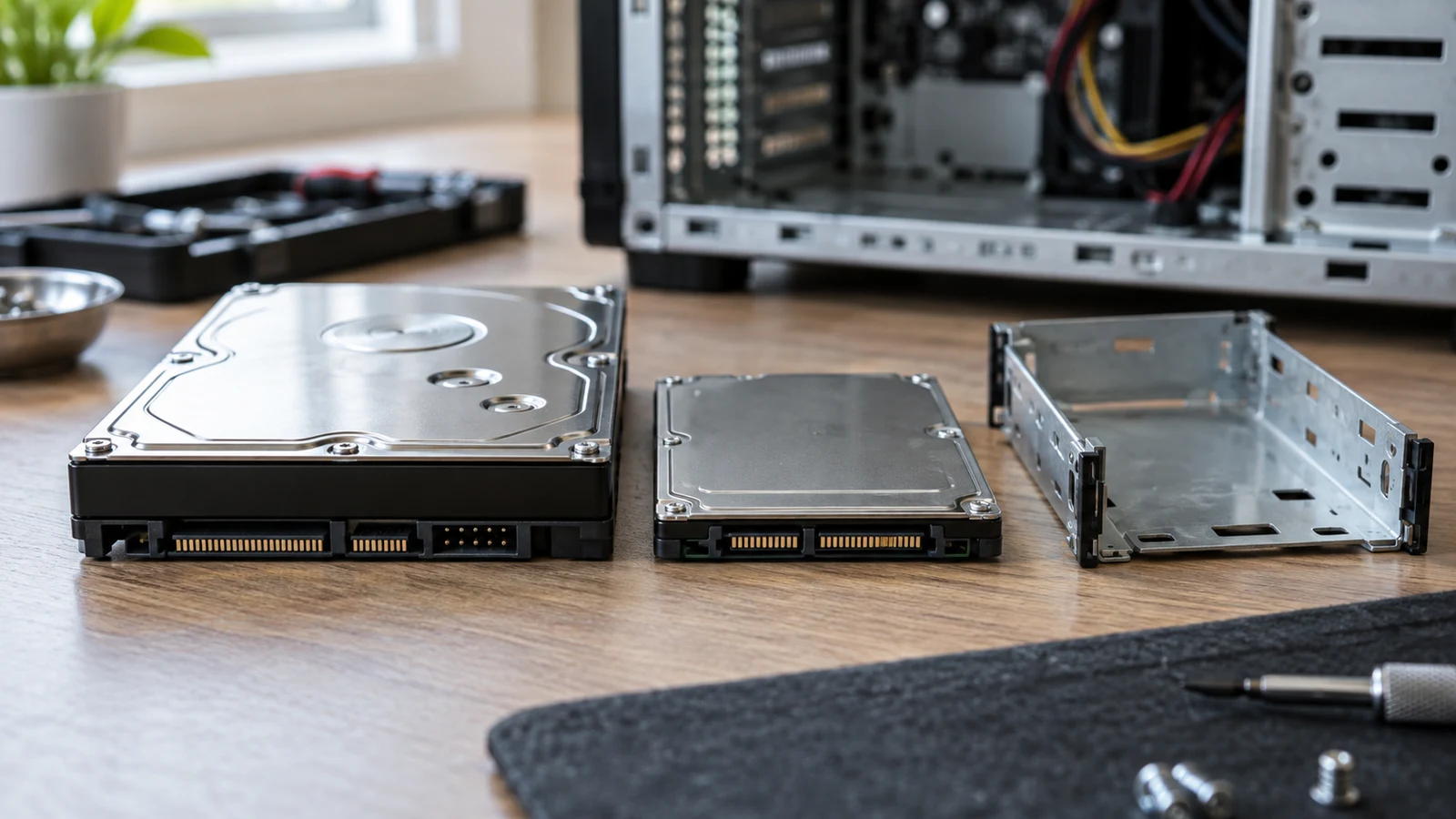
A replacement drive listing can tell you a great deal about the drive and almost nothing about the computer that would receive it. To check hard drive compatibility, identify the exact desktop configuration first, then ask whether its documented storage connection and physical accommodation match the proposed drive. A shared Dell name, an HDD option and a plausible capacity do not answer those questions.
Consider the Dell HUC101818CS4204 (RF9T8) drive alongside a restored Dell OptiPlex desktop listing. The drive description identifies a 2.5-inch SAS device; the desktop description offers storage capacity choices without identifying the storage interface of a particular machine. This is an inquiry to resolve before choosing a replacement, not evidence that the two listings describe a compatible pair.
Identify The Refurbished Desktop Configuration First
Start with the computer you actually have, or the precise computer you intend to order. The advertised refurbished desktop configuration describes a restored Dell OptiPlex with an Intel Core i5 8th Gen processor and selectable details, including up to a 2TB HDD or a 512GB SSD. Those are alternatives in a product description; they do not identify which storage option, exact model or chassis belongs to a particular unit.
For a desktop already in your possession, record its full model or service identifier and its actual storage configuration from reliable documentation for that machine. For a proposed purchase, ask the seller to identify the exact model and the specific storage option being supplied. If the listing covers more than one build, an answer about an unspecified OptiPlex may still leave your question open. A refurbished desktop configuration needs to be pinned to one receiving machine before you compare its storage requirements with a proposed part.
The word “restored” does not supply a missing interface specification. Nor does the processor generation tell you which drive connection, bay or mounting arrangement is present. Keep the product description separate from the details you still need for the individual machine. A photograph of one possible configuration should not be treated as a specification for another one.
Write the receiving computer at the top of your inquiry: exact model, selected or installed storage option, and the source that identifies each detail. If one field is unknown, leave it blank. That blank is useful: it prevents a capacity choice from quietly becoming an assumption about the physical computer you will receive.
Read Replacement Part Numbers As Drive Identity
The hard drive compatibility question has a more detailed drive side. The supplied Dell listing calls the device HUC101818CS4204 (RF9T8), 1.8TB, 2.5-inch, SAS, SFF, 6G and 10K. Preserve those fields together when asking about a match. An answer for a different drive that happens to have the same capacity will not settle this particular inquiry.
HUC101818CS4204 and RF9T8 are identifiers to quote precisely. SAS is the interface wording in the advertisement; 2.5-inch and SFF describe its advertised physical format. The other listed values help identify the exact product under discussion, but none establishes what connections or mounting parts are present in the prospective computer. Even a model number quoted correctly cannot fill in an unknown host specification.
A separate guide about replacement part numbers explains the broader distinction between identifying a part and establishing where it fits. For this storage question, use that distinction narrowly: ask whether the documented receiving computer supports this specifically identified SAS drive, rather than assuming that an identifier or a Dell label is a cross-reference to every Dell desktop.
If a seller describes the drive with a shortened name, request confirmation that the offered item matches the full advertised identifier and interface. Tracking replacement part numbers accurately keeps the inquiry about the actual proposed drive. If a computer document lists supported storage hardware under a different naming scheme, ask for a model-specific explanation connecting the two. Similar-looking codes are a reason to ask a clearer question, not to declare a match.
Separate Capacity From The Refurbished Desktop Configuration’s Connection
The desktop description’s 2TB HDD or 512GB SSD alternatives speak to offered storage choices. They do not state that the receiving computer accepts every hard drive of a similar or smaller stated capacity. In particular, “HDD” names a kind of storage device in the option list; it does not supply the interface required by the Dell drive listing.
Ask what storage interface the exact desktop configuration supports for the position you would use. Then ask whether its documented connection can support the listed 6G SAS drive, with whatever equipment the exact machine requires. Do not infer the answer from the presence of a hard drive option. The computer listing as supplied gives no receiving-interface specification from which to settle the question.
It is possible to know which of the two advertised capacity alternatives you prefer and still have no answer about the replacement drive. If you are replacing an existing device, identify that device and its position in the actual system through appropriate model-specific records before comparing it with the proposed part. If you are considering a desktop purchase, ask which storage option will be delivered and whether the seller can document support for the proposed replacement in that exact build.
Keep The Refurbished Desktop Configuration Tied To One Machine
A response such as “OptiPlex desktops use hard drives” is too broad for this inquiry. Ask for the full machine identification behind any compatibility answer, and whether the answer applies to the selected storage configuration rather than another variant in the same listing. If the documentation covers multiple configurations, locate the one the seller would actually supply or the one printed on your own machine’s records.
The same caution applies when a support document mentions several possible storage arrangements. A supported option elsewhere in a model family is not necessarily the option present in the computer you are evaluating. You need a connection between the documented option, the exact machine and this drive’s advertised SAS interface. Otherwise, mark the interface row as unresolved.
Ask About Physical Accommodation With Replacement Part Numbers In Hand
A 2.5-inch label answers a limited physical-size question. It does not tell you whether an identified desktop has an available position for the drive, what carrier that position uses, or which connection arrangement is needed there. Treat those as separate questions to put to the seller or to check in documentation for the exact machine. Do not order a carrier or connector from a picture alone.
Ask which bay or mounting position is meant for the replacement and what, if anything, must be supplied alongside the drive to use that position. Ask whether the proposed drive’s listed format is supported there and how the system would connect to it. A seller might be able to answer from the exact configuration; if not, seek documentation for that machine rather than filling the gap with a general assumption about desktop hardware.
This is also where the complete drive identity helps. “Will a 2.5-inch disk fit?” is too little information when the proposed item is specifically an HUC101818CS4204 (RF9T8) SAS drive. Include its interface and identifiers in the question so a reply cannot mistake it for a different device of the same physical size. Ask for confirmation about the offered or installed desktop, rather than a statement about the Dell brand in general.
When a listing does not say whether a carrier or other required connection part is included, do not infer its presence or absence. Record what the exact machine requires and what the proposed purchase actually includes as two different facts. An unresolved mounting or connection detail remains unresolved even after someone confirms that the drive itself is 2.5-inch.
Pair Known Drive Details With The Refurbished Desktop Configuration Evidence Still Needed
Build a short, two-sided inquiry before deciding. On one side, copy the advertised drive detail; on the other, write the exact computer evidence you still need. The pairs below keep a clear question attached to each field rather than allowing one reassuring number to stand in for the missing answers.
- Drive identity: Dell HUC101818CS4204 (RF9T8). Computer evidence: the exact desktop model and configuration to which any compatibility answer applies.
- Drive interface: 6G SAS. Computer evidence: documented storage-interface support for the intended position in that specific machine, plus clarification of any required connection hardware.
- Drive format: 2.5-inch SFF. Computer evidence: the supported bay or mounting position and any carrier or mounting parts needed for that configuration.
- Drive capacity and other advertised fields: 1.8TB and 10K. Computer evidence: a model-specific answer about this identified drive rather than an inference from the desktop listing’s 2TB HDD or 512GB SSD options.
Use the pairs to ask one concrete question: “For this exact desktop model and selected storage configuration, is the Dell HUC101818CS4204 (RF9T8) 1.8TB 2.5-inch 6G SAS drive supported in the intended position, and what connection or mounting parts would be required?” Include the machine identifier when you have it. If you do not, ask for that identifier before accepting a compatibility answer.
Record where each answer came from. A product title establishes what was advertised for the drive; a configuration option establishes what a desktop listing offers; documentation or a specific seller response may address what a particular machine supports. Keep the answer tied to its subject. A statement about one build should not be carried over to another build merely because both are called OptiPlex.
Leave the purchase decision open wherever the interface, mounting position or required parts have not been established for the exact computer. Once those questions have specific answers, revisit the drive listing with the identifiers in front of you and decide whether the offered item matches the documented requirement. If a cryptocurrency payment option appears at checkout, evaluate it only after the hardware question is settled; the availability or terms of such an option are not established by these product descriptions.
The useful outcome of a hard drive compatibility check is a defensible answer for one receiving computer and one proposed drive. If the seller cannot identify the desktop configuration or document the needed connection, keep the inquiry open instead of treating the advertised capacity or a shared brand as a substitute for that evidence.