Office Supplies & Stationery
Bullet journal vs guided planner: choose your page layout
Compare a self-designed dot-grid notebook with a guided 13-week journal by trying a real entry in each layout and checking the actual interior pages.
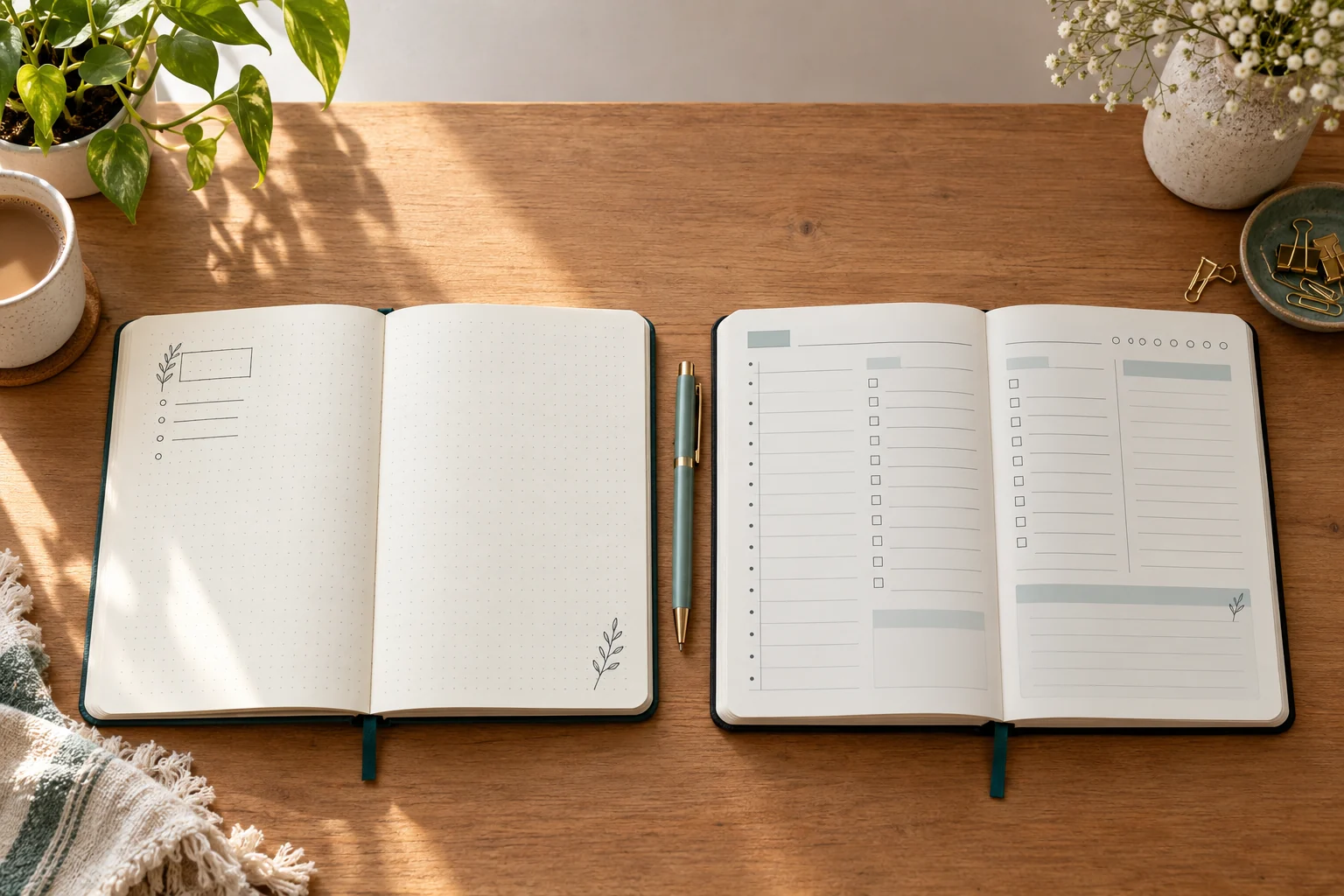
The Bullet journal vs guided planner choice starts with how much page setup you want to do each day. If you are choosing one for a new planning habit, start with the part you want to write yourself. A flexible notebook leaves the arrangement to you. A guided planner gives that arrangement a shape before you open it.
Choose the amount of page design you want to do
The Official Bullet Journal Edition 2 is listed with 204 numbered dot-grid pages and a grid guide inside the front cover. You can decide where a daily log, a list, or a longer note belongs. That freedom asks you to make a layout and keep track of where you put things. The listing describes the paper and guide, but its single gallery image shows the closed cover. It does not show a sample spread.
The BestSelf 13-Week Self Journal is listed as an undated guided planner with time blocks, task lists, habit tracking, and weekly reflection. Its gallery also shows a closed journal and packaging, so the photo cannot settle how much space each section gives you. The listing describes a structured planning format. It does not establish that the format will improve focus, happiness, or any health outcome for a particular reader.
Imagine the first ten minutes of use. If drawing a simple grid and choosing your own headings sounds useful, the dot-grid notebook gives you that control. If you would rather respond to printed prompts, inspect a sample of the guided planner's actual pages before ordering. A closed-cover photo cannot answer whether those prompts leave enough room for the way you write.
Make a one-page trial with the notebook you have
Draw two rough pages on spare paper. On the first, leave open space and add only the headings you would choose yourself: perhaps a date, a short task list, and a note area. On the second, divide the page into time blocks, tasks, and a place to look back at the week. Use real entries from an ordinary day. You are testing how much of the page you need to organize before you can start writing.
Notice what you leave blank and what runs out of room. If your task list changes during the day, a format you can rearrange may be easier to maintain. If you keep rewriting the same headings, a prearranged page may save that setup. Neither test predicts whether you will keep the habit for thirteen weeks; it gives you a practical question to take back to the product pages.
Check the physical format separately
The bullet-journal listing names a medium A5 format and 204 pages. The guided planner's title names a thirteen-week period, but that is not a measurement of usable writing space on each page. Check current dimensions, page examples, and the selected variant with the seller if those details decide the purchase. The two cover images show distinct books, not their interior layouts or paper performance under your pen.
If you carry a journal, compare the stated size with the bag or desk space you actually use. If you write long notes, ask for a photographed interior page and look for the room left after printed sections. A paper-weight figure or a marketing claim about focus cannot replace trying the layout that will hold your entries.
Keep other planning questions in their own place
A journal page is for your personal record. A shared wall display has a different job: the wall calendar setup guide compares a weekly board and a monthly grid for dates other people need to see. If one occurrence of a recurring plan changes, the calendar exception notes guide covers recording that change without rewriting the whole arrangement. Those decisions do not determine which journal page you will enjoy using.
Choose the notebook around the entry you expect to make tomorrow. Write that entry in both trial layouts, then check the listing for the page details the trial could not show. Keep unanswered questions open until the seller provides a sample of the exact edition and variant you plan to buy.
Decide what the journal must hold
Write down the entries you actually expect to make. A person recording appointments and a few tasks may need a different page from someone collecting ideas, sketches, and long notes in one place. Use a recent ordinary week as your sample. Count the days that needed a full page, the days that needed only a line, and the subjects you would want to find again. This gives you a rough picture of the space and navigation you need. It also tells you whether a repeating daily template would be used or mostly left empty.
For a planning journal, separate the entry from the calendar that supplies the date. Write a commitment only after checking the source that establishes it. A notebook can help you remember what to ask or prepare, but its pages do not make an appointment or alter somebody else's schedule. If you often revise a plan, leave room to mark where the current version came from. That practice works in either journal. It is a decision about your record, rather than a feature promised by either listing.
Think about entries that do not fit a date. A reading note, packing list, or question for a later conversation may need to stay findable after the day passes. On the dot-grid trial page, put a short reference at the top and decide where an index would point to it. On the guided trial page, choose where the same note would go without taking over a time block. If that placement is awkward, ask for interior pictures of the exact planner before assuming its prompts will accommodate your notes.
Try a dot-grid journal layout
For the dot-grid journal layout trial, start with only the structure you need today. Mark the date. Add a small task area, then leave the rest open for notes or an unexpected item. Tomorrow, try the same arrangement without looking back. If you need to redraw boxes each time and find that work irritating, the flexible notebook asks for more setup than you want. If you change the layout naturally as entries change, its open page may be the reason to choose it.
The official bullet-journal listing says the pages are numbered and includes a grid guide. Those details make it reasonable to test an index and a repeated layout on scrap paper. They do not tell you how a particular index will be printed or whether a page will accept the pen you use. Write a short index entry such as “October project notes, page 6” in your mockup, then try to find the note a day later. The test is about your navigation method. The native cover image does not show the index or interior pages, so check a seller-supplied sample if that part matters.
Leave an unfinished task in the trial and bring it forward the next day. Decide how you will mark it so you can tell a completed task from one merely copied onto another page. If you cannot read your own marks a week later, simplify them. A notebook with open pages gives you room to change the scheme. It cannot supply a universally correct set of symbols, and this guide does not assume that any particular method will make you more productive.
Test a guided 13-week journal with the same day
To test the guided 13-week journal format, use the same sample day. Divide a blank sheet into time blocks, a task area, a habit area, and a place for reflection. Those section names come from the Self Journal listing; this paper mockup is not a copy of its actual page design. Put the same entries in the mockup that you used for the dot-grid version. Compare how much had to be squeezed into a section, how much room stayed empty, and how often you wanted to put a note somewhere the sections did not suggest.
Try an interrupted day, too. Suppose a meeting moves and one task becomes tomorrow's problem. Mark the change on the paper mockup and decide where the new information would live. If you want a large blank area for the reason behind a change, a highly divided daily page may feel tight. If seeing the same headings each day helps you begin, the guided format may be worth that trade. The product page does not show enough interior detail to decide it for you. Ask to see a current edition spread before treating your mockup as the book's measured layout.
The listing calls the planner undated and names a thirteen-week span. That means the title presents a defined planning period; it does not prove how many pages you receive for each day, how many undated pages you can leave unused, or what happens if you pause halfway through. Ask for a page count and a sample week when those details affect your choice. Avoid inferring a daily page count from the cover or the number of weeks in the name.
Plan for a missed day and a changed routine
Most journal comparisons picture a full, tidy page. Try a blank day in each mockup. For the self-designed page, decide whether to leave a gap, turn to the next page, or write a short note about why no entry was needed. For the guided page, decide whether a preprinted blank spread would bother you or help you resume. There is no need to fill every box to justify a purchase. This exercise is a way to find out which arrangement you can return to without spending time reconstructing what happened.
Repeat the exercise with a week that changes shape. Perhaps one day needs a long project note and another has three brief errands. A flexible page can allocate space differently on those days, provided you are willing to organize it. A guided page can make routine entries quicker to locate, provided its printed sections match the entries you make. Those are tradeoffs to test with your own writing. Neither native listing measures how often your schedule will change or which format you will prefer after a month.
Check the daily planning notebook format
Check the daily planning notebook against your available space as carefully as you check its layout. The bullet-journal title states a medium A5 format and its description states 204 pages. Those are listing claims tied to that offer; confirm the selected variant at checkout. For the guided planner, the title's thirteen weeks describe the intended planning span, not its thickness in a bag. If you have a shelf, bag pocket, or desk drawer in mind, compare stated external dimensions to that space. If the listing does not give them, leave the fit question open.
Paper feel is another question the gallery cannot settle. The bullet-journal listing names a 120 GSM paper, but that figure alone does not prove how your specific ink will behave. The guided planner's listing emphasizes prompts rather than a demonstrated pen test. If you rely on a particular fountain pen, marker, or highlighter, seek a trustworthy sample with that pen or inspect the book in person. Do not treat a photograph of closed covers as evidence of bleed-through, drying time, or writing comfort.
Make the final comparison on one sheet
Draw two columns labeled with the exact products you are considering. Under each, write what the native page actually states: the bullet journal's numbered dot-grid pages and front grid guide; the guided planner's time blocks, task lists, habit tracking, and weekly reflection. Put a question mark beside every interior detail the product page has not shown. This keeps a confirmed listing feature separate from an assumption about the page you will receive.
Below those notes, put the result of your two paper trials. Which page held your longest ordinary entry? Which took more setup before you could write? Could you find a note again after a day? Did a blank day make either format awkward to resume? Your answers may favor one book even if both native descriptions sound useful. If the difference hinges on an interior measurement or page example, ask for it before ordering. The trial shows your preference; the seller must establish the exact product details.