Crypto Commerce
Azulle Access Pro mini PC stick vs MiniX NEO J51 for a small workstation
Compare Azulle Access Pro mini PC stick by processor identity, memory, storage, network ports, display setup, expansion, and desk fit.
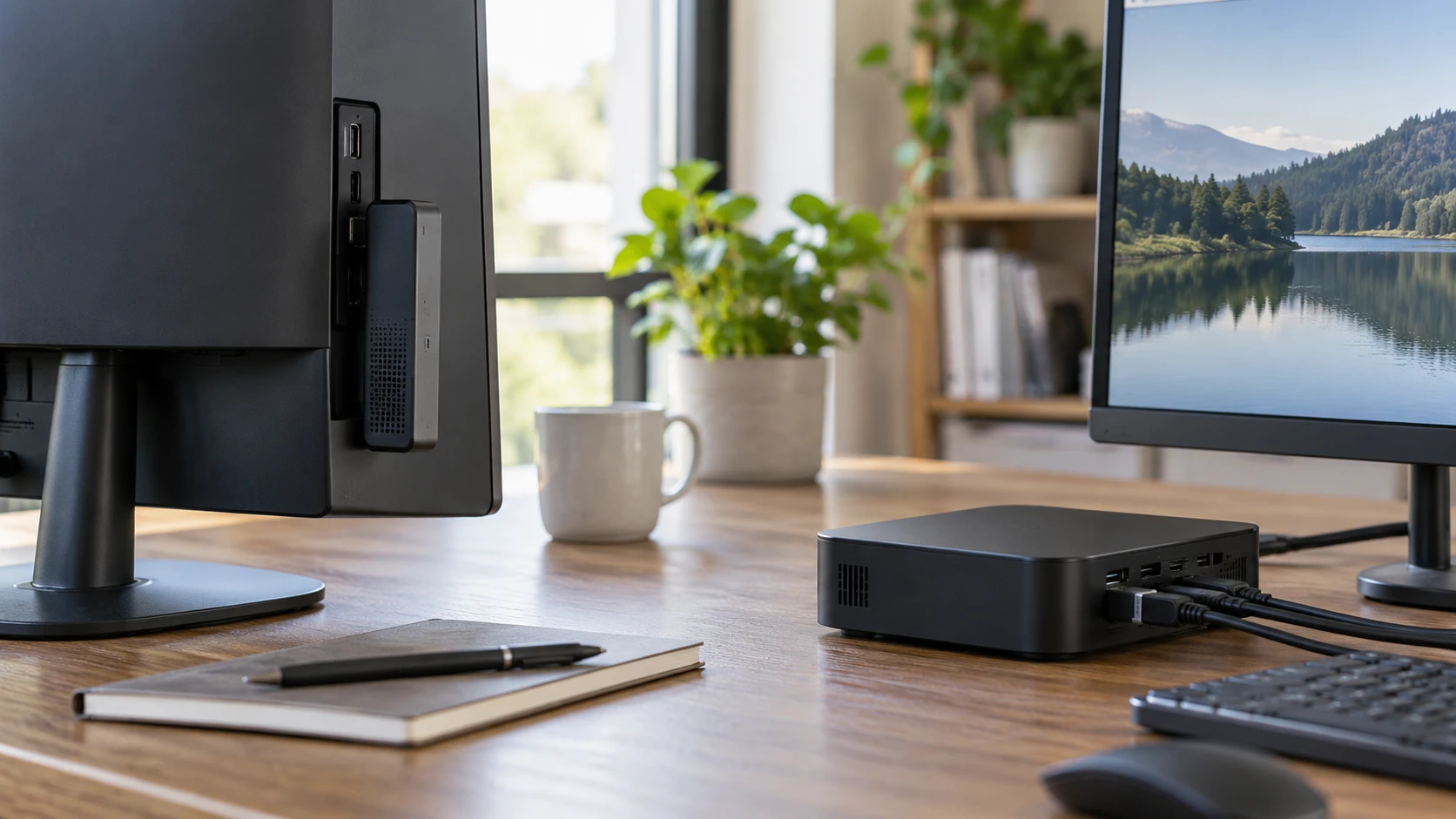
The Azulle Access Pro mini PC stick plugs into a display and lists 4GB of memory with 64GB of eMMC storage. MiniX NEO J51-C8 MAX is a small desktop box with 8GB of memory and a 512GB NVMe drive. The first may suit a simple display that needs a Windows computer close behind it; the second has more stated room for applications and files. The listings do not include matched performance tests. Choose the software, screen, and network connections first, then check that the exact configuration shipped has the ports and operating system you expect.
The published guide on computer memory and storage capacities helps separate two figures often compressed into a single buying decision. Memory keeps open programs working; storage holds Windows, installed applications, and files. Azulle's 4GB/64GB and MiniX's 8GB/512GB are not interchangeable pairs of numbers. A person keeping only one light application open may have different needs from someone using several browser tabs and storing local media. Ask how much free space remains after Windows and required software are installed on the exact machine.
The MiniX NEO J51-C8 MAX mini PC lists an Intel Celeron N5105, DDR4 memory expandable to 16GB, and an NVMe SSD with support for up to 2TB. Azulle's listing describes a fanless stick with a much smaller case and includes a microSD slot. It does not state that its built-in memory or eMMC can be upgraded. Treat microSD expansion as a separate removable-storage option until the manual clarifies its speed and allowed use. If the computer is expected to last through larger software updates, the upgrade path deserves as much attention as the initial price.
Verify the exact processor and Windows package — MiniX NEO J51-C8 MAX mini PC
The Azulle description gives two processor options: Intel Celeron J4125 up to 2.7GHz or Intel N100 up to 3.4GHz. Its graphics line names Intel UHD Graphics 600, but the excerpt does not map each processor and graphics combination to a separate offer. Confirm the SKU, processor, memory, and storage shown on the product label or in Windows before accepting delivery. A title that combines option names does not prove that a particular box contains the faster one. Check Republeq's product page for a photo of the exact configuration page if the N100 is part of your decision.
MiniX names one processor in the pinned row: a quad-core, quad-thread Celeron N5105 with Intel UHD700 graphics. It describes office work, media playback, webcasting, and e-sports as possible uses. Those are marketing use cases, not measured frame rates or responsiveness in your applications. Try the program you intend to run, with the browser and security software that will be installed in daily use. Compare the time it takes to open a file, play your normal video, and return to another application. Clock speed and processor names alone cannot replace that exercise.
Both listings say Windows 11 Pro comes preinstalled. MiniX calls it Windows 11 Pro Retail, while Azulle says Windows 11 Pro. Ask for the activation status and recovery method for the exact unit; the saved excerpts do not specify how either device will be restored after a drive failure or system reset. On a managed office network, confirm that the Windows edition and hardware meet the organization's enrollment and security requirements. Neither product listing establishes support policies, firmware-update frequency, or a particular warranty term.
Azulle's fanless construction may appeal in a quiet location, but its excerpt does not give a measured noise figure or long-duration thermal test. MiniX does not specify its cooling design in the pinned text. Check ventilation instructions for both before placing one behind a monitor or inside a cabinet. A tiny case still needs the airflow the maker requires. Run the intended workload long enough to see whether the device becomes unresponsive or changes performance after warming up. The saved catalog descriptions do not settle thermal behavior under continuous use.
Plan where files and applications will live — computer memory and storage capacities
Azulle lists 64GB of integrated eMMC storage. MiniX lists a 512GB PCIe NVMe SSD. Those are different storage technologies as well as different capacities, but the source does not provide matched read or write measurements. The practical gap is space for the operating system, updates, applications, and user files. Write down the size of the software you need and whether files will be kept locally or on a shared drive. If a kiosk or simple display application needs few local assets, Azulle's smaller number may be workable. If offline documents or media grow over time, MiniX provides a larger stated starting drive.
MiniX says its 8GB DDR4 memory can expand to 16GB and its 512GB drive supports up to 2TB. The source does not say whether expansion requires replacing existing parts, which components are user accessible, or whether service affects a warranty. Request the maintenance guide and compatible-part list before buying on the assumption that an upgrade will be simple. Azulle's listing gives a microSD slot but no internal upgrade procedure. A removable card may help hold media or transfer files, while it should not be treated as an assured replacement for internal Windows storage without manufacturer guidance.
MiniX's office and webcasting examples may involve background applications, a video call, and files open at the same time. Azulle's 4GB memory can be assessed against the exact program and tab count rather than a broad label like "light use." If the intended workload is a digital sign or a single browser page, test that setup through a full workday. If several programs must stay open, repeat the test on both machines. Watch for disk activity and delays when switching tasks. That gives a more useful answer than comparing the two capacity labels in isolation.
Connect the screen and network — MiniX NEO J51-C8 MAX mini PC
Azulle lists HDMI 2.0, one USB-A 3.0 connection, one USB-C 3.0 connection, a microSD slot, and RJ45 Gigabit Ethernet. Its stick measures 4.5 by 2 by 0.8 inches and weighs a stated 4.4 ounces. It is meant to plug into most displays, but the saved description does not include the monitor. Inspect the HDMI area on your screen before ordering. An adjacent port, a recessed socket, or a wall mount can leave too little room for a stick and its cables. Ask whether an HDMI extension, power adapter, keyboard, or other accessory is included; the pinned listing does not answer those packaging questions.
MiniX specifies two USB 3.2 ports with transfer speeds up to 10Gbps and dual 2.5G LAN. It also lists dual-band 802.11ax Wi-Fi. The pinned excerpt does not name its video outputs, case dimensions, or included cables. A computer described as supporting 4K playback still needs a confirmed connection to the particular display you own. Request a rear-panel photo and video-output specification before treating the MiniX as a drop-in replacement for an HDMI stick. Check whether its two USB ports are enough for input devices, external storage, and a webcam in your setup.
Azulle lists Wi-Fi 6 and Bluetooth 5.2 along with its wired Gigabit connection. MiniX lists 802.11ax Wi-Fi and two 2.5G LAN ports. The higher MiniX Ethernet rating does not automatically make internet browsing faster: the switch, router, cable, and service path all matter. Dual ports could be useful in a network task if the software supports the arrangement, but the listing does not describe a routing or firewall function. Test the intended network and ask whether the device must remain reachable when the screen is off or the computer restarts.
The Azulle USB-C port is listed as USB-C 3.0, without a statement that it carries video or powers the computer. Do not assume those functions from the connector shape. MiniX's source describes USB 3.2 speed but gives no Type-C function table. Confirm each device's power input and whether the supplied adapter occupies a nearby outlet. A compact computer can still create a cluster of cables behind a display. Sketch the keyboard, mouse, network, storage, audio, and power connections, then count physical ports rather than relying on a product photograph that hides one side.
Decide how the computer will be maintained — MiniX NEO J51-C8 MAX mini PC
Azulle's stick is easy to imagine behind a single screen, but someone still needs access to its ports and reset controls. Check whether a person can remove it without taking the display off a mount. The stated microSD slot and Ethernet jack may be hard to reach once the stick is installed. MiniX has more stated internal expansion and network capacity, yet its mounting method and dimensions are not documented in the pinned excerpt. Ask whether it can be secured under a desk or behind a monitor, and whether that position leaves room to open the case for later service.
Keep a record of the delivered model and Windows activation before assigning either unit to a shared display. For Azulle, note whether it is the J4125 or N100 option; for MiniX, confirm the N5105, 8GB memory, and 512GB SSD. Test a normal boot, software update, and restart with the display and network that will be used. The saved listings establish specifications to check, not a record that either individual unit will maintain performance indefinitely. If remote recovery matters, ask about BIOS settings and supported management tools instead of assuming a consumer mini PC can be managed unattended.
Azulle is the one to inspect for a display-adjacent Windows stick where physical size and direct HDMI placement are priorities. MiniX is the one to inspect for a small desk or network position that benefits from more starting memory and storage, stated upgrade limits, and two faster-rated Ethernet ports. Confirm Azulle's processor variant and MiniX's video outputs before paying for either. Then run the intended application and a realistic update cycle on the exact configuration. The machine that fits both the workload and the cable layout will be easier to keep useful than the one with the more attractive specification list alone.