Crypto Commerce
Audioengine A2+ desktop speakers + vs DFYXO soundbar for a computer desk
Compare Audioengine A2+ desktop speakers by wired and Bluetooth inputs, power, placement, controls, lighting, and upgrade paths.
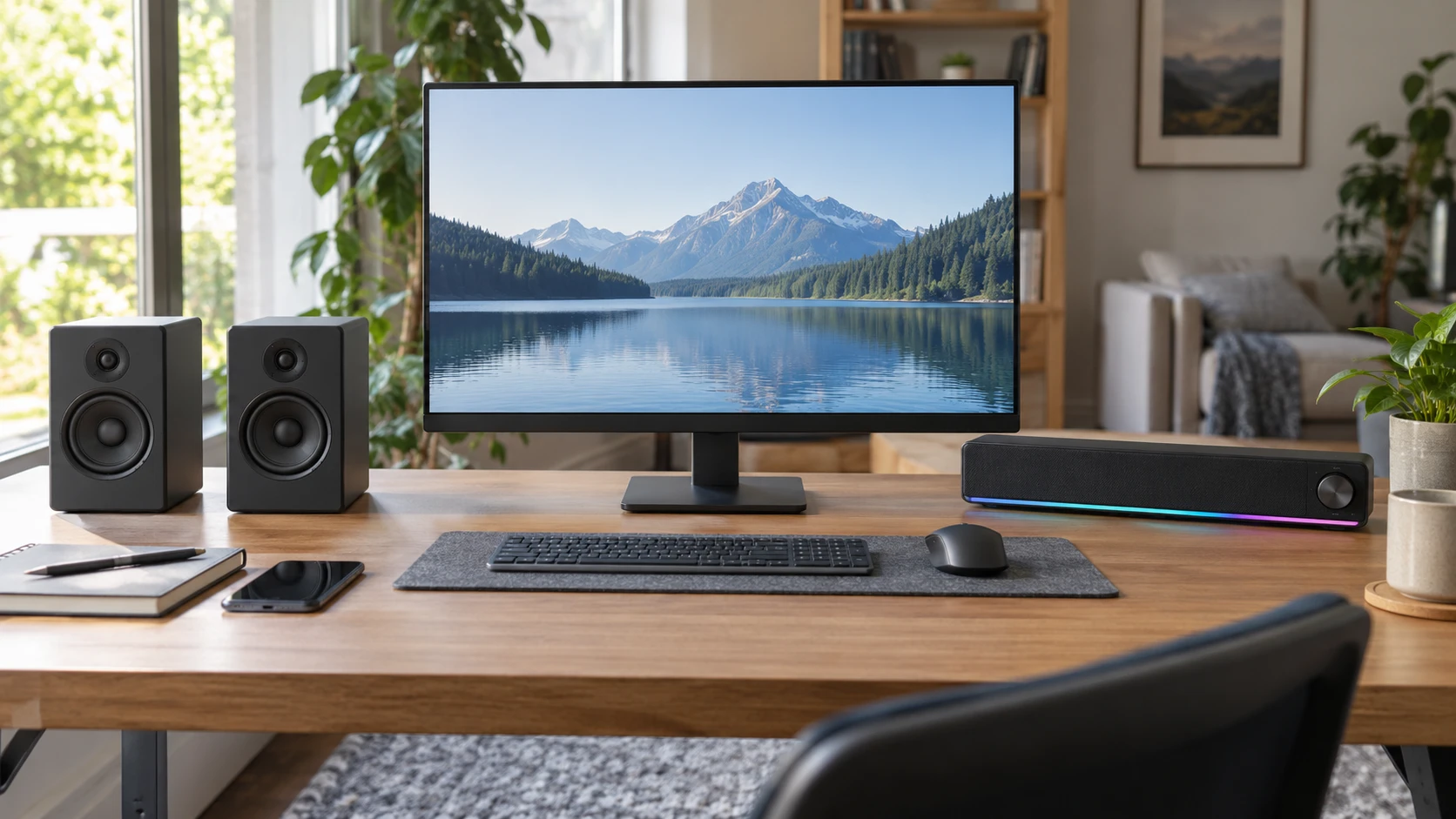
The Audioengine A2+ desktop speakers are a two-cabinet system with USB-C, RCA, 3.5 mm, and Bluetooth input options, plus an output for a subwoofer. DFYXO is a compact USB-powered soundbar with Bluetooth 5.0, a 3.5 mm auxiliary input, a single control knob, and RGB lighting. The pair needs room on both sides of a display and a route for its wires. The bar needs a clear space below or beside the screen and a USB power source. Start by marking those spaces on your actual desk.
The published guide on Bluetooth audio pairing direction explains why the source of a sound and the device playing it must be paired in the right direction. It does not test these speakers. Decide whether the computer will send audio through a cable or Bluetooth and whether a phone will also use the system. Then test the real sequence: play from the computer, switch to the phone, and return. A device can show as paired while the operating system still sends sound to another output.
Map the inputs before buying — Bluetooth audio pairing direction
Audioengine lists USB-C, RCA, and 3.5 mm AUX for wired sources. Its Bluetooth 5.3 listing names aptX-HD and a range up to 100 feet. Those details make it worth checking the output available on each computer, turntable, or phone. The saved source does not state whether every USB-C source is supported, the exact converter behavior, or how multiple inputs are prioritized. Do not assume a connector carries the preferred audio mode just because its plug fits. A short cable test with the actual source will settle more than a port list.
DFYXO lists Bluetooth 5.0 and a 3.5 mm AUX connection, with USB supplying power. Its description says it works with a range of devices that have a standard 3.5 mm output. That does not mean its USB lead is a digital audio input; the short source describes USB as power. If a laptop has no headphone jack, plan how it will send audio through Bluetooth or an appropriate adapter. If a console or desktop is the source, check its available analog output before assuming a controller or monitor jack has the desired behavior.
Audioengine's aptX-HD claim requires a compatible source to be relevant, and neither listing supplies a measured latency figure. For video or games, play a scene where speech and lip movement are easy to compare. If timing is distracting, try a wired connection. For casual music from a phone, wireless pairing may be convenient even if the source cannot use that codec. Test at the normal desk distance, with the computer and phone you intend to connect, and notice how long it takes to switch between them.
The Audioengine system also lists a dedicated subwoofer output. That provides a named upgrade path if you later want more low-end output, though the saved source does not say which subwoofer or cable should be used. DFYXO's excerpt does not mention a subwoofer output. If an existing subwoofer must be part of the setup, verify the connection on the exact unit. Extra bass can disturb neighbors or travel through a desk, so first see whether the speakers alone handle your usual music and games.
Fit the cabinets to the desk — DFYXO USB-powered soundbar
Audioengine describes two hand-built wooden cabinets with 2.75-inch aramid-fiber woofers and 0.75-inch silk-dome tweeters, driven by a class A/B amplifier. Those construction details are concrete, but the saved source does not give cabinet dimensions or a measured frequency response. Place paper outlines on the desk before buying. Each speaker needs a location that keeps it clear of a monitor stand, a microphone arm, and the space where your hands move. A pair can create a useful left-right arrangement when positioned properly, but it takes two surfaces and a wire between them.
DFYXO puts two full-range drivers into one compact soundbar, with a stated 10 W stereo output. The single bar may be easier to position below a monitor if there is enough height, while its center placement may suit a narrow desk. Its saved description does not give dimensions, so measure the gap below the screen and check whether the monitor stand or keyboard will block it. If the bar sits under a monitor with a low bezel, test whether sound reaches your seat unobstructed.
Desk placement changes the sound you hear. A speaker pressed against a wall, buried beside a stack of books, or pointed at your knees may not deliver the same result as one facing your ears. Try the normal seated position with a familiar spoken voice and a track you know well. The Audioengine source calls its presentation room-filling, and DFYXO uses similar language, but neither excerpt includes a shared listening test. Use the desk and room where the system will live.
Audioengine's orange limited-edition finish and glossy paint process are visible parts of the offer. DFYXO offers cycling RGB lighting. Appearance matters if the speakers sit in sight all day, but the effect should be under your control. DFYXO's multi-function knob is described as cycling light modes, while the source does not explicitly state whether every light can be disabled. Confirm that before choosing it for a bedroom or a desk used during calls. The Audioengine description does not name decorative lighting.
If the desk is also used for video meetings, test the speakers with your usual microphone. The microphone may capture audio from either set at high volume, especially when the speakers sit close to it. Put the cabinets or soundbar where speech stays clear without directing sound straight toward the mic. Neither saved description claims echo cancellation for the complete computer system. Good meeting sound depends on the microphone, room, app settings, and output level as much as the speaker you buy.
Check power and daily controls — DFYXO USB-powered soundbar
Audioengine's box is said to include a power supply and cord, speaker wire, USB cable, mini-jack audio cable, bags, and a setup guide. That makes a two-cabinet wired installation possible from the listed contents, subject to checking cable lengths against your desk. The speaker wire is 6.5 feet; the USB and mini-jack cables are listed as 5 feet each. Route them around drawers and moving monitor arms before the system is placed. A clean wiring path matters more than an accessory count if cables must cross the workspace.
DFYXO draws power from USB, according to its source, and uses one knob for power, volume, switching Bluetooth and AUX, and changing light modes. That can keep the visible setup simple, but a multifunction control may take practice. Try switching sources and changing volume without accidentally cycling lighting. Check whether the USB power source stays on when the computer sleeps. If it does not, the speaker may need to restart or reconnect when you return; the saved excerpt does not describe that behavior.
Audioengine's short source does not inventory a comparable one-knob control, so do not infer that changing sources or volume is equally quick. Find the actual controls and try them with the speaker in its intended position. A rear-mounted knob may be harder to reach than a front control; a phone volume control may be convenient but can behave differently across sources. The test is a normal day of switching between meetings, music, and a video, not one uninterrupted song.
Audioengine mentions high-resolution 16- and 24-bit playback and custom tuning. DFYXO describes clear sound and anti-magnetic technology intended to reduce static. Those manufacturer descriptions do not provide comparable measurements of clarity or background noise. Listen to speech at low volume, a busy music passage, and silence with the system powered on. A hum may come from the power source, analog cable, or nearby computer equipment, so test the complete chain before assigning it to the speaker itself.
Decide what comes with the offer — DFYXO USB-powered soundbar
The Audioengine listing says its A2+ limited edition is covered by a three-year guarantee. Confirm the terms, Republeq's catalog, and eligibility for the exact item. DFYXO's saved excerpt does not provide a warranty statement or a full box inventory. Ask whether the USB power cable and AUX cable are included, and whether an external USB supply is needed. Neither product description gives every possible adapter for phones and laptops. Count the additional parts required to make your chosen connection work.
For a shared room, check sound from more than one seat. A two-cabinet pair positioned for one person at a desk may need adjustment if someone else watches a video from across the room. A soundbar below the display can make a simple single-location setup, but its driver spacing and placement may differ from the separate pair. The descriptions do not provide matched off-axis measurements. Move around during a familiar recording before deciding that either system fills the room in the way you need.
The DFYXO USB-powered soundbar offers a compact one-piece layout, a stated 10 W output, and direct knob control for Bluetooth, AUX, and lighting. Audioengine offers a two-speaker setup with more listed inputs, supplied cables, and a subwoofer output. Leave enough room to reach the controls and run the required cables without crossing the keyboard area. Then listen to a familiar voice at your normal volume; a convenient layout will matter little if speech sounds strained from your seat.