Crypto Commerce
ASUS ZenScreen Duo OLED MQ149CD — Two panels that stand alone or two that flank a laptop?
Compare ASUS ZenScreen Duo OLED MQ149CD by screen shape, cable and power requirements, Mac compatibility, and workspace use.
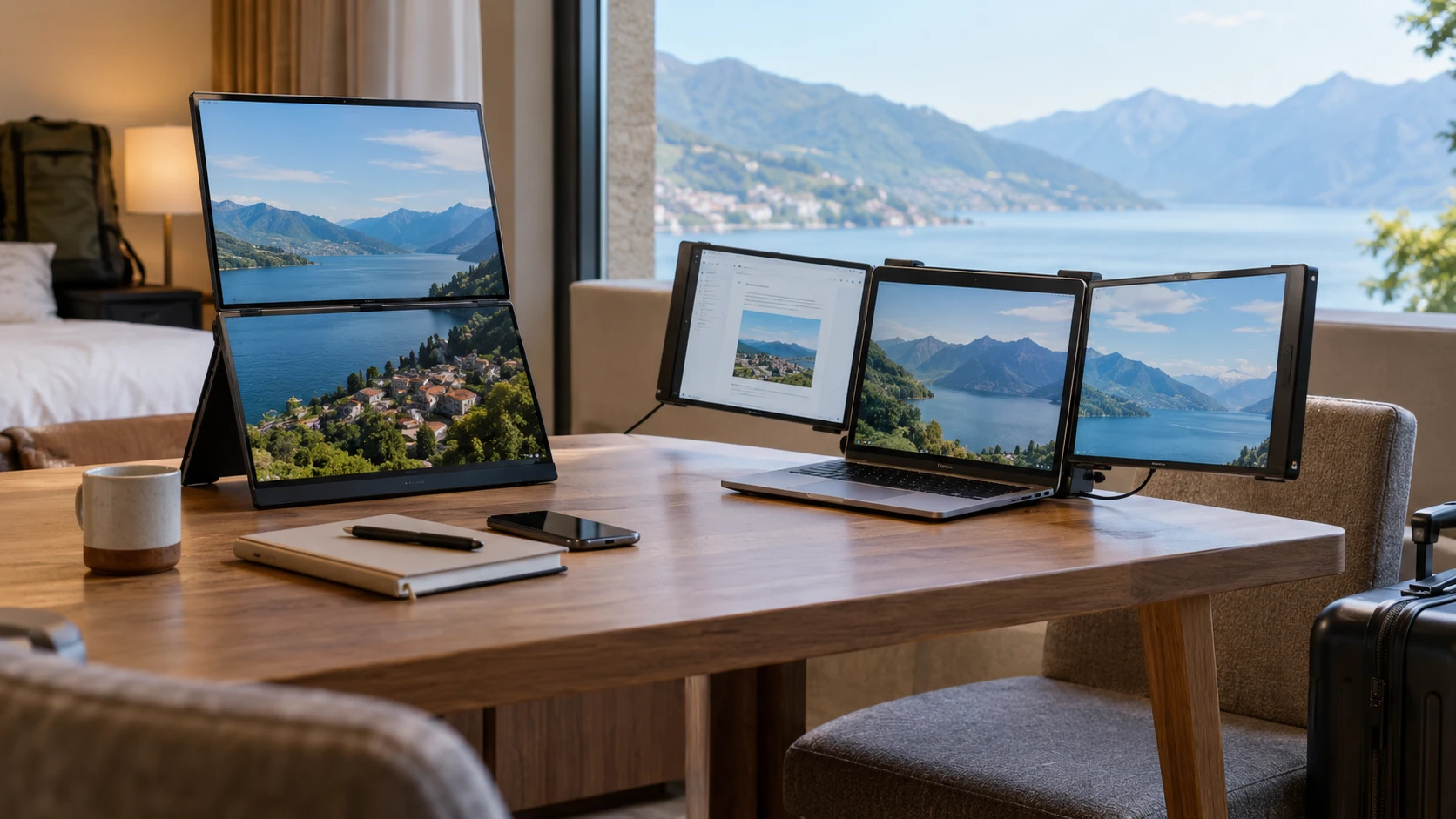
The ASUS ZenScreen Duo OLED MQ149CD is a foldable portable display with two 14-inch OLED panels. Each is listed at 1920 by 1200 pixels in a 16:10 shape. A 360-degree hinge, integrated kickstand, and tripod mount let the panels be placed in several orientations. The saved description calls their combined area a 21-inch workspace, but that phrase does not describe the physical size or resolution of one continuous panel. It remains two screens with a hinge between them.
Before choosing any multi-screen travel setup, use the published guide to display connection checks for a travel desk. Count the laptop's ports, then identify which ones carry video and which can supply power. The number and shape of sockets alone do not settle those questions. This matters especially here because the two product descriptions provide very different levels of connection detail. Run the check against the exact laptop you will take on the road.
The SIAVIALA 14-inch triple laptop extender adds two side screens around a compatible laptop rather than folding into one separate dual-panel unit. Each extra IPS panel is listed at 1920 by 1080 in a 16:9 shape. Its saved description specifies a laptop size range of 13 to 17.3 inches and gives an unusually detailed cable path: two full-featured USB-C ports are easiest, while one full-featured USB-C port can be paired with HDMI and a separate power lead for the second screen.
Picture the workspace before counting screens — SIAVIALA 14-inch triple laptop extender
ASUS's two 16:10 panels can be arranged using the kickstand or tripod mount. The 360-degree hinge supports alternative positions, and the product lists automatic rotation through DisplayWidget Center. That arrangement may work for reference material beside a primary laptop, a presentation facing another person, or portrait pages. It does not state that every orientation is equally stable on a narrow airline tray or crowded cafe table. Measure the surface where the setup will actually be used and test the fold angle you expect to need.
SIAVIALA's stated design is a sliding, foldable extender mounted around a laptop display. It makes a three-screen arrangement when the host laptop is counted. That can keep the keyboard and main screen centered while putting a chat window or source document on each side. A three-screen setup also needs more horizontal space and may change the balance of the laptop lid. Confirm fit for the laptop's screen size, hinge strength, and case thickness. The stated 13-to-17.3-inch range cannot account for every physical design.
The two listings use the word “portable” for different reasons. ASUS specifies a 1.07-kilogram foldable unit. SIAVIALA describes sliding and foldable screens but does not give a verified weight or packed dimensions in the saved description. The laptop attachment may reduce the number of separate stands to carry, yet cables can still become a sizable part of the kit. Put the device, required cables, charger, and laptop in the actual travel bag before deciding which arrangement feels lighter.
There is a visual difference too. Each ASUS panel is 1920 by 1200, leaving more vertical pixels than a 1920-by-1080 panel. SIAVIALA names 16:9 IPS panels, which can align more closely with familiar full-HD video content. Those format labels do not predict how readable a spreadsheet or code editor will feel at a particular scaling setting. Open the applications you use most and look at the full text size, menu bars, and window borders across the intended layout.
Treat the cable map as part of the product — SIAVIALA 14-inch triple laptop extender
SIAVIALA's description says two full-featured USB-C laptop ports can drive the two extension screens with two Type-C cables. With only one such port, it gives a second path using HDMI plus USB-A. It explicitly says the HDMI-connected extender also needs a USB-A-to-USB-C cable for power. That is the sort of detail that prevents a disappointing hotel-desk setup: an HDMI cable may send the picture but does not necessarily supply the display's operating power.
The package is listed with Type-C, HDMI, and USB-A cables. The source does not establish that every laptop will expose a free port of each required kind after its charger and other peripherals are connected. Check the ports with the charger attached, then account for a mouse receiver, storage drive, or meeting-room adapter. A hub may help with connector count, but its own video and power capabilities need verification. Do not assume a generic hub duplicates two full-featured USB-C video paths.
The ASUS saved listing does not enumerate video-input ports, power requirements, or included cables. Its display quality and hinge specifications are detailed, but they cannot answer whether a particular laptop can drive both panels in the intended mode. Check the current MQ149CD specification and box contents for the host's required connection, then test two independent extended desktops. The missing catalog detail is a reason to verify, not proof that the unit has fewer or more connection choices than SIAVIALA.
If a laptop has only one usable display output, a three-screen product may not behave like three independent desktops without a supported alternate transport or driver. The SIAVIALA listing gives cable paths but does not prove that every host graphics system can address both panels separately. An external display-count limit is a host-computer question. Before buying, look up the precise laptop model and operating system, then run a test that moves different windows to each added panel rather than showing the same mirrored image everywhere.
Check the computer, especially a Mac — SIAVIALA 14-inch triple laptop extender
SIAVIALA's compatibility text names Windows, ChromeOS, Linux, Android, and several Mac chip families, but its Mac wording is internally qualified. It says ordinary M1, M2, and M3 chips are excluded while naming some Pro and Max variants; it also suggests an H5-T cable for some chip issues. That is not a simple promise that every MacBook works. Confirm the exact chip and year of the laptop, required cable, and whether the desired extended-screen mode is supported before ordering.
The SIAVIALA source also names PS4, Xbox, Switch, and Type-C phones as compatible device categories. That does not establish that a console will create a three-screen desktop. A game system may simply send one image to one panel, and a phone's external-display behavior depends on the phone. Verify the intended use with the particular device. For a travel-work purchase, laptop compatibility should be established first; occasional game or phone use can be tested after that.
ASUS's saved description does not list supported operating systems or chip families. DisplayWidget Center is named for automatic rotation, yet the source does not say which hosts run that software. If automatic orientation is important, verify the current app and platform support. A display that can be turned physically may still require manual rotation in a host's settings when software support differs from the listing's example.
Make a practical connection rehearsal. At the desk, attach the screens in the order the instructions specify, confirm the laptop still charges, and open display settings. Set one panel to a portrait document and the other to a reference image. Unplug and reconnect once to see whether the window arrangement survives. A setup that works only after repeated cable changes can consume the time a portable monitor was meant to save.
Use picture claims for the right kind of work — display connection checks for a travel desk
ASUS lists 100% DCI-P3 coverage, Delta-E below 2, and DisplayHDR 400 True Black certification for its OLED panels. Those are meaningful stated display characteristics for reviewing visual work. The catalog does not include an independent calibration report for the unit that would arrive, so a photographer or designer should still test the color workflow with known images and current settings. A wide gamut does not make every untagged image look accurate by itself.
SIAVIALA's IPS panels are described as 16.7-million-color displays with 72% NTSC gamut, and the listing says each screen can have brightness and contrast adjusted separately. Those numbers are expressed on a different basis from ASUS's DCI-P3 and Delta-E claims. Do not turn them into a numerical color-quality ranking without matched measurements. For note-taking, chat, or reference pages, consistent brightness and readable text may matter more than wide-gamut claims.
Both arrangements can create a productivity gain when they eliminate repeated window switching. The SIAVIALA description goes further and quotes an “up to 300% efficiency boost,” but gives no test method or workload. Do not plan staffing or deadlines around that number. Count the windows you actually keep visible and how often you move between them. If the second side screen stays empty most of the day, a smaller arrangement may be easier to carry and set up.
Buy the cabling and layout you can repeat — SIAVIALA 14-inch triple laptop extender
The ASUS is the more specifically documented choice for foldable dual OLED presentation: two 16:10 panels, a 360-degree hinge, kickstand and tripod options, automatic-rotation software, and a stated 1.07-kilogram weight. Its saved source leaves the connection and host-compatibility questions open. The SIAVIALA offers two full-HD IPS side screens around the laptop and spells out the USB-C, HDMI, and separate-power paths. Its Mac chip qualifications deserve a close check.
Take the laptop model and a list of occupied ports to the product specifications before buying. At home, rehearse the complete setup with the charger, both panels, and the applications used on a normal workday. Confirm that each added screen can show distinct content at a readable scale and that the equipment fits the desk and bag. That test answers the practical travel question far better than counting panels on the box.