Computers & Gaming
AirPods case cover compatibility starts with the device generation
Compare a third-generation snap pouch and a fourth-generation shell by exact stated fit, carrying role, and access to the charging case.
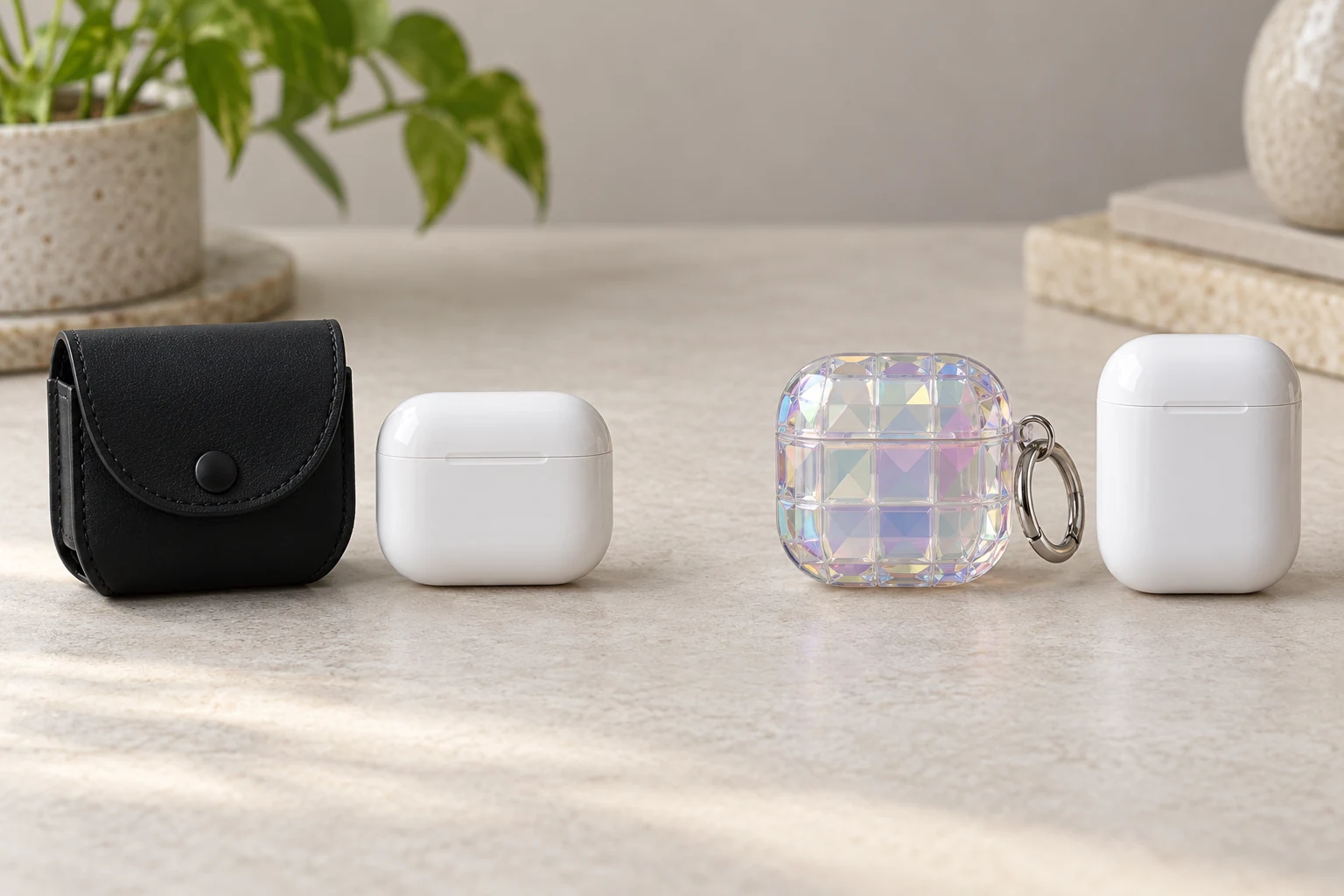
A protective cover can look right in a product photograph and still be wrong for the charging case in your hand. AirPods case cover compatibility begins with the exact generation of the device, then the way a cover sits around its lid, port, and everyday carrying routine. An AirPods third-generation pouch and an AirPods fourth-generation square shell illustrate different approaches. Their product pages name different generations, so they are not alternatives for one unidentified charging case. Find the device name first, read each cover's exact fit statement, and leave any unlisted variant unconfirmed.
Read the charging case before the accessory page
Put the charging case on a table and identify the model from your device information or original documentation. Write down the generation and any variant named by the maker. A description such as “my AirPods” leaves too much open: a cover may be shaped for a specific charging case, and a similar-looking case in a gallery does not establish fit. If you are buying for someone else, ask for the exact device identity before choosing a color or a clip. A photograph of the front can help with the visual check, but it should not replace the documented model.
Next, decide what you expect a cover to do. Do you want a pouch that encloses the charging case for carrying, or a shell that stays on it during ordinary opening? These are different handling patterns. A pouch may need to be opened or removed when you reach the case; a fitted shell must leave the lid usable when installed. The saved product pages show one of each, but they do not authorize fitting either accessory to a device generation omitted from its listing. Treat the generation check as a boundary, not a styling preference.
Put the exact model wording on a small note next to the device while comparing pages. This keeps a seller's general search label from replacing the name you verified. If the device was bought secondhand, check its settings or original paperwork instead of relying on the shape of a case that may have been swapped. A case cover is a small purchase, but the decision should still use the same device identity you would use to choose a replacement charging component. Separate the accessory's decorative role from the electronic device it is meant to surround.
A third-generation snap pouch
The AllSaints black AirPods pouch names third-generation Apple AirPods in its product description. The gallery shows a black flap pouch with a snap closure and metal clip. It does not show earbuds or a device being fitted inside, so the gallery supports the physical pouch identity while the exact generation claim comes from the product text. The listing describes a carrying accessory, not a charging case or a charging adapter. Check the size and closure against the actual third-generation charging case before relying on it for daily transport.
Look at how you would open the pouch with one hand while holding a bag or phone. The flap and clip may be useful if you plan to keep the charging case on a bag, but the clip itself does not prove that every bag loop or belt attachment is suitable. Try the placement with the real item and follow its care instructions. If the pouch covers the charging port when closed, plan to open it when charging as directed by the device and accessory makers. The product page does not establish that charging through the closed pouch is supported.
The listing uses “one size” for this specific pouch. That phrase does not mean one size for every AirPods generation or every third-party charging case. Keep the exact third-generation wording beside your device note. If your charging case has a different model name, ask the seller for a supported fit statement rather than assuming that a leather pouch has enough spare room. A pouch can be attractive and still fail the simple test of letting you carry and retrieve the device without stress on the closure.
A fourth-generation square shell
The square AirPods 4 cover names fourth-generation AirPods on its product page. Its gallery shows a patterned square shell around a charging-case silhouette, with a silver ring at the side. The text says the cover supports wireless charging, but that is a seller claim for this item; it is not a measurement of your charger or evidence that every fourth-generation variant fits. The listing does not explicitly resolve the Active Noise Cancellation variant. Check that point with the maker or seller before buying for an ANC case.
A fitted shell changes the way you handle the lid and port. Examine the gallery for the hinge and opening line, then compare them with the real case in your hand. Do not infer hidden cutouts or button access from a front-only image. If a shell blocks a light, pairing control, charging connector, or ordinary lid movement on your case, it is the wrong accessory even if the front shape looks close. Use the device's charging directions and the cover maker's installation guidance before relying on the advertised wireless-charging statement.
Look at the rear and bottom as carefully as the patterned front. A ring can be useful for carrying, but its location might change how the case sits on a flat charging surface. A shell also has to open and close repeatedly without its two pieces shifting. Those are checks to make on the actual accessory and device, not outcomes guaranteed by the listing photograph. If the seller supplies dimensions or more views, compare them with the model information you recorded; if it supplies only a front image, keep the missing access details unresolved.
The square shape is also a carrying choice. The ring gives a visible attachment point, while the patterned front is more conspicuous than the black pouch. Neither photograph proves impact resistance for your own drop or the strength of a particular key ring. Hold the accessory against the bag or pocket where you intend to keep it and think about what catches on nearby objects. A cover that is awkward to open or carry may remain unused even when its model statement is correct.
Do not transfer a fit claim between generations
The two pages use different model language. The AllSaints pouch explicitly names third-generation AirPods. The square shell explicitly names fourth-generation AirPods. Neither page states that its cover fits the other generation. A broad word such as “AirPods case” in a search result or headline cannot overrule those specific descriptions. If you are unsure whether a device is third or fourth generation, pause the accessory choice and confirm the device identity from a reliable record. The cost of the wrong cover is not just the purchase; it can also interfere with opening, carrying, or charging the device.
The same rule applies to variants within a generation. A listing that names standard fourth-generation AirPods may or may not include the version with Active Noise Cancellation. This square cover page does not settle that issue in the saved material. Do not treat an image of a white charging case as a dimensional guarantee. Ask for a variant-specific statement, dimensions, or supported model list from the accessory maker. If that evidence is unavailable, choose an accessory whose fit is actually documented for the case you own.
The laptop sleeve size guide addresses a related but separate fit problem: checking an actual laptop's dimensions before choosing a sleeve. A charging-case cover needs an exact generation check and access to its lid or port, so a laptop measurement alone cannot decide it. The useful shared habit is starting with the device in hand and the accessory's stated limits rather than a generic size word.
Check the parts you use every day
Make a short routine list before choosing between a pouch and shell. How often do you open the lid? Where is the charging port? Do you use a wireless charger, and where does the charging case rest on it? Where would the clip or ring attach? Each answer points to a physical access check. A pouch can be easy to carry but require an extra opening step. A shell can stay on the case, but its openings must line up with the actual device. Do not assume that a marketing image documents every side of either accessory.
Test the attachment without the charging case first if you can handle the accessory before purchase. Move the flap or shell lid slowly, check for rough edges, and make sure a clip does not rub the device or nearby items. If the product is already owned, follow its installation instructions rather than forcing a tight corner. Stop when the case does not seat naturally or the lid movement feels obstructed. A protective accessory should not require pressure that the device or cover instructions do not permit.
Storage is part of compatibility too. The black pouch can be kept in a bag; the square shell may remain on the case. Keep accessories away from loose grit or items that could scratch their surfaces, and follow the materials' care guidance. If you switch bags often, check whether the clip or ring remains accessible without inviting an accidental tug. The product pages show attachment hardware, but neither one certifies every attachment or carrying situation.
The wireless headphones fit guide covers how full-size headphones sit on the wearer and how their controls are reached. Earbud charging-case covers solve a different physical problem: matching an accessory to the small case and keeping its lid and charging access usable. If you are shopping for both headphones and earbuds, keep those fit decisions separate. A good earcup fit says nothing about a protective cover for a charging case.
Make the model check repeatable
Save a note with the device generation, the chosen cover's exact product name, and the source that states the fit. If the accessory is a gift, include that note so the recipient can verify it before trying to install the cover. Keep a receipt or return information according to the seller's policy, but do not treat that as a substitute for a fit check. If the model or variant remains uncertain, leave the purchase open rather than using appearance as evidence.
When a new phone or earbud model is announced, review this note before reusing a cover from the previous device. A working clip, clean pouch, or undamaged shell can still have the wrong internal shape for the next charging case. Keep it only for the model it is known to fit or pass it on with its exact compatibility information. This prevents an accessory from acquiring a vague “fits AirPods” label after the box is discarded. Model names belong with accessories just as they do with devices.
Once the model wording agrees, check the physical role one last time. The third-generation example is a snap pouch for carrying the charging case. The fourth-generation example is a square shell shown around it. Their different forms may suit different routines, but they do not establish cross-generation fit or identical charging access. Choose the cover whose stated device identity and handling pattern match the case you own, then verify its actual lid, port, charging, and attachment behavior before using it every day.