Crypto Commerce
TZDZRC KF102 GPS drone vs Ratfeit for GPS flight planning
Compare TZDZRC KF102 GPS drone by controller display, video claims, batteries, range, return-to-home, and conflicting specifications.
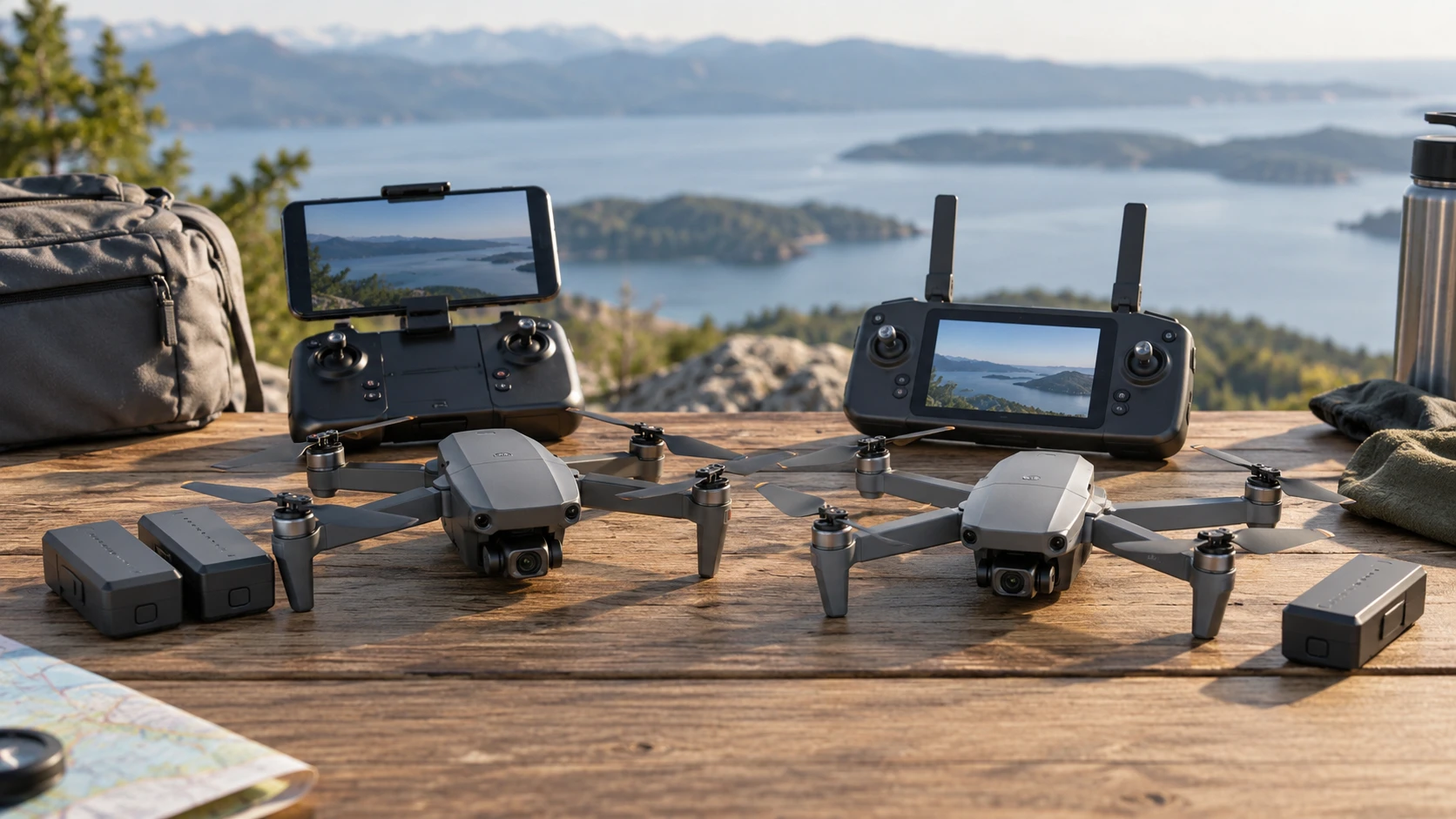
Two GPS camera-drone listings can look similar until you read what each says about the controller. The TZDZRC KF102 GPS drone describes a live image sent over a 5 GHz Wi-Fi link to a compatible phone, while the Ratfeit listing describes a remote with its own 4.5-inch screen. KF102's offer also says two aircraft batteries are included; Ratfeit's saved description names one drone and specifies an aircraft battery, without stating that a spare is included. A built-in controller display may remove a phone from the basic viewing setup, but it does not settle camera quality, flight range, or reliability.
Both descriptions contain internal conflicts. KF102 calls its camera 2.7K while listing 1920 by 1080 video, and it describes the remote as rechargeable in one place but powered by three AA cells in another. Ratfeit's offer title advertises 27 minutes, while its detailed specifications say 20 minutes per aircraft battery. Treat these as questions for the Republeq's catalog and the exact model manual. Do not turn whichever number sounds better into a verified capability.
Controller and phone requirements — Ratfeit screen-remote GPS drone
KF102's saved text describes a repeater and real-time image transmission through 5 GHz Wi-Fi. It says the user's phone must support that band. Before ordering, confirm the supported app, phone operating systems, device holder, and whether an internet connection is needed for setup or only a local radio link during flight. The listing's use of “5G” alongside “5GHz Wi-Fi” should not be read as a promise of cellular-network service. Check whether the live preview reaches the phone through the remote or directly from the aircraft and what happens if the app closes.
Ratfeit describes live HD viewing on a 4.5-inch screen built into its remote, without a phone. That can make a quick launch simpler, provided the screen is bright enough for the intended light and the controls display needed flight information. The saved excerpt does not state screen resolution, battery endurance for the controller, or whether footage is stored on the remote. Ask how to review and export recorded video. A screen can show a live view while the aircraft records to a different medium, or it may only show a lower-resolution preview.
KF102's listing gives an effective image-transmission distance of 300 meters and a remote-control distance of 600 meters. Ratfeit says control range reaches 400 meters horizontally and 120 meters in height. These figures describe different measurements and test conditions, so they are not a simple 600-versus-400 contest. Local radio rules, interference, obstacles, antenna orientation, and battery state affect practical operation. Follow applicable airspace and visual-line-of-sight requirements. Do not plan a flight to the edge of a claimed range just because a product page prints it.
Camera resolution needs a precise question — drone video resolution checks
KF102's source calls the camera “UHD 2.7K” but separately lists video at 1920 by 1080 pixels and photos at 4096 by 3072 pixels. A high-resolution still photo does not prove 2.7K recorded video. The phrase may refer to a sensor, a marketing mode, or a different version of the product. Ask for the exact recorded file resolution, frame rate, compression, and a downloadable sample from the shipped configuration. Its two-axis electronic and mechanical stabilization wording is similarly unclear; request an explanation of the actual gimbal axes and whether stabilization is optical, mechanical, electronic, or combined.
Ratfeit's description calls its camera ESC 1080P and says the lens angle adjusts by 90 degrees. It does not provide a pixel-by-pixel still-photo specification or a sample clip in the saved excerpt. A moving camera lens can help aim at a subject, but that is different from a stabilizing gimbal. Confirm whether the angle adjustment is remote-controlled in flight or set before takeoff. If smooth aerial video is the main goal, view unedited footage in changing light and during a turn rather than relying on the words HD or 1080P.
The published guide on drone video resolution checks examines a different pair of drones and explains how camera and recorded-file claims can diverge. Apply its method to these listings without borrowing its product specifications. Get one actual file, inspect its width, height, frame rate, and metadata, then watch it at normal speed. Compare a still image separately. A live controller preview may be compressed or lower resolution than the saved file, so it is not a reliable proxy for the final recording.
Batteries and the time you can plan — Ratfeit screen-remote GPS drone
KF102's offer describes two aircraft batteries and states a maximum of 22 minutes per 7.4-volt, 2,200-mAh battery, with about three hours for charging. Two batteries could provide more total opportunity to fly, but not one uninterrupted 44-minute flight. Landing, switching a battery, checking it, and obtaining a safe takeoff location all use time. Confirm whether the package truly includes two batteries and the charger needed for them. The saved text also conflicts on remote power: it says rechargeable lithium battery and later lists three AA batteries not included. Resolve that before leaving for a location without spare cells.
Ratfeit's saved text gives a 3.7-volt, 3,800-mAh aircraft battery, a 180-minute charging time, and 20 minutes of flight per battery in the specification line. Its title instead mentions 27 minutes. The remote has a separate small rechargeable battery and a claimed 20-minute charging time. Different voltage and milliamp-hour ratings cannot be compared directly as flight-time promises. Battery capacity alone does not account for aircraft weight, wind, camera use, or motor efficiency. Ask for a tested flight-time range under stated conditions, then plan to land with reserve rather than wait for the maximum.
Cold, wind, and repeated climbs can shorten a flight. Check battery level before takeoff and establish a conservative return point. A return-to-home feature is a backup, not permission to fly beyond a safe reserve. Follow the maker's charging and storage instructions for lithium batteries, and inspect a pack that is swollen, damaged, or unusually hot. Neither saved excerpt provides enough information to promise a particular number of flights from a charge schedule.
GPS and return-to-home — Ratfeit screen-remote GPS drone
KF102 claims GPS and GLONASS positioning for fixed-point hovering and an automatic return when the remote signal is lost or the battery runs low. Ratfeit claims GPS and automatic return-to-home in emergencies. Both features depend on a valid position fix, a correctly set home point, sufficient battery, and a safe return path. The saved descriptions do not explain return altitude, behavior near obstacles, or how the pilot cancels an automated return. Read the exact manual and test the behavior in a wide, clear area before relying on it near trees or buildings.
Ratfeit advertises light-based 360-degree obstacle detection and grade-7 wind resistance. Those are substantial claims but the saved excerpt does not give a detection range, obstacle size, test conditions, or a wind-speed definition. A camera or sensor can miss thin branches, reflective surfaces, or dark objects. KF102 lists intelligent follow, waypoint flight, point-of-interest, and other app functions, but the excerpt does not specify limits or regional availability. Treat automated flight modes as aids that still require a pilot who can take control promptly.
The Ratfeit package is described for ages 14 and up; KF102's excerpt frames it for adult hobbyists. Neither statement overrides local registration, location, or privacy rules. Learn the controls on the ground, set the correct return point, and check the route for people and obstacles. If flying to record others, follow applicable consent and airspace requirements. A feature list cannot tell you whether a particular park, neighborhood, or travel destination allows a flight.
Portability and accessories — Ratfeit screen-remote GPS drone
KF102's expanded size is listed around 32 by 30 by 6.5 centimeters. Ratfeit says its unfolded body is about 20.8 by 18 by 7.5 centimeters and gives a package weight of 760 grams. That package weight is not the same as takeoff weight. Check the aircraft's actual mass with battery and any accessory installed, since local rules may use that number. Also check the folded size, case contents, spare propellers, and whether the control screen needs protection in a bag. The saved excerpts do not provide a complete packing list for either model.
KF102 mentions an SD card slot accepting 32 to 128 GB cards, with a card not included. Confirm the card format and whether the aircraft records full-resolution video to that slot. Ratfeit's saved description does not state a storage method. Ask how files are saved, retrieved, and backed up before a trip. A screen remote that shows a pleasant image in flight will not help if the footage was never recorded or cannot be exported to edit.
Which listing is clearer for your trip? — Ratfeit screen-remote GPS drone
KF102 has more stated camera-file detail, a longer stated control range, and a claimed two-battery package, but its camera-resolution and remote-battery descriptions disagree internally. The Ratfeit screen-remote GPS drone offers phone-free live viewing in its saved description, while its flight-duration headline and specification conflict. For either, request an exact manual, complete box list, and sample recording tied to the model being sold.
Choose according to the controller you can operate comfortably, the files you can verify, and a flight plan with ample battery reserve. Do a short test flight in an allowed open location, inspect the actual recording, and practice landing well before low-battery return engages. That evidence is more useful than a larger resolution label or an extra seven minutes that appears only in a title.