Crypto Commerce
Reolink Duo 2 PoE camera — Fixed 180-degree view or moving PTZ for an entrance
Compare Reolink Duo 2 PoE camera by coverage, zoom, tracking, PoE setup, local recording, and privacy controls.
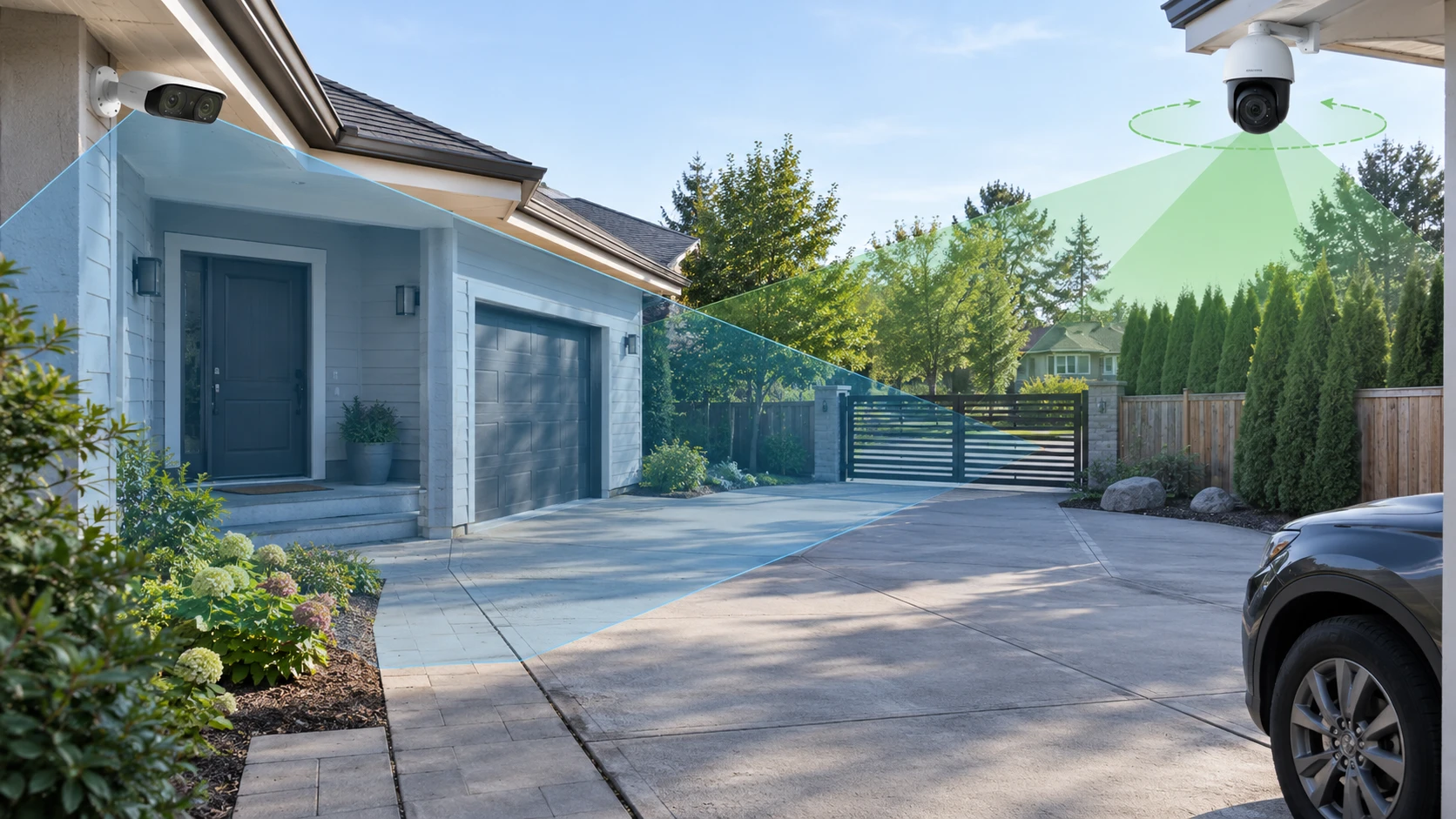
The refurbished Reolink Duo 2 PoE camera uses dual lenses for a stated 180-degree horizontal and 60-degree vertical view. It watches a broad scene from a fixed direction. The Reolink RLC-823S2 can pan through 360 degrees, tilt through 90 degrees, and use 16-times optical zoom to inspect a smaller area in more detail. Those are different kinds of coverage. A moving camera can look around a property, while a fixed wide view keeps the same entrance and surrounding path in frame at once.
The published guide to PTZ versus multi-camera coverage planning can help sketch what must be seen continuously and what can be inspected when a camera turns. It discusses a different set of products, so use it for the coverage method rather than as evidence about these Reolink models. Draw the driveway, door, gate, and any blocked sightlines, then mark where a person could pass while a PTZ camera is facing another direction.
The Reolink RLC-823S2 PTZ camera lists preset patrol points and automatic tracking when motion is detected. That can help follow a person or vehicle across a larger space, but tracking does not give simultaneous views of every direction. Its saved row says 4K recording, color night illumination with built-in spotlights, and an infrared mode claimed to reach up to 80 meters. Place the camera and test those functions at night before treating a maximum-range number as reliable identification at the far edge of a yard.
Decide what must stay in frame — Reolink RLC-823S2 PTZ camera
Duo 2's dual lenses are described as producing a wide scene at a fixed 3.2 mm focal length. The saved row gives an 8-megapixel 4608-by-1728 recording size and a default 20 frames per second. That shape is useful to think about when placing the camera across a broad entrance, but a wide frame distributes pixels over many objects. Inspect a sample at the actual distances where faces, packages, or vehicle markings matter. A person near the edge may occupy a small fraction of the image even though the path is visibly covered.
The PTZ camera's 16-times optical zoom gives a way to frame a distant object more tightly, according to its listing. That may help see a gate or parked vehicle after the camera is aimed there. During a zoomed view, however, less of the yard is visible in that instant. Test a patrol pattern with the intended preset positions and see whether the camera spends too long away from the front door. If continuous coverage of two separate approaches is required, consider whether another fixed camera is needed rather than expecting motion control to show both simultaneously.
Neither a 180-degree lens nor a 360-degree pan eliminates obstructions. A porch post, tree, fence, or parked truck can block the critical area from the mounting point. Walk the route at the times and heights that matter, then review sample clips. A high mounting position may reduce tampering but make faces appear smaller; a lower position may show detail while being easier to reach. Check the manufacturer's mounting and privacy guidance before choosing a height.
The RLC-823S2 row lists tailored motion zones and person, vehicle, and animal detection. Duo 2 lists human, vehicle, and pet detection with push and email alerts through the Reolink app. These labels do not guarantee that every event will be classified correctly. Test a delivery, a person approaching at night, and routine movement from pets or trees. Adjust the zones to reduce unnecessary notifications without excluding the path that must be watched.
Check night coverage in both modes — PTZ versus multi-camera coverage planning
Duo 2's saved description names six infrared LEDs with a stated range of 30 meters and motion-activated spotlights for color night vision. It also lists a siren and two-way talk. A streetlight, reflective wall, or moving car can change how useful the image is. Test the actual entrance after dark with the infrared mode and the spotlights, then check whether illumination reaches the area where a person first enters the view. If a spotlight is motion-triggered, record the first seconds of the event to see what happens before it turns on.
RLC-823S2 lists infrared black-and-white visibility up to 80 meters and a full-color mode using spotlights that remain on. Its description also names two-way audio and a remotely activated siren. The claimed 80 meters is a visibility figure in the listing, not a guarantee of readable detail at that range. Aim at the intended distant point and review the recorded clip on a larger screen. A zoom setting that improves one distant target may leave a nearby approach out of frame.
Both models carry an IP66 weather rating in their saved rows. That is a rating to verify for the exact unit and installation, not permission to leave a network connector exposed to rain. Duo 2's box list includes a waterproof lid for the connection; inspect its condition on this refurbished offer. For the PTZ, follow the current instructions for cable routing, wall mounting, and protection of moving parts. Check how the camera behaves in wind and whether foliage triggers repeated tracking.
Plan power, recording, and app access — Reolink RLC-823S2 PTZ camera
Both are described as PoE cameras, so power and data can travel over an Ethernet run when the network equipment supports the required standard. Duo 2's row states IEEE 802.3af active PoE at 48 volts or a 12-volt DC option, and names a PoE switch requirement. The RLC-823S2 excerpt does not give its exact power budget. Verify the switch, injector, cable length, and model compatibility in the current manuals before mounting either camera. A nearby Ethernet jack is only useful if it is connected to equipment that supplies the right power.
Duo 2's saved row names H.265 video and a microSD slot supporting up to 256 GB. RLC-823S2 also lists local microSD storage up to 256 GB, Reolink NVR recording, and FTP backup options. Card size alone does not set retention days; resolution, frame rate, motion activity, and continuous versus event recording change the amount of footage stored. Make a short trial recording under the selected settings and use the resulting file size to estimate retention. Confirm that old files are overwritten or preserved according to the chosen policy.
The PTZ row says dynamic privacy masking can hide a sensitive area while the camera pans or tilts, but the feature currently operates through the Reolink app or client. It also notes that some functions with specific NVR models are operated through the app or client. Test the installed control path before relying on a preset or privacy zone. Duo 2's saved excerpt does not describe an equivalent dynamic mask. If neighbors' windows or a public path enter the scene, establish the permitted view before starting recording and adjust the mount or software accordingly.
The fixed Duo 2 is listed as refurbished. Its saved package includes the camera, mounting template, a one-meter network cable, waterproof lid, sticker, quick-start guide, and screws. Inspect the lens windows, seals, ports, and supplied accessories on the exact unit, and confirm the warranty terms for the exact model and return process. The RLC-823S2 row does not provide a comparable full box inventory or warranty term in the saved excerpt. Request those details for both before ordering installation hardware or storage separately.
Review what the camera records after an alert — Reolink RLC-823S2 PTZ camera
An alert can arrive when a person is already halfway through the view. Compare the saved clip with the phone notification rather than judging from the alert thumbnail. On Duo 2, look at where the person first appears in the wide frame and whether the fixed position keeps them visible until they leave. On RLC-823S2, check where its patrol was pointing before detection, how long it takes to turn, and whether tracking stays with the same subject when another person or vehicle enters. Repeat the walk in the direction a visitor would actually take. A camera that records a clear close-up only after the person passes the door has missed the useful part of that event.
If several people will use the system, agree on who can change patrol points, alert zones, and privacy masking. Duo 2's listing gives separate administrator and user accounts; the PTZ description places some controls in the Reolink app or client. Test ordinary viewing and configuration from the accounts and devices that will be used day to day. Record one event, find it again, and export a copy before deciding the setup is ready.
Run a coverage rehearsal — PTZ versus multi-camera coverage planning
Start with the broad approach to the property. Mount or temporarily position Duo 2 so its 180-degree scene includes the important entrances, then check fine detail at the furthest point. Set the PTZ to a useful home position and test its patrol and tracking with someone walking the same route. Record during daylight and darkness. Watch the entire clips, including the moments before an alert and while the PTZ turns, to find any unobserved interval.
Duo 2 may fit an entrance where the whole width must remain visible and the refurbished package and fixed-lens detail pass inspection. RLC-823S2 may fit a site where following motion or zooming toward a distant point is important and an operator can configure patrol and privacy behavior. A broad site with simultaneous high-detail requirements may need both; the saved listings do not establish that one camera alone can cover every angle. Let the map and recorded trial decide how many views the property requires.