Skills & Planning
Paper shredder backlog: size batches before replacing a unit
Count actual sheets and likely passes, then check run and cooling limits before assuming a larger feed slot will clear a backlog faster.
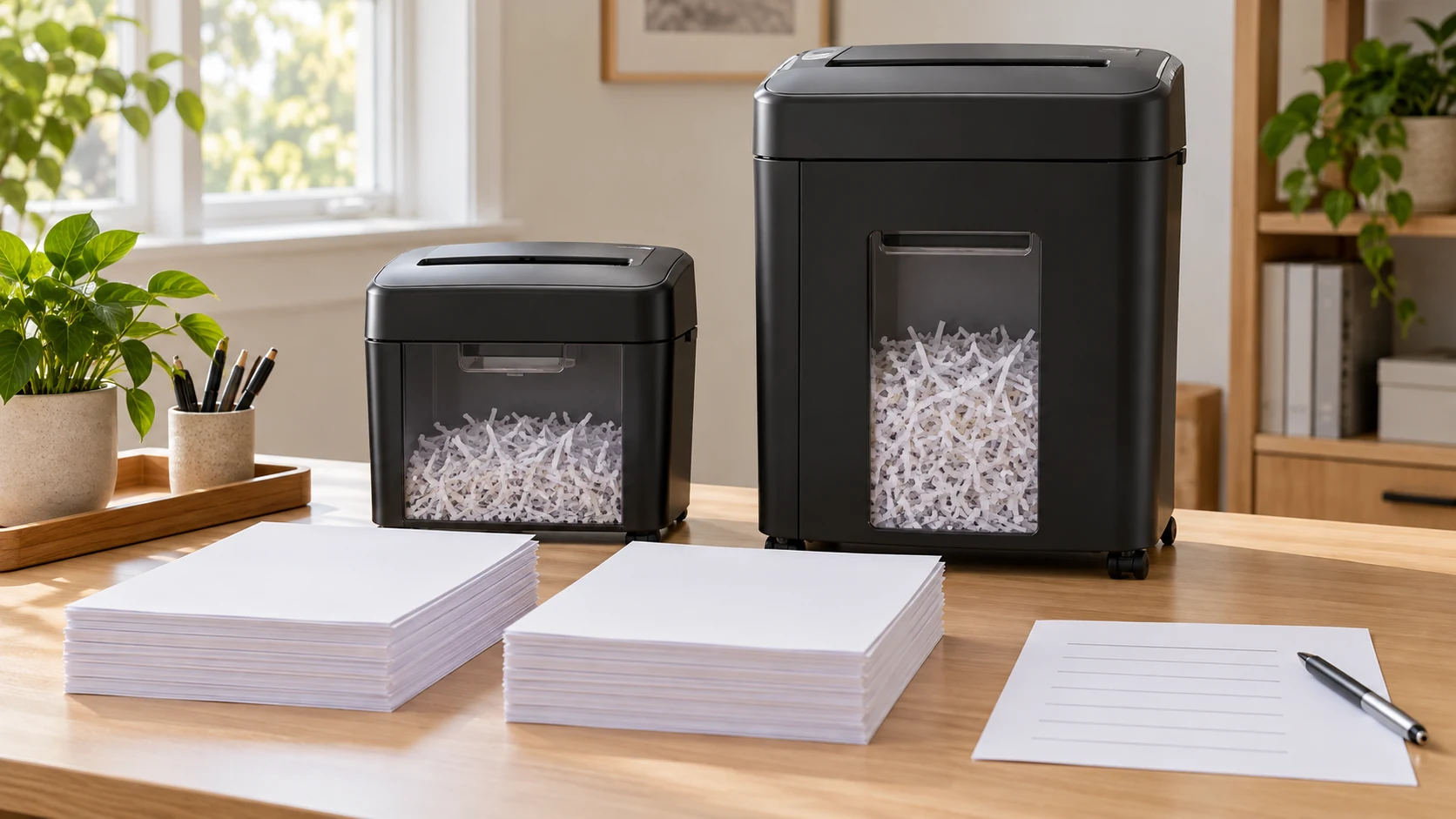
A paper shredder backlog can make a working machine feel too small. Before replacing it, count the sheets you actually need to destroy, check what your machine accepts per pass, and read its running and cooling instructions. A larger feed rating may reduce the number of passes. It does not, by itself, tell you how long a machine can run, whether it will handle staples, or how often you will empty its bin.
Two current listings show why those numbers need separate columns. One describes an 18-sheet cross-cut shredder with an eight-gallon pull-out bin. Another describes a compact two-sheet shredder with a four-liter bin and a stated 10-minute-on, 45-minute-off cycle. These are listing claims for two exact offers, not a timed comparison. The 18-sheet page does not give a comparable duty cycle. Keep that blank until the maker or seller supplies the operating instructions for the precise unit.
Define the pile before choosing a machine
Set out only material you have already decided to shred. A mail pile contains several different jobs: bills to file, documents needing a reply, envelopes to recycle, and private pages ready for destruction. The paper workflow guide helps separate those actions before they reach a machine. Once the destruction pile is real, count sheets rather than guessing from the height of a stack. A thick envelope, a folded insert, and a single loose page do not load a feed slot in the same way.
For a manageable count, separate ordinary loose sheets from cards, staples, paper clips, glossy pieces, or other materials. Check your current shredder's manual before feeding any of them. A product page may say its machine handles a particular material, while the machine already in your room may have different rules. Do not run a trial with an unknown item to see what happens. A damaged page or a jam is an avoidable way to discover the limit.
Write down three observations from the last backlog session: how many ordinary sheets you processed, whether the machine stopped or signaled cooling, and whether the bin filled before the work was done. These observations identify the actual bottleneck. If the pile was mostly unneeded envelopes that never belonged in the shredder, a new unit will not solve the sorting problem. If the machine pauses after a short run despite careful feeding, investigate its stated cycle and actual condition before assuming feed width is the cause.
Turn shredder feed capacity into a batch count
A listed shredder feed capacity is an upper limit for each pass. The listed 18-sheet cross-cut shredder advertises up to 18 sheets in a pass and an eight-gallon pull-out bin. The listed two-sheet desktop shredder advertises two sheets per pass and a four-liter bin. An advertised maximum is an upper bound under the seller's stated conditions. It is not a target you must feed on every pass. Paper weight, folds, dampness, attachments, and the actual instructions can lower what is suitable for your pile.
Make a simple pass estimate with your own count. If you have 180 acceptable loose sheets, dividing by two gives 90 passes at the small listing's maximum; dividing by 18 gives 10 at the larger listing's maximum. These are arithmetic examples, not a measured run time. Each batch takes handling time. You may choose smaller groups to stay within instructions, and you may need to pause for cooling or to empty a bin. Write the estimated passes in pencil until you have checked the exact materials and machine rules.
A batch worksheet needs only four columns: material, sheets, permitted sheets per pass, and estimated passes. Add a separate note for items requiring special instructions or another disposal route. Do not multiply a nominal per-pass rating by a guessed number of minutes to claim a daily throughput. The two listings do not provide enough comparable operating data for that calculation. The useful estimate is narrower: how often you will stand at the slot feeding ordinary sheets, if the rest of the work proceeds normally.
Feed a flat, aligned group that your machine explicitly allows. Avoid packing the slot because a printed rating looks large. If your present unit has a reverse control or a jam indicator, follow its own manual when either is needed. Stop the machine and follow its manual before clearing or inspecting a blocked feed. Keep hands out of the opening. If it repeatedly jams on permitted ordinary sheets, stop and use the maker's service guidance instead of increasing force or trying a larger stack.
Read shredder duty cycle separately
A shredder duty cycle tells you how running and rest periods fit together. The compact two-sheet listing states a 10-minute running period followed by 45 minutes off. That is a seller's claim for that exact offer. It gives you a question to ask about your work: can you comfortably break the backlog into short sessions? It does not establish that every two-sheet shredder shares the cycle. The 18-sheet listing gives no comparable run-and-rest interval in the captured product description, so its larger feed number cannot be converted into a faster completion promise.
Look for the manual or a precise seller answer before choosing a replacement mainly to clear one large pile. Ask for continuous operating time, required cooling interval, what triggers an automatic stop, and whether those figures apply to the exact model and local power configuration. A statement such as “heavy duty” or “fast” does not answer those questions. If the seller cannot provide them, leave the completion-time comparison unresolved and decide whether you are comfortable buying with that gap.
Your current machine may have stopped because its bin was full, because it reached a cooling threshold, or because material caught in the feed. Those causes need different responses. Read the indicator or manual rather than diagnosing a motor failure from a pause alone. Record the sequence: what was fed, the signal shown, and what happened after the prescribed cool-down or bin check. If the manual's normal steps do not restore operation, use support or repair guidance for that model before another test.
For a one-time archive clear-out, spreading the work over several sessions can be sensible if the machine is functioning and the pile can be stored securely between them. For a repeat weekly backlog, a different feed limit or bin size may save routine handling. Keep those two circumstances distinct. A large one-day pile is poor evidence of your normal demand, while a recurring bottleneck deserves a count taken over several ordinary weeks.
Check shredder bin size against your space
Your shredder bin size affects placement and emptying. An eight-gallon pull-out bin and a four-liter compact bin call for different routines. The smaller unit may fit a desk where a floor machine would obstruct movement; the larger bin may need emptying less often for the same paper volume. Neither listing tells you exactly how much your particular shredded mix will fill the bin. Cross-cut pieces, how they settle, and how full you allow the bin to become all affect that observation.
Measure the space where the machine will actually run, including access to the feed opening, the path for pulling out a bin, the outlet route, and room for you to stand or sit safely. The larger listing image shows a floor-standing unit with a pull-out bin; the compact listing image shows a small desktop unit with a front window. Pictures establish the form of the offered products, but they are poor substitutes for verified dimensions. Request missing overall and clearance measurements before ordering if your space is tight.
Think about the trip to empty the bin. A container that is comfortable to slide out may still be awkward to carry when full. Make sure you have a place to dispose of shredded material according to your local rules; those rules can differ by area and material. If your existing bin fills after only a few pages, check whether its sensor or fit is working as instructed. A larger replacement may be unnecessary if the apparent “full” signal comes from a service issue.
Keep cut shape out of the throughput verdict
The two listings use different security-level language. That language does not tell you how long either unit will run or whether a feed will jam. The cut-shape guide addresses what to do when output differs from an expectation. Use that separate check for a cut-type question. For this backlog decision, compare accepted materials, per-pass sheets, operating interval, bin access, and your actual work pattern. Do not infer a privacy guarantee from an image of shredded pieces.
If a document needs a specified destruction method, get the applicable requirement from the organization or document owner and verify the exact unit against it. Neither a generic security label nor this batch worksheet can certify that result. Keep a private record of which documents you meant to destroy without leaving their contents exposed in an open working pile. Place material awaiting a later session where other household or office users will not mistake it for ordinary recycling.
Try a controlled session before deciding
If the machine you own still runs, use a short, permitted batch to test your working assumption. Record the number of sheets, how many passes you chose, any stops, and whether the bin needed attention. Follow the manual's material and cooling instructions throughout. A clean short session shows only that those pages worked in that session; it does not certify a whole archive will run without interruption. If the unit stops, preserve the signal and circumstances for support rather than repeating the same feed unchanged.
Then compare three realistic routes. Keep the current machine and schedule the remaining pile in allowed sessions; seek service if it fails on permitted material; or consider a replacement after obtaining the missing specifications. For each route, note the time you can spare, safe storage between sessions, floor or desk space, and how often this kind of pile returns. The worksheet should show why the chosen route fits your situation, including any unanswered seller question.
Do not treat the 18-sheet claim as proof of a shorter whole-project duration. Ten nominal passes can still take longer than expected if the duty cycle is short or material must be prepared. Likewise, 90 small passes may be tolerable when the pile is occasional and the compact machine already works. The numbers describe handling opportunities, not a product ranking. The only fair comparison includes the missing run interval, your actual batch size, and the effort of emptying each bin.
Check the exact order and payment state
Before buying, open the exact product page again and confirm the selected machine, stated feed limit, bin description, dimensions, included items, current availability, delivery terms, and checkout total. The product pages can change after this guide was written. Keep the two product URLs with your worksheet so you do not compare one model's instructions with another model in a cart. If a seller answers a duty-cycle question, save the model-specific answer beside the offer you intend to order.
First confirm the product and shipping details at the live checkout. If that checkout offers a cryptocurrency route and you choose it, use only the asset, network, address, amount, order reference, and time limit displayed for that specific order. A network or address remembered from a different order is not evidence for this one. Review the sending wallet's network and fee details against the live instructions before authorizing a transfer.
If the cart changes after you copy payment instructions, return to the current checkout and inspect the updated order. Do not send to a stale address or reuse an old amount. Keep the order reference and any transaction identifier. When a wallet reports a transfer but the order remains unconfirmed, ask the seller or payment service to reconcile that first attempt. A second transfer can create a duplicate payment while leaving the original question unanswered.
The same reconciliation principle applies if you pay by another method. A slow confirmation page does not establish that no order was placed. Check the order status before submitting payment again. An order receipt proves a transaction record, not that the shredder's actual running interval, materials, or fit in your room matched the listing. Compare the delivered model and instructions with your saved decision before using it on the full backlog.
A useful replacement decision starts with the selected destruction pile and your current machine's behavior. Count the passes, obtain the exact duty-cycle instructions, and measure the bin and operating space. The two listings show a wide feed and bin contrast, but the larger unit's runtime remains an open question. Keep that gap visible until you can answer it; then choose whether to continue in batches, service the machine you own, or order a different one.