Office Supplies & Stationery
Magazine holder tipping on a desk: find the cause
A step-by-step diagnosis for a desktop magazine holder that rocks, tips, or lets contents lean: check the surface, base, placement, and actual load before changing holders.
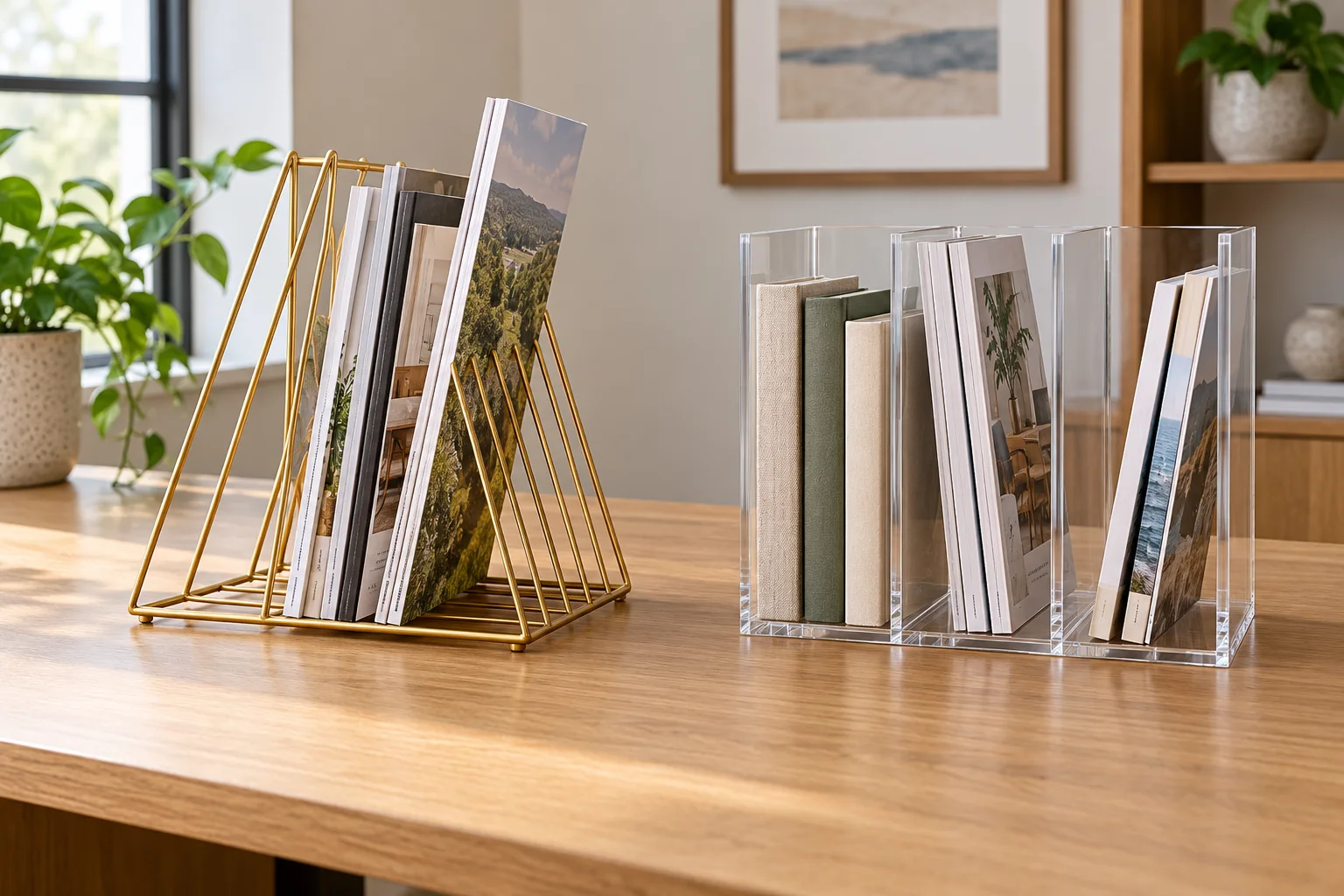
Magazine holder tipping is usually easiest to diagnose with the contents removed. Set the holder on the desk where it will actually live, press lightly at each corner, and watch whether the base rocks. Then add a few of the magazines or books you intend to store, one at a time. The point is to find the change that makes the holder lean: the desk surface, the position near an edge, or the way the load bears against a divider. Do this before assuming a different holder will cure the problem.
Two current desktop designs make the checks concrete. The Slot Gold wire magazine holder has repeated triangular wire supports over an open base. The clear acrylic magazine holder is pictured with three vertical spaces and side panels. The listings describe their intended use, while the gallery images show the broad geometry. Neither listing establishes the safe load for your particular mix of reading material or proves stability on your desk. Check the delivered product and follow any maker instructions that come with it.
Name the failure you can see
Start with the holder empty and upright. Does the entire base rock when you touch alternating corners, or does it sit flat until a magazine enters a slot? Those are different problems. Rocking while empty points to the supporting surface, a foot or base that does not meet the surface evenly, or damage to the holder. A holder that starts to move only under load calls for a closer look at where that weight lands and how the material leans.
Watch the direction of movement. A rack that tips toward the front may be carrying tall, heavy material near its front edge. One that leans sideways may have most items in a single outer slot. An item that falls out while the holder remains planted is an item support problem, not necessarily a tipping base. Make a brief note of the first movement you observe. If you change the desk position, the number of magazines, and their order together, you will not know which change mattered.
Take out damaged or unusually large items before testing. A curled magazine, a thick binder, and a thin issue do not press against a divider in the same way. Use the material you actually plan to keep on the desk, but begin with one ordinary piece. Do not put a laptop, tablet, or other valuable device into an unstable rack just because a listing says the rack can hold many kinds of things. The product page does not settle your setup's stability.
Check the desk and the base
Clear a patch of desk larger than the holder footprint. Move papers, cords, and small desk accessories away from the base. A cable trapped under one corner can make an otherwise flat rack seem warped. A desk mat can introduce a soft or uneven layer, and a seam between two surfaces can leave one side unsupported. Set the empty holder on the exposed desk first. If it sits steadily there but rocks on the mat, the surface under it is a useful lead.
Look at the location as well as the material. Place the entire base on the desk with space between the holder and the edge. An open rack near a frequently used armrest or keyboard path may get brushed each time someone reaches across the desk. Moving it inward may reduce accidental contact, even if the product itself was level. Keep access practical: a holder pushed so far back that you have to pull it forward every time may create a new tipping moment.
Inspect the holder without trying to reshape it. On the wire design, look for a bent support or a base rail that no longer touches the desk where expected. On the acrylic design, check whether the base and side panels meet squarely and whether a panel appears cracked. The product images show new examples; they cannot tell you the condition of a delivered or long-used unit. If a piece is damaged or assembly instructions are unclear, use the seller or maker's support route rather than forcing a repair.
Repeat the empty test in a second clear spot on the same desk. If the wobble follows the holder, focus on its base or assembly. If it disappears, the original spot deserves attention. This simple comparison is more informative than adding weight to suppress a rock. Extra weight could hide the symptom while leaving the cause in place, and it may make a later tip more consequential.
Add a small, centered load
Choose one medium-size magazine or book that fits the intended opening without being bent. Put it in a middle slot or central space, where the design allows. Release it slowly and observe whether it stands, leans against a divider, or pulls the whole holder. Add a second item only after the first position is stable. A controlled sequence lets you identify the first item or location that changes the result.
Keep tall, heavy issues from collecting in one outermost position. Shift one toward the center and see whether the holder settles. The open wire rack gives each item a narrow support path; a thick publication may bridge several slots or press on a wire at an awkward angle. The acrylic holder's visible dividers create broader spaces, but a wide item may still lean against one wall. These are observations to check with the real item, not rated capacities drawn from a photograph.
If the entire rack stays still while a magazine slumps, examine the item-to-slot fit. A thin issue may need another issue beside it, or the chosen space may simply be wider than its spine. You can group similar sizes if the holder remains steady and the contents are easy to remove. Do not wedge material so tightly that it bends or so high that it shifts the center of the load outward. Remove the questionable piece and see whether the problem stops.
Check retrieval as part of the same test. Pull out the item you expect to use most often with one hand while the other hand is ready to steady the rack. If removal drags the entire holder across the desk, the arrangement is not serving the daily task. Try less content, a different position, or a more accessible location. A storage layout that looks neat only while nobody touches it does not solve the desk problem.
Read the two holder layouts carefully
The Slot Gold listing calls its wire rack durable and stable and says it can hold files, magazines, books, newspapers, and other items. Those are seller claims about intended use. The first gallery image shows an open triangular framework with many narrow divisions and a broad wire base. That image helps you see where an item would rest, yet it does not show a loaded rack on your particular desktop or give a tested weight limit. Treat stability language as a reason to inspect the actual product, not a guarantee against tipping.
The clear acrylic listing's title names a magazine rack with three vertical spaces. Its short description gives little usable construction detail. The gallery image shows clear outer panels, internal dividers, and a selection of books and notebooks. You can infer that the pictured design separates material into wider groups than the wire rack's narrow slots. You cannot infer from the image that every magazine format fits, that the unit will hold a particular load, or that its base will sit flat on your desk.
Test the geometry that matters to your contents. For a few thin magazines, narrow slots may keep each issue more individually visible; for several books, a wider divided space may be easier to load. Those are possibilities to verify, not reasons to order from a picture alone. Measure the desk footprint and the tallest material, read current product dimensions if supplied on the listing or package, and confirm clearance for taking items out. If dimensions are missing or inconsistent, ask for them rather than inventing a fit.
The decision here is separate from the magazine holder cost per usable location guide. That article asks whether a single holder or a two-piece set earns its delivered cost at one or two real locations. A tipping holder presents a physical setup problem at an existing spot. First establish whether the surface, load, or holder geometry causes the movement; purchase arithmetic can wait until you know a replacement is needed.
Choose the smallest useful change
If the holder is steady when empty and with a centered light load, keep that arrangement as your baseline. Add the remaining items gradually, stopping when you see the first lean or shift. You may find that removing one oversized publication or spreading several issues across spaces fixes the practical problem. Keep the desk area clear enough that the holder's base rests fully on the surface. Recheck after a few days, because the contents can migrate toward the most convenient slot.
If the desk position is responsible, move the rack to a level patch with room around the base and a natural reach path. Avoid places where a door, chair, or regularly moved monitor arm will strike it. A holder should be easy to reach without lifting or dragging it. If the only available spot is narrow or uneven, measure that constraint before considering another design. A wider pictured base cannot compensate for a footprint that hangs over the edge.
If the empty holder rocks in several clear locations, stop loading it. Check the supplied assembly directions and visible condition. A bent wire, loose connection, or cracked acrylic panel needs a product-specific answer. The listing does not provide repair instructions, and improvised shims or heavy weights may conceal movement without addressing damaged material. Document the condition with photographs if you need to ask the seller about it.
If no stable arrangement holds the material you need at this desk, define the requirement before shopping. Record the available footprint, the height and thickness of typical items, and how often you pull them out. A smaller load in a suitable holder may serve better than a larger rack crowded into a bad location. Compare complete products using current measurements and descriptions. Do not assume a product named “magazine holder” will suit every magazine, binder, or book.
A desktop holder is also different from a wall-mounted paper workflow. The wall file organizer paper workflow guide assigns incoming sheets to actions and finished-paper destinations. It does not diagnose a tabletop base that rocks under a book. If your real problem is loose action papers rather than reading material that will not stand, that workflow may be the more useful starting point.
Finish with a repeatable check: the empty base rests flat, the intended contents remain upright, and removing one item does not pull the holder over. Keep the arrangement that passes all three in the place where you actually use it. If one check fails, preserve the specific observation and change one variable at a time. That gives you a clear reason to reposition, reduce the load, seek product support, or choose a different holder.