Cameras & Video Gear
Backpack camera clip strap fit: check width and lock before walking
A camera carrying clip needs an actual strap that seats fully and a lock that stays closed during a controlled check. Compare native width and thickness limits, confirm the camera attachment, and stop if the clip shifts.
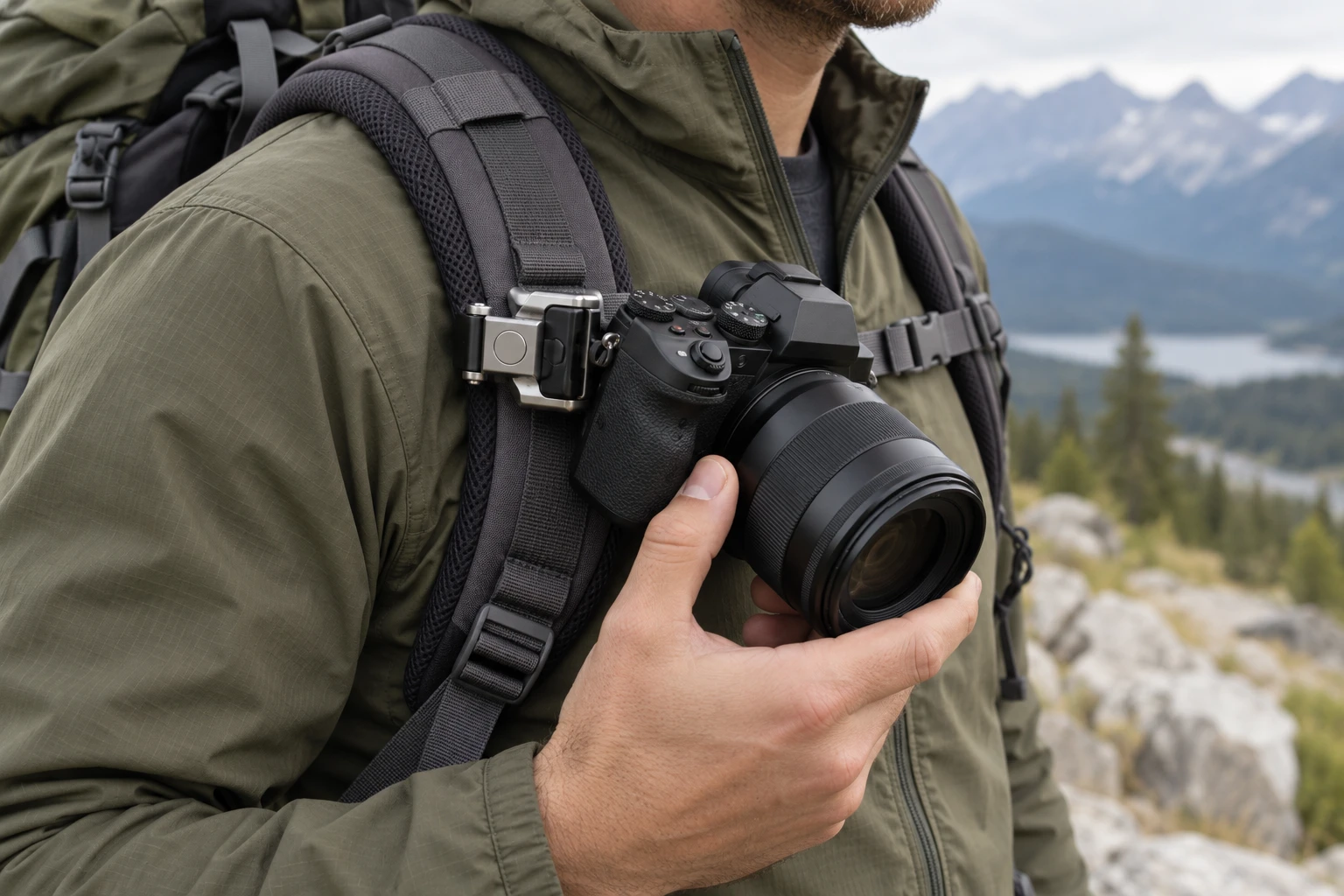
The camera hangs from the shoulder strap, so that strap is part of the mount. A clip that closes on a flat sample may sit differently on a padded strap with a raised seam. Before putting a camera on it, identify the exact place where the clip would ride and check that place against the maker's stated limits. The decision is about a stable carrying position during ordinary movement. A plate that fits a tripod receiver answers a different question.
Two current Republeq listings give different strap limits for backpack clips. The PGYTECH Beetle Camera Clip V2 with plate states a strap width limit of 3.15 inches and a thickness limit of 0.78 inch. The Bigcan 360 backpack clip mount states a strap width limit of 7 centimeters but gives no thickness limit in its native description. Their clip bodies, camera connectors and release arrangements also differ in the native descriptions and images. Measure the pack in hand and check its camera connector before relying on either listing.
Choose the spot on the strap first
Put on the backpack with the load you normally carry. The shoulder strap may be widest near its padded upper portion and narrower near an adjustment buckle. It can also curve across your chest. Choose a location you can reach without looking down for long and where the camera would not strike your arm with each step. A place that looks convenient while the pack is on a table can land directly under a chest strap or on top of a thick seam once you wear it.
Measure the strap where the clip will actually clamp. Use the full width, including any folded edge that must pass between the jaws. Measure thickness at the same spot, especially where the strap has padding, webbing folded over itself, or a stitched patch. The two dimensions answer separate questions: a strap can be narrow enough to enter a clip and still be too thick for it to close as intended. If the proposed spot sits next to a buckle, check that the buckle will not hold one jaw away from the strap.
For the PGYTECH listing, compare those measurements with both stated limits. For the Bigcan listing, the stated 7-centimeter width gives one boundary; its description does not establish a thickness allowance. Ask for the exact maker's fit information if thickness is close or unknown. Do not treat a photo of a clip on an unspecified pack as a measurement for yours. The native product images show the hardware form, not how it sits on your shoulder strap under load.
Look at the strap surface and edges
A clamp needs a section it can grip consistently. Some straps have a smooth face over firm padding; others have mesh, stitched channels or a raised piping edge. Move the clip, without a camera attached, to a flat section that lets both sides close evenly. If the only available position puts a jaw partly on a seam, do not count the strap as fitted merely because the latch can be pushed shut. Observe whether the clip rocks when you gently move it and whether it slides toward a thinner section.
Check what happens when you tighten or loosen the backpack. Strap tension changes as you adjust the pack, lift it by one strap, or add weight inside. A clip near an adjustment path may end up sitting on different webbing after a small fit change. If you regularly wear a chest strap, fasten it during this check. It may press on the camera, block the clip release, or change the strap angle. Make the fit decision with the pack configured as you will use it, then keep that location in mind when you adjust the pack later.
Know which part carries the camera
The PGYTECH product is a backpack clip with a camera plate shown above its clamping body in the native gallery. Its description refers to a primary clamp and a slide-up secondary lock. The Bigcan product is a clip with a removable ball head and a GoPro-style connector plus a stated 1/4-inch screw adapter. Its native image shows the clip body and ball-head form. These are different paths from camera to strap. Verify the exact part supplied with the offer and the maker's assembly and release instructions before mounting the camera.
Do not infer that a camera plate from one clip will slide into the other. The phrase “quick release” describes an action, not a shared physical profile. A 1/4-inch camera thread says how one part may attach to a camera or adapter; it does not establish the fit of a plate in another receiver. The separate tripod quick-release plate compatibility guide covers plate-to-clamp geometry when that is your actual problem. Here, inspect the connector only as one part of a camera-to-strap carrying setup.
If your camera uses an action-camera fork, an adapter, a cage, or a plate already installed for another support, write down the exact model of each part. Find the current instructions for the clip and that camera attachment. Check whether the intended connector is present in the package instead of assuming every pictured accessory is included. A connector that can be tightened by hand is still a separate fit check from whether the shoulder-strap clamp stays in place.
Close the clip without the camera attached
Start with the empty clip at the chosen strap position. Follow the maker's directions for opening and closing its jaws and any secondary lock. Watch the strap edges as the clip closes. Both sides should sit where the design expects; a folded edge should not be forced under one side to make the latch reach. If closure feels unusually hard, reopen and check the measurements and obstruction before trying again. The listing's convenience claim is no substitute for a complete closure on your actual strap.
After closure, gently move the empty clip along and across the strap. Observe whether the whole clip slides, twists, or lifts at one edge. A little motion of the strap itself is normal when you handle it; focus on movement between clamp and strap. Try the pack on and repeat the check while standing still. If it shifts into a buckle or seam, choose a new location that meets the stated dimensions or ask the maker whether the clip suits that strap. Do not add tape, a wedge, or extra hardware to make an unsuitable jaw position look tight.
The PGYTECH listing describes a primary clamp and a slide-up secondary lock. Check both against the maker's instructions instead of treating the visible closed jaw as proof that every lock is set. The Bigcan listing describes a reinforced, non-slip clamp but does not give a thickness specification in its native text. For that offer, an empty-clip fit check is useful evidence about your own strap; it cannot replace missing maker guidance about a limit the listing does not state.
Mount and test over a supported surface
When the empty clip stays put, attach the camera at a table or another place where it can be supported if you need to stop. Follow the exact connector and release steps for the hardware in hand. Hold the camera while checking that the plate, adapter or ball head is seated and its required lock is engaged. Keep fingers clear of a release control during the test. If you cannot tell which position is locked, remove the camera and consult the maker's directions before carrying it.
With one hand supporting the camera, put on the pack and stand still. Note whether the camera hangs clear of your arm, chest strap and pack buckle. Turn your shoulders slowly. If the camera's position changes because the strap shifts across your shoulder, that may require a different location even when the clamp itself stays closed. If the camera can strike a hard buckle or your arm, adjust the carry position before walking. This supported test shows whether the specific pack, clip and camera stay in position.
Take a few deliberate steps on level ground with the camera supported or immediately catchable. Stop and inspect the strap contact and every required lock. Do not use a ride, run, ski trip or steep hike as the first test. The Bigcan description lists active uses, but a use label does not establish a safe fit on your particular strap. If the clip creeps, twists toward an edge, or needs repeated retightening, remove the camera. A stationary test and a short walk show how the setup behaves in those conditions; repeat the check if the pack or activity changes.
Separate strap movement from connector movement
When something feels loose, locate the moving interface before changing anything. If the entire clip travels along the shoulder strap, inspect strap size, texture, placement and clamp closure. If the clip stays fixed while the camera rotates, the camera connector or adjustable head deserves attention. If the camera-to-plate connection moves while the rest of the mount stays put, use the camera and plate instructions. Changing the strap position will not repair a loose camera screw, and tightening a camera adapter will not make a clamp fit an oversized padded strap.
The Bigcan listing describes a removable ball head that can be positioned for different framing angles. That adjustability introduces another point to check. Confirm the maker's intended lock position for the head before interpreting movement as strap slippage. The PGYTECH listing instead emphasizes a clip and plate with a secondary lock. Do not transfer one product's release sequence to the other. A reader with an angle-drift problem on an already mounted tripod can use the tripod angle movement guide to locate that separate issue.
Check access before relying on quick release
Try reaching the release with the pack on while continuing to support the camera. A release partly hidden by a chest strap or thick jacket can be difficult to operate deliberately. Observe whether you can tell that the required lock is set after putting the camera back. A convenient mount should not require you to pull at the camera or twist the shoulder strap to reach its controls. Move the empty clip to a suitable location if access is poor, then repeat the fit and movement checks from the beginning.
Think about how you will set the camera down when you remove it. A small plate or adapter can remain on the camera and be easy to misplace if you swap between supports. Keep the maker's parts together and record the exact clip, plate or adapter model. That record is useful when you later replace a small piece or ask whether a different camera can be used. It also helps you avoid assuming that a familiar screw size or similar looking release means the new combination has been checked.
Make the decision from your own assembly
The PGYTECH and Bigcan listings offer different evidence. PGYTECH supplies both a stated width and thickness limit for its backpack clip. Bigcan supplies a stated strap width for its clip and describes an adjustable ball-head connection, while its native listing leaves strap thickness unspecified. Neither page can measure a pack you own, confirm a particular camera attachment, or prove that a clamp will hold on a seam. Use the product-specific facts to decide what you can check and what remains a question for the maker.
A useful short record contains the pack and strap location, measured width and thickness, clip model, camera connector, and result of the empty and supported movement checks. If you change to a thicker strap, add a chest strap, use a different camera or move the clip near a buckle, repeat the relevant checks. Carry the camera only when the actual assembly closes as instructed, remains seated in a controlled test, and lets you operate the release deliberately. If any part remains uncertain, keep the camera off the strap while you get the exact maker guidance.