Crypto Commerce
ACTi E96 fisheye dome camera vs i-PRO WV-X22500-V3L Dome Cameras
Compare ACTi E96 fisheye dome camera by fisheye coverage versus motorized zoom, night imaging, codecs, power, housing, and analytics.
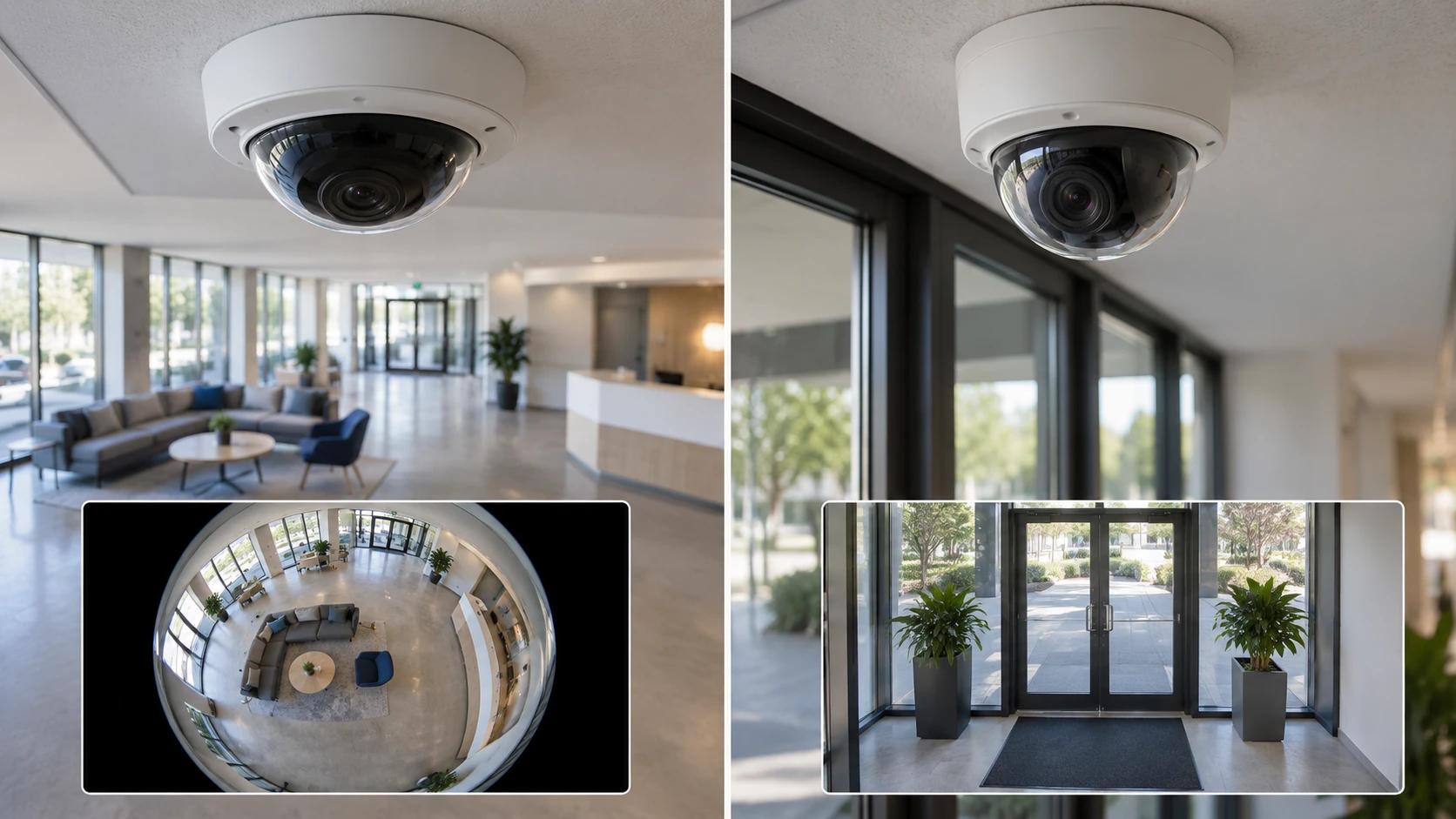
An indoor dome camera can be chosen to watch a whole space or to bring one part of it into clearer view. The ACTi E96 uses a fisheye view with digital pan, tilt, and zoom options. The i-PRO WV-X22500-V3L uses a motorized 2.9 to 9 mm lens and infrared illumination. Both saved catalog rows call them 5 MP network cameras, but that shared pixel label does not describe the same coverage or night performance. A replacement should begin with the scene the recorder needs to preserve.
The catalog descriptions give feature claims, not a measured comparison in the same room. Neither one includes a full lens chart, bitrate table, or sample recording. Match the camera to the existing network, power, recording system, and mounting location before treating a product page as an installation specification.
Wide coverage or a chosen frame — i-PRO WV-X22500-V3L dome camera
The ACTi E96 fisheye dome camera is described as a compact indoor mini dome with 180-degree and 360-degree viewing options. Those modes could suit an open room where a single mounting position needs to cover several directions. Ask how each mode is produced and displayed in the current firmware and recorder. A panoramic image can be useful for situational awareness while still showing less detail on a distant face than a narrower camera aimed at that person.
ACTi says the E96 supports ePTZ, which means digital panning, tilting, and zooming within the captured image. That can let an operator inspect part of a fisheye scene without physically moving the lens. Digital zoom cannot create detail that the original image did not capture. Test a saved clip at the distance of the doorway, register, or workstation you need to identify. Check whether the recorder stores the whole panorama or only the dewarped view, and whether an operator can return to the wider scene after zooming.
The i-PRO camera has a motorized 2.9 to 9 mm lens with a listed 3.1x range. That offers a way to frame a chosen zone during setup without moving the camera body, subject to the mount and control software. The saved row does not give horizontal viewing angles at the wide and telephoto ends. Ask for those values or make a field-of-view test at the intended distance. A narrower view can make a subject larger in the recording but can leave adjacent activity outside the frame.
The i-PRO row states 3072 by 1728 capture at 5 MP. ACTi’s row calls its image 5 MP without giving a pixel grid. Both statements describe total image size, not pixels on a particular subject. With a fisheye camera, a wide scene shares its pixels across a large area; with a zoom lens, the pixels can be devoted to a smaller area. Draw a plan of the room and mark the smallest detail that must be readable. Then check sample files at the actual mounting height.
If the space has a central ceiling position and the objective is to understand movement across the whole room, ACTi’s panoramic approach merits a test. If the goal is to watch a specific entry, counter, or corridor segment, i-PRO’s adjustable lens may be easier to frame for that job. Neither saved listing proves what can be identified in a particular scene. Light, motion, compression, and distance all change the result.
Day, night, and difficult light — PoE dome replacement planning
ACTi lists a progressive-scan CMOS sensor and WDR for handling scenes with bright and dark regions. It does not give a WDR measurement, low-light rating, or infrared feature in the saved row. Check the current specification and make a test at the time of day when windows or doors create the strongest backlight. A wide image that looks balanced at noon may still lose detail near a bright entrance or in the corners after lights are turned off.
i-PRO explicitly describes day and night operation with IR LED illumination. Test whether the infrared reaches the area you need and whether nearby walls, glass, or a dome cover cause reflections in the night image. The row does not give an IR range, lux threshold, or field test. A camera that works in a dark demonstration room may behave differently in a lobby with mixed outdoor light, reflective floors, and periodic headlamps.
The two cameras could be assessed with the same short schedule: one recording in normal indoor light, one facing the brightest entrance, and one under the site’s night lighting. Keep the camera positions and recorder settings documented. Check the full saved clip, not only the live thumbnail. Motion blur or compression artifacts may only become clear when a person crosses the scene.
The published PoE dome replacement planning guide concerns a different dome model. It is useful here as a prompt to check power, mounting, and recorded coverage before replacing an installed camera. It does not verify ACTi or i-PRO compatibility with a particular recorder or bracket.
Power and network compatibility — i-PRO WV-X22500-V3L dome camera
ACTi’s saved row lists Power over Ethernet. i-PRO lists either DC 12 V or PoE Plus, along with 10/100 LAN connectivity. PoE and PoE Plus are not interchangeable power-budget statements. Read the exact switch-port standard and available wattage, especially if the i-PRO camera will run its motorized lens, infrared illumination, and analytics together. The saved rows do not give maximum draw figures, so a site power calculation needs the current manuals.
Check the existing cable route before ordering. A camera that accepts network power still needs a sound cable run, weather-appropriate termination where applicable, and a network port that reaches the recorder. Confirm whether the installed switch has free PoE budget under full load, including every other camera on the same switch. A bench test on one powered port will not prove that a fully populated switch can support the entire deployment.
For i-PRO’s alternative DC 12 V input, verify the allowed power supply and polarity from the current instructions. Do not assume that an old adapter from another dome is suitable. ACTi’s saved row does not name a separate DC option. If a site depends on local power rather than a PoE switch, confirm ACTi’s exact supported supply before treating it as a drop-in replacement.
The network connection also has to work with the existing video-management system. ACTi names H.264 High Profile and MJPEG encoding. i-PRO names H.264, H.265, and MJPEG. H.265 can reduce storage demand in some configurations, but only when the recorder and client support the chosen stream and the quality settings remain appropriate. Ask for the actual bitrate at the required frame rate and scene complexity. A codec name alone does not establish days of retention on a particular drive.
Set up a sample stream in the real recorder. Check live view, recorded playback, time stamps, event handling, and remote client access. If the recorder only accepts a subset of the camera’s formats, the available resolution or analytics may change. Preserve the camera’s firmware version and chosen stream settings in the installation record so a later technician can explain a difference between live and recorded images.
Housing and installation location — i-PRO WV-X22500-V3L dome camera
ACTi describes an IK08-rated vandal-resistant enclosure for indoor use. i-PRO lists IK10 impact resistance plus IP66 and IP67 ingress ratings, while its saved row also calls it an indoor network camera. These labels speak to different tests. Impact resistance does not establish dust or water protection, and ingress ratings do not by themselves authorize every outdoor mounting position. Follow the current manufacturer installation limits and warranty terms for the exact model and enclosure.
Check whether the existing bracket, back box, and cable entry fit either candidate. The saved rows do not give mounting-hole patterns, body dimensions, weight, or approved accessories. A dome can have a familiar shape and still require new hardware or a different cable path. Before removing an old camera, photograph the mount and verify that the replacement can be aimed, sealed, and serviced without exposing wiring.
The E96’s fisheye design may make placement near the room’s center attractive, but a ceiling beam, hanging sign, or partition can still block a portion of its wide view. The i-PRO’s adjustable lens may let an installer frame around one obstruction, at the cost of a narrower watched area. Walk the room and mark likely blind spots rather than relying on a catalog drawing. Check the image from the recorder after the final cover is fitted; a dome cover can change glare and reflections.
Analytics, audio, and security claims — i-PRO WV-X22500-V3L dome camera
i-PRO’s listing names an AI engine with support for up to nine analytics apps. It does not identify the apps, licensing conditions, or which combinations can run at once. If analytics are part of the project, ask for the current application list and test the exact event needed, such as a motion or object alert, in the chosen management software. A capacity claim is not proof that a particular alert reaches the operator’s dashboard.
The i-PRO row also lists audio input and output. Confirm whether microphones or speakers are built in or require external accessories, and check local policies before recording sound. ACTi’s saved row does not describe audio support. If the site needs two-way communication, request the current wiring and accessory requirements rather than assuming a network camera with video can also provide talkback.
i-PRO claims FIPS 140-2 Level 3 compliance for cryptographic security. That is a specific claim worth checking against the current certification, firmware, and deployment configuration if a procurement rule depends on it. The saved row does not explain the validated module boundary or operating mode. ACTi’s row gives no comparable security certification detail. Both devices still need routine network controls, supported firmware, credentials, and access rules; a catalog label is not a complete security plan.
Choose by the recorded scene — i-PRO WV-X22500-V3L dome camera
The saved catalog records show both products as available, but price, stock, firmware, and package contents can change. Compare current Republeq's catalog terms, warranty, and approved mounting accessories. The ACTi E96 is the more explicit wide-scene option, with 180-degree and 360-degree modes, ePTZ, PoE, WDR, and an IK08 indoor enclosure. Confirm its night behavior and the recorder’s dewarping support. The i-PRO WV-X22500-V3L dome camera is the more explicit targeted-frame option, with a motorized zoom lens, IR, H.265, analytics claims, and stronger listed impact and ingress ratings. Confirm its PoE Plus budget and the exact features required by the site.
Before standardizing either model, mount one at a representative location and record a day-and-night trial. Have the operator inspect the actual doorway, person, or object the system is meant to show. Save the stream settings, power measurements, and mounting notes with that trial. If the required detail is missing, adjust the lens or location and repeat the comparison before a larger installation.